Motion graphics designs turn static graphic elements into visual communication that moves.
Text can enter a screen with purpose.
Numbers can build into a chart.
A logo can transform.
A diagram can explain a process one stage at a time.
Shapes, icons, photographs, illustrations, interface elements, and typography can all become graphics in motion.
That combination of graphic design and movement has made motion graphics an important tool for businesses, advertisers, enterprises, government agencies, technology companies, manufacturers, educators, and other organizations that need to communicate information visually.
Unlike some forms of animation that revolve around characters or complete narrative worlds, motion graphics designs frequently begin with graphic-design elements and use movement to create hierarchy, emphasis, explanation, and engagement.
Businesses use graphic motion across:
- Advertising
- Commercials
- Websites
- Social media
- Product launches
- Sales presentations
- Trade shows
- Corporate videos
- Explainer videos
- Data visualization
- Software demonstrations
- Internal communications
- Training
- Digital signage
The objective is not simply to make graphics move.
Effective motion design asks a more useful question:
What can movement help the audience understand, notice, remember, or do?
What Are Motion Graphics Designs?
Motion graphics designs are graphic-design compositions that use animation and movement to communicate information, ideas, branding, or visual stories over time.
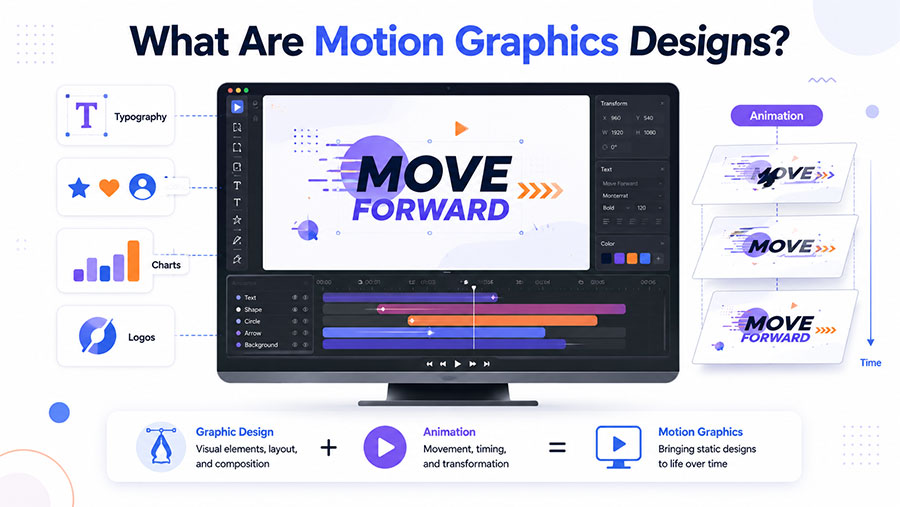
Typical elements include:
✓ Typography
✓ Shapes
✓ Lines
✓ Icons
✓ Logos
✓ Charts
✓ Numbers
✓ Illustrations
✓ Photographs
✓ Interface graphics
✓ Diagrams
✓ Brand assets
A static graphic has a fixed composition.
A motion graphic introduces another creative dimension:
time.
The designer can decide:
- When an element appears
- How it enters
- Where it moves
- How quickly it moves
- What appears next
- Which information receives emphasis
- How one scene transitions into another
- When the viewer is given time to absorb information
That means motion graphics sit at the intersection of:
Graphic design + animation + timing + storytelling + sound.
Professional motion graphics services can take a company’s existing visual identity and extend it into animated videos, advertisements, presentations, digital content, and branded communication.
What Does “Graphics in Motion” Mean?
Graphics in motion simply describes visual graphic elements that have been animated.
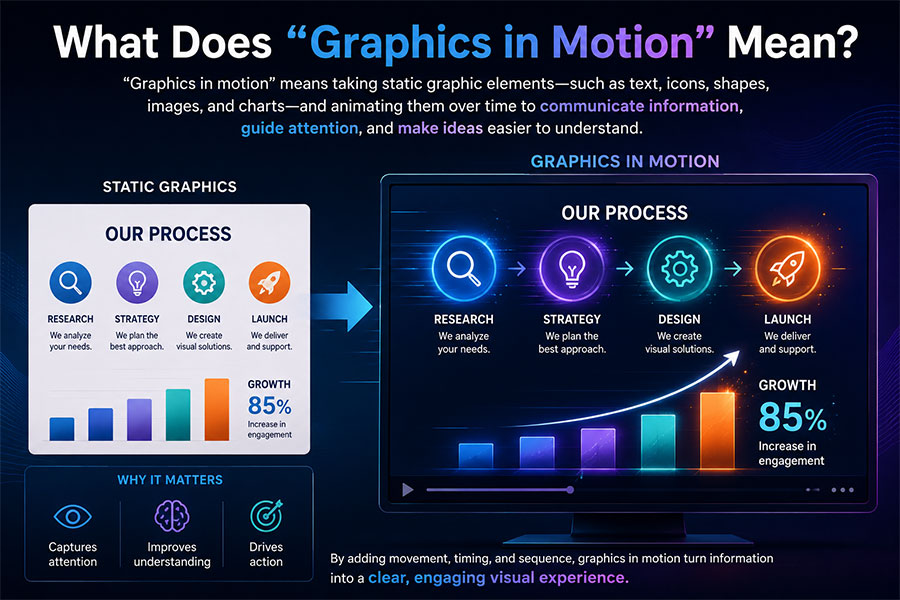
Consider a static infographic containing:
- A title
- Three statistics
- A bar chart
- Four icons
In a motion-graphics version, the information could unfold sequentially.
The title appears first.
The primary statistic grows from 0% to 73%.
Bars rise on the chart.
Icons enter one at a time.
The final conclusion becomes highlighted.
The information itself has not necessarily changed.
What changes is how the viewer experiences it.
Movement can control the order in which information is understood.
That can make graphics in motion particularly useful for complicated subjects.
What Is Graphic Motion?
The phrase graphic motion is often used informally to describe movement applied to graphic-design elements.
Graphic motion can include:
- Text animation
- Logo animation
- Shape animation
- Animated icons
- Infographics
- Chart animation
- UI animation
- Transitions
- Background graphics
- Title sequences
The term overlaps heavily with motion graphics and motion design.
Regardless of terminology, the fundamental principle remains the same:
Graphic elements are intentionally changed over time to communicate something.
Motion Graphics vs. Traditional Animation
Motion graphics and traditional animation overlap, but they are not always identical.
| Motion Graphics | Traditional Animation |
|---|---|
| Often graphic-design driven | Often character or scene driven |
| Frequently uses typography | Frequently uses character performance |
| Commonly explains information | Commonly tells narrative stories |
| Strong for charts and data | Strong for acting and emotional scenes |
| Uses shapes and icons extensively | Uses illustrated or 3D environments |
| Common in branding and advertising | Common in entertainment and storytelling |
| Can be highly abstract | Often depicts characters or objects |
The boundary is flexible.
A motion graphics video can include characters.
A character animation can contain motion graphics.
A commercial might combine:
3D product animation + animated typography + logo animation + visual effects.
Businesses should therefore choose techniques based on the communication goal rather than worrying excessively about production labels.
Motion Graphics vs. Graphic Design
Graphic design traditionally works with static visual composition.
Examples include:
- Posters
- Brochures
- Logos
- Packaging
- Advertisements
- Reports
- Website layouts
- Presentation slides
Motion graphics extend those principles through time.
A graphic designer asks:
Where should this headline appear?
A motion designer also asks:
When should it appear, how should it move, and what happens after it appears?
Graphic design establishes:
- Hierarchy
- Typography
- Color
- Composition
- Brand identity
- Alignment
- Contrast
Motion design adds:
- Timing
- Movement
- Transitions
- Rhythm
- Acceleration
- Sequence
- Sound synchronization
The two disciplines are closely connected.
Strong motion graphics usually begin with strong graphic design.
Why Do Businesses Use Motion Graphics?
Businesses often need to communicate information that is:
- Complex
- Abstract
- Technical
- Numerical
- Difficult to film
- Easy to overlook
Motion graphics can turn that information into a sequence the audience can follow.
Motion Graphics Control Attention
If every element appears simultaneously, viewers have to decide where to look.
Motion can establish a sequence.
Look here first.
Then:
Look here.
Then:
This is the conclusion.
That visual hierarchy is useful when explaining complicated information quickly.
Motion Graphics Simplify Complex Ideas
Consider a technology company explaining how data moves through five systems.
A static architecture diagram may contain dozens of arrows.
A motion graphic can show:
- Data enters.
- The first platform receives it.
- Information is processed.
- A second system receives the result.
- The final output reaches the user.
The viewer does not need to understand the entire system simultaneously.
Motion Graphics Make Data Easier to Follow
Numbers are easier to understand when viewers can see relationships developing.
Motion graphics can animate:
- Bar charts
- Line graphs
- Percentages
- Comparisons
- Timelines
- Maps
- Rankings
- Financial data
- Research findings
Animation should not distort the data.
Its job is to make the data easier to interpret.
Motion Graphics Strengthen Branding
Motion can become part of a company’s visual identity.
A brand may define:
- How its logo moves
- How headlines enter
- How icons animate
- How transitions work
- How fast movement occurs
- How calls to action appear
When these rules remain consistent, graphic motion becomes recognizable in the same way typography and color can become recognizable.
Where Businesses Use Motion Graphics Designs
Motion graphics are extremely adaptable because the same design system can often be used across multiple platforms.
Motion Graphics in Advertising
Advertising demands rapid communication.
Audiences may encounter an advertisement while:
- Scrolling
- Watching television
- Streaming video
- Browsing a website
- Walking through an airport
- Attending an event
Motion can attract attention and establish the message quickly.
Common advertising motion graphics include:
✓ Animated headlines
✓ Promotional offers
✓ Product benefits
✓ Price information
✓ Brand graphics
✓ Calls to action
✓ Statistics
✓ Logo reveals
✓ Product labels
Professional advertising animation may combine motion graphics with 2D animation, 3D product visualization, characters, typography, and branded storytelling depending on the campaign objective.
Motion Graphics in Commercials
Television, streaming, and online commercials often use motion graphics even when most of the advertisement is live action.
Examples include:
- Product names
- Pricing
- Offer details
- Animated logos
- Legal information
- Statistics
- Location details
- Calls to action
- End cards
A live-action automotive commercial might end with animated financing terms and branding.
A healthcare commercial may use animated diagrams to explain how a service works.
A technology commercial may combine interface animation with filmed footage.
Motion graphics become the bridge between visual storytelling and specific information.
Motion Graphics in Marketing
Marketing teams can use graphic motion throughout the customer journey.
Awareness
Short animated messages can capture attention.
Education
Motion graphics can explain a problem or category.
Consideration
Animated comparisons can present product benefits.
Decision
Case-study statistics and customer results can be visualized.
Retention
Training, onboarding, and product-update animations can continue supporting customers after purchase.
This versatility is one reason motion graphics are frequently used within broader marketing campaigns, rather than existing only as standalone videos.
Motion Graphics on Websites
Motion graphics can make web content easier to explore when implemented carefully.
Common applications include:
✓ Hero animations
✓ Animated icons
✓ Product diagrams
✓ Process animations
✓ Interactive graphics
✓ Numbers and statistics
✓ Scroll-triggered graphics
✓ Calls to action
✓ Software demonstrations
Movement should not compete with usability.
If every section moves continuously, nothing receives meaningful emphasis.
Good web motion is selective.
The animation should help visitors understand where they are, what happened, or what deserves attention.
Motion Graphics for Social Media
Social media is especially suitable for motion design because viewers often encounter content without actively searching for it.
Moving typography and graphics can communicate even when the viewer has sound disabled.
Useful formats include:
- Reels
- Stories
- Short advertisements
- Statistics
- Announcements
- Product launches
- Animated quotes
- Event promotions
- Branded loops
Text should remain readable long enough for viewers to process it.
Speed is useful.
Unreadable speed is not.
Motion Graphics for Corporate Videos
Corporate communication frequently contains information that does not naturally produce interesting footage.
Examples include:
- Financial performance
- Strategy
- Company history
- Market growth
- Internal processes
- Employee information
- Organizational structure
Motion graphics can transform these subjects into visual sequences.
Instead of displaying a static slide containing six numbers, the animation can introduce the figures in the order that supports the speaker’s message.
Motion Graphics for Business Presentations
Presentations can use motion selectively to make information easier to follow.
Good presentation animation can:
✓ Reveal steps sequentially
✓ Build charts as they are discussed
✓ Introduce departments one at a time
✓ Compare scenarios
✓ Highlight the most important figure
✓ Explain workflows
Poor presentation animation does the opposite.
It distracts viewers with:
✗ Constant spinning
✗ Excessive bouncing
✗ Unnecessary transitions
✗ Text that disappears too quickly
✗ Different effects on every slide
Professional motion design is usually more restrained than people expect.
Motion Graphics for Trade Shows
Trade-show environments create unusual communication challenges. Motion graphics is a form of trade show animation.
People may be:
- Walking
- Talking
- Several feet away
- Unable to hear audio
- Looking for only a few seconds
Motion graphics can help booth displays communicate visually without depending entirely on narration.
Useful trade-show graphics include:
- Large animated headlines
- Product benefits
- Brand loops
- Animated statistics
- Product sequences
- Interface demonstrations
- Logo animation
- Short calls to action
The design should be understandable at a distance.
Small paragraphs rarely work well on a large trade-show display.
Motion Graphics for Technology Companies
Technology companies often need to explain products that are difficult to photograph.
Motion graphics can visualize:
- Cloud infrastructure
- APIs
- Cybersecurity
- Data
- AI
- Automation
- Software workflows
- Networks
- Integrations
Abstract systems can be represented through graphic language.
Data might become moving particles.
Applications might become connected nodes.
Automation can become a sequence of actions.
These visual metaphors help audiences build mental models of unfamiliar technology.
Motion Graphics for Manufacturing
Industrial businesses can combine technical animation with motion graphics.
For example, a 3D machine animation might demonstrate moving components while motion graphics provide:
- Labels
- Measurements
- Directional arrows
- Temperatures
- Flow rates
- Safety information
- Performance statistics
The 3D animation shows the machine.
The motion graphics explain what the viewer should notice.
Motion Graphics for Finance
Financial information often contains large amounts of data.
Motion design can simplify:
- Market changes
- Investment performance
- Insurance processes
- Payment systems
- Financial forecasts
- Risk
- Customer savings
- Economic comparisons
Motion should be particularly disciplined in financial communication.
A dramatic animation should never exaggerate a small difference in the underlying data.
Visual accuracy matters.
Motion Graphics for Healthcare
Healthcare communication can use motion graphics to present:
- Patient information
- Treatment processes
- Statistics
- Healthcare systems
- Insurance processes
- Timelines
- Medical-device information
Motion graphics can also be combined with detailed medical animation.
For example, a 3D anatomical sequence may show a procedure while animated labels explain each stage.
Motion Graphics for Government and Public Sector
Government organizations can use motion graphics for:
- Public programs
- Safety campaigns
- Infrastructure
- Reports
- Policy communication
- Emergency information
- Public education
- Community initiatives
Graphic motion can make complicated public information easier to scan and understand.
Accessibility remains important.
Essential information should not depend exclusively on animation.
Motion Graphics for Education and Training
Training materials frequently involve processes.
Animation can reveal those processes in sequence.
Examples include:
Step 1 → Step 2 → Step 3
or:
Incorrect procedure → consequence → correct procedure
This is useful for:
- Employee onboarding
- Safety
- Software instruction
- Compliance
- Product training
- Classroom education
Motion can reduce the amount of information learners have to process simultaneously.
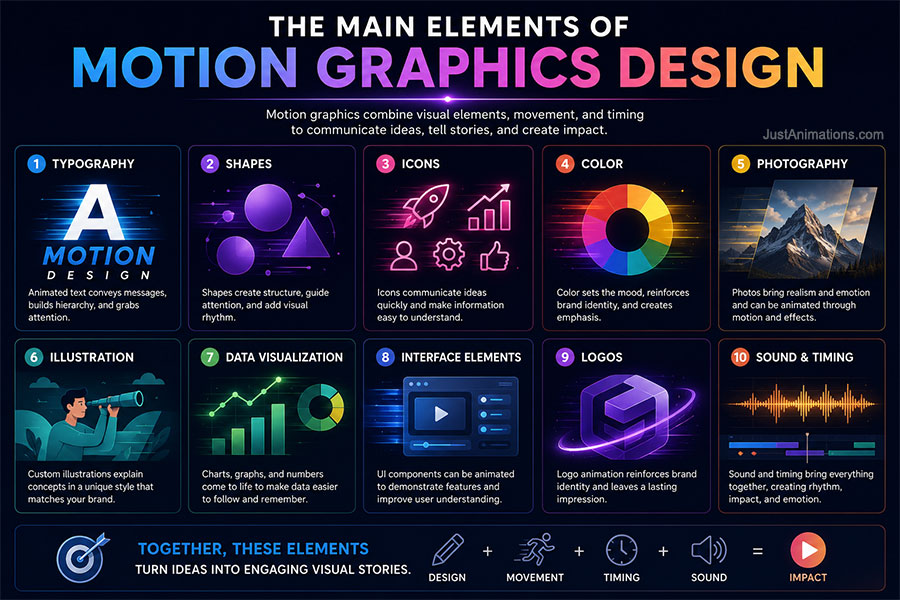
The Main Elements of Motion Graphics Design
Professional motion graphics require several design disciplines to work together.
Typography
Animated typography can communicate:
- Headlines
- Statistics
- Quotes
- Calls to action
- Brand statements
Typography should remain readable.
An effect should never be more important than the words.
Shapes
Circles, rectangles, lines, and abstract forms can create:
- Transitions
- Emphasis
- Backgrounds
- Data visualization
- Visual systems
Simple geometry can create surprisingly sophisticated motion.
Icons
Icons communicate rapidly.
Animated icons can show:
- Features
- Services
- Status
- Categories
- Actions
- Progress
Consistent icon design matters.
Color
Color guides attention and reinforces brand identity.
Motion designers may use color changes to:
- Indicate progress
- Separate categories
- Signal warnings
- Highlight important data
Photography
Photographs can be animated through:
- Cropping
- Parallax
- Camera movement
- Masking
- Layer separation
- Typography overlays
A static photograph can therefore become part of a larger motion sequence.
Illustration
Custom illustrations can be separated into layers and animated.
This creates greater stylistic freedom than stock footage.
Data Visualization
Charts and diagrams can be built progressively.
The objective should be comprehension—not visual spectacle.
Logos
A logo can become an animated signature for:
- Commercials
- Websites
- Social videos
- Presentations
- Events
Movement should reflect the brand.
What Makes Graphic Motion Feel Professional?
Good motion is not simply smooth.
Professional graphic motion has intention.
Timing
The movement should happen at the right speed.
A viewer needs time to understand the information.
Easing
Real movement rarely starts and stops instantaneously.
Objects usually accelerate and decelerate.
This principle helps digital motion feel more natural.
Hierarchy
The most important element should receive the strongest emphasis.
Consistency
Similar elements should behave similarly.
If every title uses completely different movement, the visual system can feel disconnected.
Restraint
Motion designers need to know when not to animate.
Stillness creates contrast.
Movement becomes more noticeable when everything else is not already moving.
Motion Graphics and Visual Hierarchy
Imagine a screen containing:
- Headline
- Subheadline
- Illustration
- Statistic
- Call to action
If everything moves at the same time, the viewer may not know where to look.
A better sequence might be:
0–2 seconds: Headline
2–4 seconds: Illustration
4–6 seconds: Statistic
6–8 seconds: Call to action
Movement becomes an organizational tool.
This concept is particularly important in advertising.
Short-form content has little time to establish hierarchy.
Motion Graphics and Storytelling
Motion graphics can tell stories without traditional characters.
A business story could be:
Problem → growth → challenge → solution → result
The visuals might contain only:
- Typography
- Icons
- Charts
- Shapes
Yet the sequence still creates narrative progression.
This is why motion graphics should not be treated merely as animated decoration.
The design should have a beginning, development, and conclusion.
Motion Graphics and Sound
Sound can significantly affect graphic motion.
A logo appearing without audio creates one experience.
Add a subtle impact sound and the same movement feels more substantial.
Sound designers may synchronize:
- Clicks
- Whooshes
- Impacts
- Transitions
- Music
- Voiceover
with visual movement.
However, motion graphics should often remain understandable without audio, particularly for:
- Social media
- Trade shows
- Public displays
- Website autoplay
Motion Graphics and Branding
Companies typically have visual-brand guidelines covering:
- Logos
- Colors
- Fonts
- Photography
- Illustration
A mature brand can also define motion behavior.
Questions include:
Does the brand move quickly or slowly?
Does it feel energetic or controlled?
Are transitions geometric or organic?
Do elements bounce?
Do they glide?
Does the logo assemble or reveal?
Motion can become part of brand identity.
This is especially important when a company produces large amounts of video.
Motion Graphics Software
Professional motion graphics can be produced using different combinations of design, animation, 3D, video-editing, and compositing software.
Adobe After Effects is one of the most widely recognized applications associated with motion design and visual effects. Adobe describes the software as supporting animated text, logos, backgrounds, transitions, 2D elements, 3D elements, compositing, and reusable motion-graphics templates.
Businesses and designers interested in the software can review Adobe’s motion graphics overview for After Effects.
Other professional production workflows may incorporate:
- Vector-design software
- Image-editing software
- Video-editing applications
- 3D software
- Audio tools
- Rendering applications
Software provides capability.
Designers still determine what the movement should communicate.
Does AI Change Motion Graphics Design?
AI can accelerate portions of motion-design production.
Potential uses include:
- Concept exploration
- Image creation
- Background generation
- Object isolation
- Voice generation
- Asset cleanup
- Versioning
- Storyboard development
AI does not automatically solve the core communication problem.
A designer still needs to decide:
What should move?
Why?
When?
How much?
What should the audience notice?
AI may accelerate execution.
Design judgment remains essential.
What Is the Motion Graphics Production Process?
A professional motion graphics project commonly follows several stages.
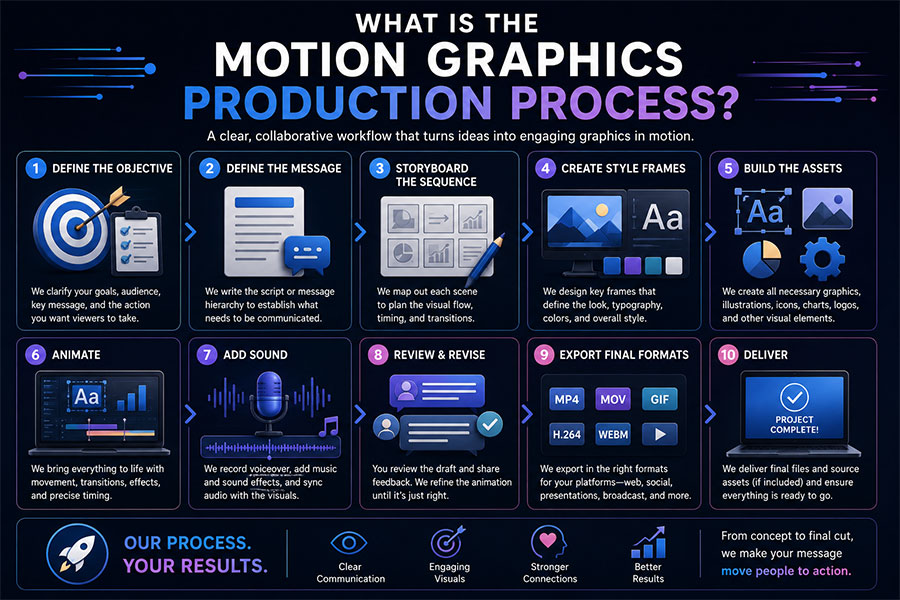
1. Define the Objective
What should the viewer understand or do?
2. Define the Audience
The visual language should reflect who is watching.
3. Develop the Message
The script or message hierarchy establishes what needs to be communicated.
4. Storyboard the Sequence
The team plans what appears in each scene.
5. Create Style Frames
Static frames establish:
- Typography
- Color
- Illustration
- Composition
- Visual direction
6. Build the Assets
Designers create the required:
- Icons
- Charts
- Graphics
- Illustrations
- Logos
- Interface elements
7. Animate
The motion designer creates:
- Timing
- Movement
- Transitions
- Camera effects
- Graphic relationships
8. Add Sound
Voiceover, music, and sound effects may be integrated.
9. Review and Revise
Clients review the completed motion against the approved storyboard and style.
10. Export Final Formats
Files may be delivered for:
- Website
- Social media
- Broadcast
- Presentations
- Events
- Advertising
How Long Does Motion Graphics Production Take?
Production time varies depending on complexity.
| Motion Graphics Project | Typical Planning Range |
|---|---|
| Simple animated graphic | Several days–2 weeks |
| Short social animation | 1–3 weeks |
| Logo animation | 1–3 weeks |
| 30-second branded sequence | 2–5 weeks |
| 60-second motion graphics video | 3–6 weeks |
| Detailed explainer | 4–8 weeks |
| Multi-video campaign | 6–12+ weeks |
| Large corporate motion system | 8–16+ weeks |
These are general planning ranges.
Production can move faster when:
✓ The script is approved
✓ Brand assets are organized
✓ Data is finalized
✓ Feedback is consolidated
✓ One decision-maker controls approvals
How Much Do Motion Graphics Designs Cost?
Pricing depends on:
- Duration
- Visual complexity
- Original design
- Number of scenes
- Illustration
- 3D elements
- Voiceover
- Sound
- Revisions
- Deliverables
General planning ranges may look like this:
| Motion Graphics Project | Approximate Budget |
|---|---|
| Simple animated asset | $1,000–$3,000 |
| Short social graphic | $1,500–$5,000 |
| Logo motion | $1,500–$8,000 |
| 30-second motion piece | $3,000–$10,000 |
| 60-second branded motion graphic | $5,000–$20,000 |
| Custom explainer | $7,500–$25,000+ |
| Complex data visualization | $10,000–$30,000+ |
| Multi-video campaign | $20,000–$75,000+ |
| Enterprise motion system | $25,000–$100,000+ |
These are planning ranges rather than fixed pricing.
A 20-second sequence with complicated data visualization and custom 3D elements can require more production than a simpler two-minute video.
Template Motion Graphics vs. Custom Motion Graphics
| Template Motion Graphics | Custom Motion Graphics |
|---|---|
| Faster setup | Built specifically for the brand |
| Lower initial cost | Higher initial investment |
| Predetermined movement | Custom motion behavior |
| Stock visual identity | Original visual identity |
| Limited flexibility | Greater creative control |
| Useful for low-risk content | Better for major campaigns |
| May resemble other content | More distinctive |
Templates can be useful.
They are not automatically inferior.
They make sense when:
✓ The content is temporary
✓ The budget is limited
✓ The message is straightforward
✓ Brand differentiation is unimportant
Custom motion graphics make more sense when:
✓ The asset represents the company publicly
✓ The campaign has significant reach
✓ Multiple assets will be produced
✓ Brand consistency matters
✓ The information is complex
✓ The content will be reused
Motion Graphics Studio vs. Freelance Motion Designer
A freelance designer can be effective for focused projects.
A studio may make more sense when production requires:
- Strategy
- Scriptwriting
- Storyboarding
- Illustration
- Motion graphics
- 2D animation
- 3D animation
- Voiceover
- Sound
- Multiple formats
- Project management
Companies in major advertising and media markets can also work with a professional Los Angeles animation studio for motion graphics, commercials, brand videos, product communication, social media, and other animated content.
The decision should be based on project complexity rather than company size alone.
Questions to Ask a Motion Graphics Designer
Before starting production, ask:
- Have you created similar motion graphics?
- Is the design custom?
- Who develops the visual concept?
- Is scriptwriting included?
- Will you create storyboards?
- Are style frames included?
- How many revision rounds are included?
- Which software will be used?
- Are source files available?
- Which final formats will be delivered?
- Can you create mobile and vertical versions?
- Is voiceover included?
- Is music licensing included?
- Who owns the final graphics?
- What is the expected production schedule?
- Can the assets be reused?
- Can the system be expanded later?
- What could increase the project cost?
A professional designer should be able to explain the production process clearly.
How to Plan Motion Graphics Designs That Actually Work
Before designing anything, answer five questions.
1. What Is the Main Message?
If the animation could communicate only one idea, what would it be?
2. Who Is the Audience?
An executive audience may expect different visual communication than a consumer social-media audience.
3. What Should Move?
Not everything needs motion.
Select elements strategically.
4. What Should Remain Still?
Stillness creates visual contrast.
5. What Should the Viewer Do Next?
Possible actions include:
- Visit a website
- Request a quote
- Download information
- Remember a statistic
- Understand a product
- Attend an event
- Buy something
Motion should support that objective.
A Simple Motion Graphics Planning Framework
| Stage | Key Question |
|---|---|
| Objective | What should viewers understand? |
| Audience | Who needs to understand it? |
| Message | What is the primary idea? |
| Design | What visual language fits the brand? |
| Motion | What movement supports comprehension? |
| Sound | Does audio strengthen the message? |
| Platform | Where will the content appear? |
| CTA | What should viewers do afterward? |
This framework keeps the project focused on communication rather than effects.
When Motion Graphics Are Better Than Live Action
Motion graphics may be the better choice when:
✓ The subject is abstract
✓ Data is central
✓ A process needs explanation
✓ Filming would be expensive
✓ The content needs frequent updates
✓ Branding is more important than realism
✓ The product does not physically exist yet
✓ Several language versions are required
Live action may be more effective when:
✓ Human authenticity is central
✓ Real locations matter
✓ Testimonials are important
✓ Physical performance is the story
The two can also be combined.
Why Motion Graphics Designs Have Long-Term Business Value
A professionally designed motion system can produce more than one video.
Individual components may be reused as:
- Social clips
- Website graphics
- Presentation elements
- Advertisements
- Trade-show loops
- Sales assets
- Animated icons
- Logo treatments
- Data animations
This makes planning important.
If reuse is anticipated from the beginning, designers can create assets modularly.
One project can become a library of graphics in motion.
Motion Graphics Designs Are About Communication, Not Movement
The most important principle is simple.
Movement should have a reason.
A title should not slide across a screen simply because it can.
A chart should not explode into particles if that makes the data harder to understand.
A logo should not spin repeatedly because animation software includes a rotation tool.
Strong motion graphics designs combine:
✓ Design
✓ Hierarchy
✓ Timing
✓ Storytelling
✓ Branding
✓ Movement
✓ Sound
✓ Purpose
Graphics in motion become valuable when they improve communication.
Graphic motion can attract attention, but attention alone is not enough.
The viewer still needs to understand what the business is saying.
Working With Just Animations on Motion Graphics Designs
Just Animations produces professional motion graphics animation for businesses, companies, enterprises, government agencies, NGOs, and public-sector organizations.
Projects may include:
- Advertising
- Commercials
- Corporate communication
- Product launches
- Websites
- Social media
- Presentations
- Trade shows
- Explainer videos
- Data visualization
- Software demonstrations
- Training
Production can include:
✓ Creative planning
✓ Scriptwriting
✓ Storyboarding
✓ Graphic design
✓ Illustration
✓ Motion design
✓ 2D and 3D integration
✓ Voiceover
✓ Sound design
✓ Editing
✓ Final delivery
The objective is not simply to create movement.
It is to determine how movement can make the message clearer, more engaging, and easier to remember.
Businesses can request an animation quote to discuss motion graphics requirements, platforms, timelines, formats, and project objectives.
Frequently Asked Questions
What are motion graphics designs?
Motion graphics designs are graphic-design compositions that use animation and movement over time. They commonly include typography, shapes, logos, icons, charts, illustrations, photographs, interface elements, and other visual graphics.
What does graphics in motion mean?
Graphics in motion refers to static graphic elements that have been animated. Text, icons, charts, logos, illustrations, and other visual elements can move, transform, appear, disappear, or change over time to communicate information.
What is graphic motion?
Graphic motion is movement applied to graphic-design elements such as typography, shapes, icons, logos, diagrams, and data. The phrase is closely related to motion graphics and motion design.
How are motion graphics used in business?
Businesses use motion graphics for advertising, commercials, websites, social media, sales presentations, product launches, trade shows, corporate communication, explainers, training, data visualization, and software demonstrations.
How much do professional motion graphics designs cost?
Professional motion graphics may range from approximately $1,000–$3,000 for smaller animated assets to $5,000–$25,000 or more for custom branded videos. Complex data visualization, 3D integration, multi-video campaigns, and enterprise motion systems can cost significantly more depending on scope.