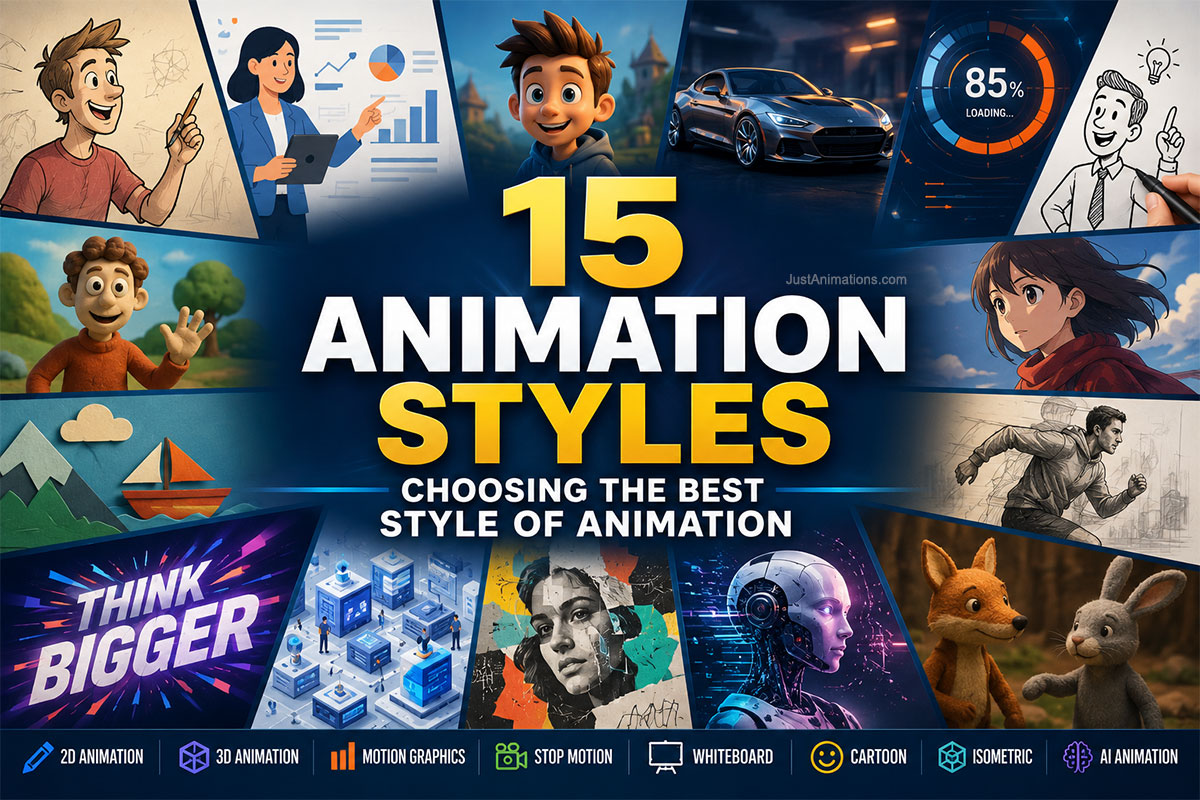
Choosing between different animation styles is one of the most important creative decisions in an animation project.
The style affects:
- How the audience perceives the message
- How realistic the animation can appear
- How characters behave
- How complicated information is visualized
- How long production takes
- How much the project may cost
- Where the finished animation can be used
A playful cartoon may be perfect for an educational campaign but inappropriate for a technical engineering demonstration.
Photorealistic 3D animation may be powerful for presenting a product but unnecessary for a simple software explainer.
Motion graphics may communicate data extremely well but may not create the emotional connection of a character-driven story.
There is no universal best style of animation.
There is a best style for a particular message, audience, product, platform, and budget.
This guide explores 15 animation styles, explains how each one works, identifies where businesses commonly use them, and provides a practical framework for choosing the right style of animation for a professional project.
What Are Animation Styles?
Animation styles are distinct visual and production approaches used to create the appearance of movement, characters, objects, graphics, environments, or stories over time.
Some animation styles are primarily defined by technique.
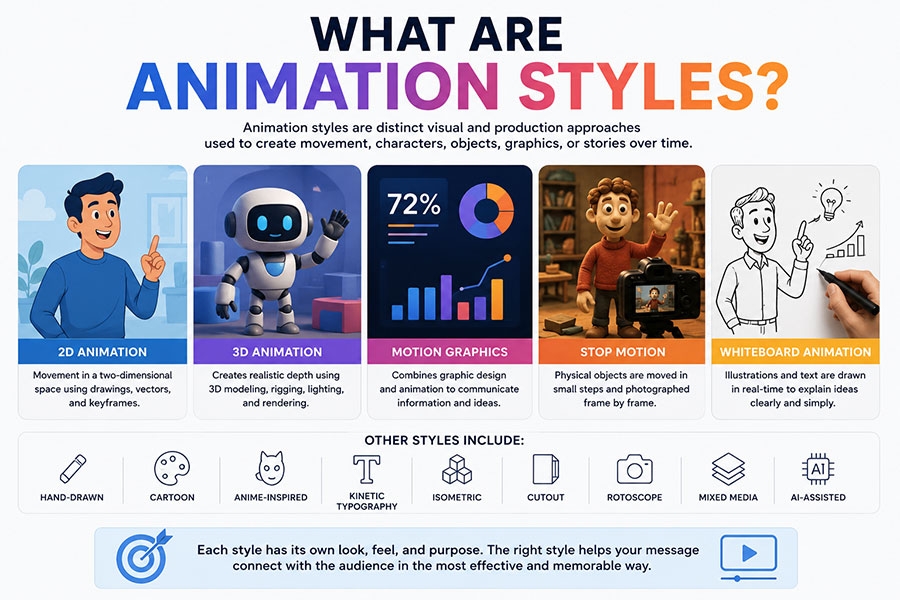
Examples include:
- 2D animation
- 3D animation
- Stop motion
Others are more strongly defined by visual presentation.
Examples include:
- Cartoon animation
- Anime-inspired animation
- Isometric animation
Others combine design and animation disciplines.
Examples include:
- Motion graphics
- Kinetic typography
- Mixed-media animation
In everyday use, all of these are commonly discussed as different types of animation styles.
Professional projects may also combine several styles in one production.
A commercial could contain:
3D product animation + motion graphics + kinetic typography + live action.
An explainer could combine:
2D characters + animated icons + interface animation.
The final result does not always need to fit neatly into one category.
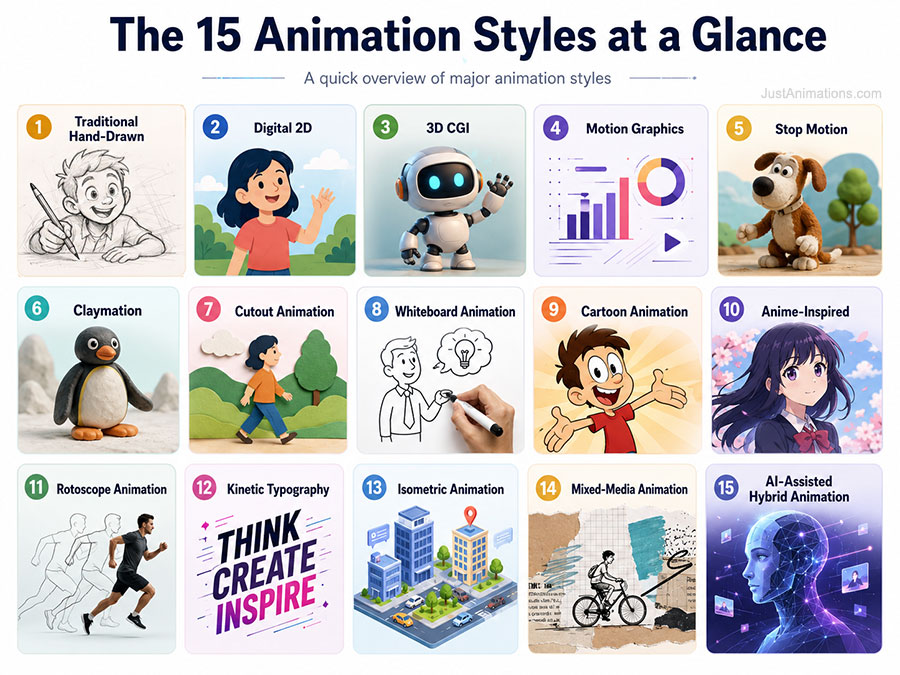
The 15 Animation Styles at a Glance
| Animation Style | Strongest Uses |
|---|---|
| 1. Traditional Hand-Drawn | Artistic storytelling, film, character work |
| 2. Digital 2D | Explainers, education, advertising |
| 3. 3D CGI | Products, characters, architecture, film |
| 4. Motion Graphics | Business information, data, branding |
| 5. Stop Motion | Distinctive storytelling and advertising |
| 6. Claymation | Character-driven tactile storytelling |
| 7. Cutout Animation | Stylized stories and educational content |
| 8. Whiteboard Animation | Training, education, explanation |
| 9. Cartoon Animation | Characters, advertising, entertainment |
| 10. Anime-Inspired Animation | Stylized narrative and entertainment |
| 11. Rotoscope Animation | Realistic human motion and stylized film |
| 12. Kinetic Typography | Advertising, quotes, messaging |
| 13. Isometric Animation | Technology, processes, systems |
| 14. Mixed-Media Animation | Advertising, art, brand storytelling |
| 15. AI-Assisted Hybrid Animation | Concepts, campaigns, experimental content |
Let’s look at each in greater detail.
1. Traditional Hand-Drawn Animation
Traditional animation creates movement through individual drawings that change from frame to frame.
Historically, artists drew characters and objects on paper or transparent cels.
Modern artists may create the drawings digitally while preserving the traditional frame-by-frame approach.
The visual result can range from:
- Rough pencil sketches
- Painted artwork
- Highly polished character animation
- Minimal line drawings
- Detailed cinematic scenes
Best For
✓ Short films
✓ Entertainment
✓ Artistic campaigns
✓ Character storytelling
✓ Educational content
✓ Premium brand films
Advantages
Traditional animation gives artists tremendous control over:
- Expression
- Shape
- Exaggeration
- Timing
- Drawing style
- Character performance
Every frame can be intentionally designed.
Limitations
Traditional frame-by-frame animation can require substantial labor.
A character’s movement may involve dozens or hundreds of individual drawings.
For businesses, this style often makes the most sense when the distinctive artistic appearance is an important part of the message.
Is Traditional Animation Still Used?
Yes.
Digital tools have changed how frames are produced, colored, edited, and composited, but frame-by-frame drawing remains an active animation method.
Adobe’s animation learning resources distinguish traditional, 2D, 3D, CGI, and stop-motion techniques and provide useful background on how these forms differ. Readers interested in the technical foundations can review Adobe’s guide to animation types and techniques.
2. Digital 2D Animation
Digital 2D animation creates movement in a two-dimensional environment using computer-based tools.
Characters, objects, graphics, and backgrounds exist primarily across:
width + height
rather than occupying fully modeled three-dimensional space.
Digital 2D animation may use:
- Vector artwork
- Digital illustration
- Character rigs
- Keyframes
- Frame-by-frame drawing
- Shape animation
Professional 2D animation services can combine these techniques depending on the creative direction.
Best For
✓ Explainer videos
✓ SaaS videos
✓ Advertising
✓ Education
✓ Training
✓ Public information
✓ Character storytelling
✓ Social media
Advantages
2D animation offers a strong balance between:
- Customization
- Production flexibility
- Brand control
- Character storytelling
- Cost
It can be simple and minimal or highly artistic.
Example
A financial services company could use clean 2D illustrations to show:
- A customer applying for a service.
- Information entering a platform.
- The platform processing the request.
- The customer receiving approval.
The style can communicate an abstract process without requiring realistic environments.
3. 3D CGI Animation
3D animation creates objects, characters, and environments with virtual depth.
Professional 3D production commonly involves:
- Modeling
- Texturing
- Rigging
- Lighting
- Animation
- Rendering
- Compositing
3D animation can appear:
- Photorealistic
- Cartoon-like
- Cinematic
- Technical
- Minimal
- Stylized
Best For
✓ Product demonstrations
✓ Machinery
✓ Architecture
✓ Medical devices
✓ Characters
✓ Movies
✓ Games
✓ Automotive visualization
✓ Technical animation
Major Advantage
3D allows the virtual camera to move around, inside, above, below, or through objects.
This makes it especially powerful for explaining physical products.
Imagine a filtration system.
A 3D animation can:
- Rotate the unit
- Remove the exterior housing
- Reveal internal components
- Show water flowing through the system
- Highlight individual parts
- Reassemble the product
That would be difficult to achieve using ordinary video footage.
Is 3D Always Better Than 2D?
No.
3D is more appropriate when dimensional realism adds communication value.
A simple financial concept may be clearer in 2D.
A mechanical product may benefit substantially from 3D.
The message should determine the style.
4. Motion Graphics
Motion graphics combine graphic design and animation.
Instead of focusing primarily on character performance, motion graphics often animate:
- Text
- Icons
- Shapes
- Logos
- Statistics
- Charts
- Diagrams
- Interface elements
They are one of the most widely used animation styles in business communication.
Best For
✓ Corporate videos
✓ Advertising
✓ Presentations
✓ Data visualization
✓ Software
✓ Social media
✓ Branding
✓ Commercials
Motion graphics are particularly effective when information itself is the subject.
A company can animate:
23% → 47% → 68%
instead of displaying the figures simultaneously.
The movement guides attention.
Our guide to Motion Graphics Designs: Graphics in Motion for Business explores this animation style in greater detail.
5. Stop Motion Animation
Stop motion creates movement by physically moving real objects in small increments and photographing each position.
When the images are played rapidly in sequence, the objects appear to move.
Stop motion can use:
- Puppets
- Objects
- Paper
- Toys
- Food
- Fabric
- Models
- Everyday materials
Best For
✓ Advertising
✓ Artistic films
✓ Product campaigns
✓ Social media
✓ Entertainment
✓ Handmade brands
Why Stop Motion Looks Different
Real objects contain natural:
- Texture
- Shadows
- Imperfections
- Materials
- Physical depth
These characteristics give stop motion a tactile appearance that is difficult to reproduce perfectly with digital animation.
Limitation
The production process can be slow.
If an animator accidentally moves an object too far, bumps the camera, or changes the lighting, correcting the sequence may require reshooting frames.
6. Claymation
Claymation is a form of stop-motion animation that uses characters or objects made from clay or similar modeling materials.
Artists physically adjust the clay figure between photographs.
Best For
✓ Character stories
✓ Children’s content
✓ Commercials
✓ Entertainment
✓ Educational campaigns
✓ Highly distinctive branding
Why Brands Use Claymation
Clay naturally creates personality.
Small imperfections can make the characters feel handmade and expressive.
The style can communicate:
- Warmth
- Creativity
- Humor
- Playfulness
- Craftsmanship
Digital Claymation Style
Some modern projects imitate the appearance of clay through 3D animation.
This can provide the visual personality of clay while allowing greater control over revisions and camera movement.
7. Cutout Animation
Cutout animation traditionally uses flat characters, objects, and backgrounds created from materials such as:
- Paper
- Cardboard
- Fabric
- Photographs
The individual pieces are moved between frames.
Modern digital cutout animation can recreate the same aesthetic without physical materials.
Best For
✓ Educational content
✓ Historical storytelling
✓ Editorial animation
✓ Children’s content
✓ Artistic explainers
✓ Social campaigns
Why Use It?
Cutout animation has a recognizable visual character.
It can feel:
- Handmade
- Editorial
- Historical
- Playful
- Experimental
The style works especially well when realism is unnecessary.
8. Whiteboard Animation
Whiteboard animation creates the appearance of an illustration being drawn while the viewer watches.
The visual sequence may include:
- Characters
- Words
- Diagrams
- Arrows
- Icons
- Charts
Best For
✓ Training
✓ Education
✓ Tutorials
✓ Internal communication
✓ Process explanations
✓ Basic explainers
Why Whiteboard Animation Works
Information appears progressively.
The viewer sees one concept before the next one arrives.
That can reduce visual overload.
Imagine teaching a five-stage process.
Instead of displaying the entire diagram immediately:
Stage 1 appears.
Then:
Stage 2.
Then:
Stage 3.
The presentation follows the speaker’s explanation.
Limitation
Whiteboard animation can feel generic when it relies too heavily on stock illustrations or predictable scenes.
Custom illustration and thoughtful pacing can make the style more distinctive.
9. Cartoon Animation
Cartoon animation uses stylized illustrated characters, environments, and objects.
The style may be:
- Simple
- Exaggerated
- Colorful
- Minimal
- Comic-inspired
- Highly detailed
Cartoons do not need to follow realistic proportions.
That freedom gives artists tremendous flexibility.
Best For
✓ Advertising
✓ Entertainment
✓ Brand mascots
✓ Educational videos
✓ Social media
✓ Children’s content
✓ Public campaigns
Why Cartoon Animation Is Effective
Characters can represent:
- Customers
- Employees
- Experts
- Families
- Mascots
- Fictional personalities
Audiences can understand their expressions and roles quickly.
The entertainment industry uses an especially wide range of animation styles for characters, stories, environments, and visual effects, from illustrated 2D content to sophisticated 3D production.
10. Anime-Inspired Animation
Anime refers broadly to Japanese animation, but globally the term is also used to describe recognizable visual influences associated with Japanese animated media.
Anime-inspired work may use:
- Expressive characters
- Dramatic poses
- Detailed environments
- Stylized eyes
- Cinematic framing
- Graphic action
- Strong color
- Dynamic effects
Best For
✓ Entertainment
✓ Gaming
✓ Youth-oriented brands
✓ Character campaigns
✓ Music videos
✓ Fan communities
Important Consideration
Anime is not one visual style.
Japanese animation includes enormous stylistic diversity.
A professional project should define exactly what visual characteristics are desired rather than simply requesting:
“Make it anime.”
References help.
The creative team should understand whether the client likes:
- Character design
- Camera language
- Background painting
- Action
- Color
- Facial expression
from a particular example.
11. Rotoscope Animation
Rotoscoping involves tracing or using live-action footage as a reference for animated movement.
Historically, artists projected recorded footage and traced movement frame by frame.
Modern tools allow similar workflows digitally.
Best For
✓ Realistic human movement
✓ Film
✓ Music videos
✓ Experimental animation
✓ Stylized advertising
✓ Hybrid live-action projects
Why Use Rotoscoping?
Human movement is complex.
Live-action reference can provide:
- Weight
- Balance
- Gesture
- Timing
- Body mechanics
Artists can then stylize the visual appearance while preserving realistic movement.
Limitation
If rotoscoping follows footage too literally without artistic interpretation, it can sometimes feel mechanically traced.
Strong rotoscope work still requires design and creative judgment.
12. Kinetic Typography
Kinetic typography turns words themselves into animation.
Letters may:
- Move
- Transform
- Scale
- Rotate
- Build
- Separate
- Change color
- Respond to sound
Best For
✓ Advertising
✓ Social media
✓ Music videos
✓ Brand statements
✓ Commercials
✓ Presentation openers
✓ Quotes
Why Typography Can Carry an Entire Animation
Words already communicate meaning.
Motion can reinforce that meaning.
The word:
FAST
might move rapidly across the screen.
The word:
HEAVY
might fall downward with strong visual weight.
The word:
GROW
might physically increase in size.
Motion and language reinforce each other.
Best Practice
Readability comes first.
If viewers cannot read the words, the typography is not communicating effectively.
13. Isometric Animation
Isometric animation uses a dimensional-looking illustration style that often displays environments from an angled overhead perspective.
It can look three-dimensional while still being constructed largely from two-dimensional graphic elements.
Common visual elements include:
- Buildings
- Offices
- Factories
- Devices
- Servers
- Vehicles
- People
- Process systems
Best For
✓ Technology
✓ SaaS
✓ Logistics
✓ Manufacturing
✓ Infrastructure
✓ Process animation
✓ Business ecosystems
Why Businesses Use It
Isometric animation can display several connected elements at once.
Imagine a logistics company.
One scene could show:
Factory → warehouse → truck → distribution center → customer
The audience can understand the entire ecosystem spatially.
This makes isometric animation useful for system-level explanations.
14. Mixed-Media Animation
Mixed-media animation intentionally combines multiple visual techniques.
A production might combine:
- Photography
- Illustration
- Live action
- Typography
- 3D
- Paper textures
- Drawings
- Video
- Collage
Best For
✓ Advertising
✓ Brand films
✓ Editorial stories
✓ Documentary sequences
✓ Music videos
✓ Artistic campaigns
Why Mixed Media Stands Out
Most audiences are accustomed to visual consistency.
Mixed media can deliberately break that expectation.
A photograph might transform into an illustration.
The illustration may become a 3D environment.
Handwritten text might appear over live footage.
This can create a distinctive artistic identity.
Challenge
Mixed media requires strong art direction.
Combining many styles without a coherent visual system can create clutter.
15. AI-Assisted Hybrid Animation
AI-assisted animation is becoming part of modern production workflows.
It may use generative systems to support:
- Concept development
- Background creation
- Character exploration
- Image generation
- Video generation
- Motion
- Voice
- Storyboards
- Effects
The strongest professional workflows often use AI as one component rather than relying on it for every stage.
Best For
✓ Concept-driven campaigns
✓ Experimental visuals
✓ Rapid ideation
✓ Social content
✓ Hybrid commercials
✓ Surreal environments
✓ High-volume creative variations
Why Call It Hybrid?
An AI-assisted production might involve:
AI-generated concept → human art direction → traditional animation → motion graphics → professional editing → sound design
The final video may contain both generated and traditionally created material.
Challenges
AI production can create issues involving:
- Character consistency
- Product accuracy
- Continuity
- Precise revisions
- Typography
- Brand control
Creative supervision remains important.
Animation Style vs. Animation Technique
These phrases are often used interchangeably, but there is a useful distinction.
Technique
Describes how the animation is made.
Examples:
- Stop motion
- 2D vector animation
- 3D CGI
- Rotoscoping
Style
Describes how the animation looks and feels.
Examples:
- Minimalist
- Cartoon
- Photorealistic
- Retro
- Anime-inspired
- Corporate
- Painterly
A project might therefore be:
Technique: 3D CGI
Style: Cartoon
Another could be:
Technique: Digital 2D
Style: Minimalist corporate illustration
This distinction helps clients communicate more precisely with animation studios.
Which Animation Style Is Best for Business?
The best style depends on what the business needs to communicate.
| Business Requirement | Recommended Animation Style |
|---|---|
| Explain software | 2D, motion graphics, isometric |
| Show physical product | 3D |
| Present data | Motion graphics |
| Create emotional characters | 2D, cartoon, 3D |
| Explain a process | 2D, isometric, whiteboard |
| Promote on social media | Motion graphics, cartoon, AI hybrid |
| Technical equipment | 3D |
| Employee training | 2D, whiteboard, motion graphics |
| Premium product launch | 3D, mixed media |
| Brand storytelling | 2D, cartoon, mixed media |
| Entertainment | Traditional, 2D, 3D, cartoon, anime-inspired |
| Website animation | 2D, 3D, motion graphics |
| Historical story | Cutout, traditional, mixed media |
| Data-heavy presentation | Motion graphics |
| Experimental campaign | Mixed media, AI hybrid |
The most technically impressive option is not always the best option.
The clearest communication usually wins.
What Is the Best Style of Animation for Explainer Videos?
For most business explainers, strong options include:
2D Animation
Best when:
- Characters are useful
- The subject is abstract
- Custom illustration is desired
Motion Graphics
Best when:
- Data matters
- Graphics already exist
- The message is corporate or technical
Isometric Animation
Best when:
- Several connected systems need to be shown
3D Animation
Best when:
- Physical form matters
- Products need demonstration
- Internal components must be shown
An explainer can combine these.
For example:
2D interface + motion graphics + 3D product
may communicate better than forcing everything into one style.
Which Animation Style Is Best for Advertising?
Advertising style depends strongly on brand identity.
Motion Graphics
Effective for:
- Fast promotional communication
- Prices
- Offers
- Product benefits
Cartoon Animation
Effective for:
- Humor
- Characters
- Mascots
- Memorable brand storytelling
3D Animation
Effective for:
- Premium products
- Automotive
- Consumer electronics
- Product visualization
Mixed Media
Effective for:
- Distinctive creative campaigns
- Fashion
- Entertainment
- Lifestyle brands
AI-Assisted Animation
Useful for:
- Experimental campaigns
- Fast creative variation
- Surreal concepts
Advertising should choose a style based on the desired audience response.
Which Animation Style Is Best for Technology?
Technology companies often need to visualize things that cannot easily be filmed.
Strong choices include:
Motion Graphics
For:
- Data
- Interfaces
- Statistics
- Platforms
Isometric Animation
For:
- Networks
- Workflows
- Infrastructure
- Connected systems
2D Animation
For:
- Customer stories
- SaaS explanation
- Business processes
3D Animation
For:
- Hardware
- Robotics
- Data centers
- Devices
Companies operating in major technology markets can use a San Francisco animation studio to develop animation for SaaS, artificial intelligence, fintech, healthcare technology, hardware, climate technology, investor communication, and related applications.
Which Animation Style Is Best for Product Videos?
Physical products often benefit from 3D.
A product can be:
✓ Rotated
✓ Exploded
✓ Cut away
✓ Enlarged
✓ Disassembled
✓ Reassembled
✓ Shown in different environments
However, not every product requires 3D.
Consumer products may use:
Live action + motion graphics
Software products may use:
Interface animation + motion graphics
Simple products may use:
2D diagrams
The right approach depends on what the audience needs to see.
Which Animation Style Is Best for Education?
Education commonly benefits from:
- 2D animation
- Whiteboard animation
- Motion graphics
- Isometric animation
- Cartoon animation
The visual style should reduce cognitive load.
Students need to understand the lesson.
Complex animation should not become a distraction.
Which Animation Style Is Best for Government Communication?
Government and public-sector animation should usually prioritize:
- Clarity
- Accessibility
- Accuracy
- Neutrality
- Readability
Useful approaches include:
✓ 2D illustration
✓ Motion graphics
✓ Whiteboard animation
✓ Isometric diagrams
✓ Data animation
Highly cinematic styles can still be useful for public campaigns, but the creative treatment should fit the subject.
Choosing an Animation Style Based on Audience
Audience matters as much as subject matter.
Executive Audience
Often responds well to:
- Motion graphics
- Data visualization
- Sophisticated 3D
- Minimal design
Consumers
May respond well to:
- Cartoon animation
- 3D
- Mixed media
- Character animation
Technical Audience
Often benefits from:
- 3D visualization
- Diagrams
- Isometric animation
- Motion graphics
Students
May benefit from:
- 2D characters
- Whiteboard
- Illustrated diagrams
- Cartoon animation
Investors
May need:
- Product visualization
- Market data
- Interface animation
- Motion graphics
Do not choose a style because the production team likes it.
Choose it because it helps the audience.
Choosing an Animation Style Based on Brand
Animation should feel like an extension of the brand.
Technology Brand
Could use:
- Clean geometry
- Interface motion
- Modern typography
- 3D visualization
Luxury Brand
Could use:
- Controlled movement
- Cinematic lighting
- Minimal composition
- Photorealistic 3D
Children’s Brand
Could use:
- Cartoon characters
- Bright colors
- Expressive movement
Industrial Brand
Could use:
- Technical 3D
- Diagrams
- Product cutaways
- Precise labels
Financial Brand
Could use:
- Motion graphics
- Data visualization
- Restrained movement
- Clean typography
The animation style should reinforce how the company wants to be perceived.
Choosing an Animation Style Based on Emotion
Style changes emotional tone.
Playful
Consider:
- Cartoon animation
- Claymation
- Bright 2D
Serious
Consider:
- Motion graphics
- Minimal 2D
- Realistic 3D
Premium
Consider:
- Cinematic 3D
- Mixed media
- Minimal motion design
Nostalgic
Consider:
- Hand-drawn animation
- Retro 2D
- Stop motion
Futuristic
Consider:
- 3D
- Motion graphics
- AI hybrid
- Isometric animation
Creative direction should define the desired emotional response before selecting the style.
How Much Do Different Animation Styles Cost?
Animation pricing depends on much more than style.
Important factors include:
- Duration
- Complexity
- Number of scenes
- Asset creation
- Characters
- 3D modeling
- Rendering
- Sound
- Voiceover
- Revisions
Still, the following provides general planning guidance.
| Animation Style | General Professional Cost Level |
|---|---|
| Whiteboard | Low–Moderate |
| Kinetic typography | Low–Moderate |
| Simple motion graphics | Low–Moderate |
| Digital 2D | Moderate |
| Isometric | Moderate |
| Cartoon | Moderate |
| Cutout | Moderate |
| AI hybrid | Moderate–High variability |
| Mixed media | Moderate–High |
| Traditional hand-drawn | High |
| Rotoscope | Moderate–High |
| Stop motion | High |
| Claymation | High |
| Stylized 3D | High |
| Photorealistic 3D | Very High |
These categories are relative.
A highly complex 30-second motion graphics video can cost more than a simple 60-second 3D video.
Scope matters more than labels.
Which Animation Styles Take the Longest?
Production time generally increases when:
- Every frame must be drawn
- Physical sets must be manipulated
- Complex models must be built
- Characters require detailed rigs
- Photorealistic rendering is required
Styles that may require greater production time include:
- Traditional hand-drawn
- Stop motion
- Claymation
- Complex 3D
- Character-heavy animation
Styles that may move faster for straightforward projects include:
- Motion graphics
- Whiteboard
- Kinetic typography
- Simple digital 2D
Again, complexity determines the final schedule.
Can You Mix Animation Styles?
Yes.
Combining styles can create stronger communication.
Examples include:
3D + Motion Graphics
Show the product in 3D while animated labels explain features.
2D + Interface Animation
Show a customer using software while the application interface appears beside them.
Live Action + Motion Graphics
Film a spokesperson while statistics animate on screen.
Photography + Illustration
Turn real photographs into animated editorial compositions.
AI + Traditional Animation
Generate visual concepts, then refine and animate them professionally.
Hybrid production is increasingly common.
The key is consistency.
Different styles should feel intentionally connected.
How Many Animation Styles Should One Video Use?
There is no fixed rule.
However, more styles do not automatically create better animation.
A video containing:
- Cartoon characters
- Photorealistic 3D
- Whiteboard drawings
- Neon typography
- Stop motion
may feel visually confused unless there is a clear creative reason.
A strong hybrid project usually has:
One dominant style + one or two supporting techniques.
For example:
Primary: 3D product animation
Supporting: Motion graphics + kinetic typography
That creates variety without losing consistency.
How to Choose the Best Style of Animation
Use this decision process.
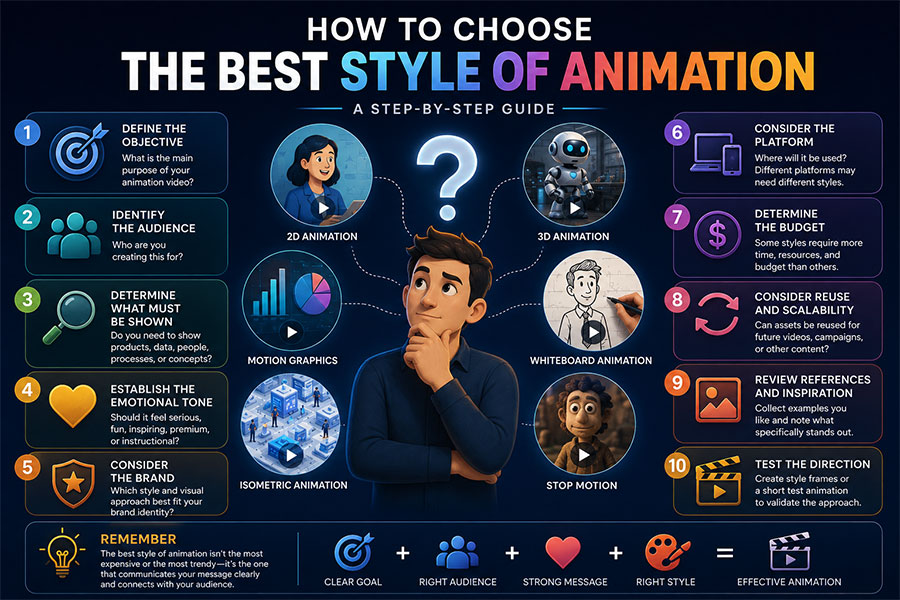
Step 1: Define the Objective
What should the animation accomplish?
Step 2: Identify the Audience
Who needs to understand the message?
Step 3: Determine What Must Be Shown
Do viewers need to see:
- Characters?
- Data?
- A physical product?
- Software?
- A process?
Step 4: Establish the Emotional Tone
Should the animation feel:
- Serious?
- Fun?
- Premium?
- Technical?
- Emotional?
Step 5: Consider the Brand
Which visual approach feels consistent with existing brand identity?
Step 6: Consider the Platform
A cinematic trade-show display may justify a different style from a short mobile advertisement.
Step 7: Determine the Budget
Some styles require more asset creation and rendering.
Step 8: Consider Reuse
Will the characters, models, icons, or scenes be reused later?
Step 9: Review References
Collect examples and explain exactly what you like.
Step 10: Test the Direction
Style frames or short motion tests can confirm the creative approach before full production.
A Simple Animation Style Decision Matrix
| Question | If Yes | Consider |
|---|---|---|
| Do we need realistic products? | Yes | 3D |
| Do we need characters? | Yes | 2D, cartoon, 3D |
| Is data central? | Yes | Motion graphics |
| Do we need a handmade feel? | Yes | Stop motion, claymation |
| Is the content educational? | Yes | 2D, whiteboard |
| Is the subject highly technical? | Yes | 3D, isometric |
| Is originality the primary goal? | Yes | Mixed media |
| Is speed important? | Yes | Motion graphics, AI hybrid |
| Is artistic expression central? | Yes | Traditional, mixed media |
| Does the content rely on words? | Yes | Kinetic typography |
Common Mistakes When Choosing Animation Styles
Choosing Based Only on Trend
A style may be fashionable but inappropriate for the message.
Choosing Based Only on Price
The cheapest style may fail to demonstrate the product effectively.
Choosing 3D Because It Sounds More Advanced
3D is not automatically better than 2D.
Using Too Many Styles
Visual inconsistency can weaken the brand.
Ignoring the Audience
A style that impresses the internal creative team may confuse customers.
Ignoring Reuse
A custom 3D model may create long-term value if it can be reused across future projects.
Copying Competitors Too Closely
References are useful.
Imitation makes a brand less distinctive.
Should Businesses Choose the Style Before Hiring an Animator?
Not necessarily.
It is useful to have preferences.
But a professional animator or studio should also be able to recommend the most appropriate approach.
A business might initially request:
“We want 3D.”
After reviewing the project, the studio may determine that:
2D characters + motion graphics
will communicate more clearly and cost less.
That recommendation can save time and budget.
The article How to Make an Animation Video: Step-by-Step Production explains why style selection should happen after the objective, audience, and platform have been defined.
What Should You Show an Animation Studio?
Provide references.
But explain what you like.
Instead of:
“Make ours like this video.”
Say:
“We like the character design.”
or:
“We like the lighting and camera movement.”
or:
“We like the way data appears, but we want a different illustration style.”
Useful reference categories include:
✓ Character style
✓ Color
✓ Camera
✓ Lighting
✓ Timing
✓ Typography
✓ Environment
✓ Realism
✓ Transitions
Specific references reduce misunderstandings.
Which Animation Style Is Most Professional?
No animation style is inherently more professional than another.
Professionalism comes from:
- Design quality
- Execution
- Storytelling
- Accuracy
- Consistency
- Appropriate creative direction
A beautifully executed whiteboard animation can be more professional than a poorly created photorealistic 3D animation.
The correct question is:
Which style professionally communicates this particular message?
Which Animation Style Is Most Engaging?
Engagement depends on:
- Audience
- Platform
- Story
- Timing
- Relevance
- Execution
Cartoon characters may create strong engagement with one audience.
Detailed 3D visualization may be more compelling to engineers.
Data animation may be more engaging to executives evaluating business performance.
Style supports engagement.
Relevance creates it.
Which Animation Style Is Best for Social Media?
Strong options include:
- Motion graphics
- Kinetic typography
- Cartoon animation
- 2D
- Mixed media
- AI-assisted animation
Social content should generally:
✓ Establish the idea quickly
✓ Use large readable text
✓ Work without sound when necessary
✓ Adapt to vertical formats
✓ Avoid long introductions
The style should survive smaller mobile screens.
Which Animation Style Is Best for Long-Term Reuse?
Styles involving reusable digital assets can create significant long-term value.
Examples include:
3D
A product model can support:
- Future videos
- Product pages
- Trade shows
- Sales presentations
- New camera angles
2D Character Animation
A mascot can appear across multiple campaigns.
Motion Graphics
A brand motion system can support many future videos.
Isometric Animation
Reusable environments can be expanded as business processes change.
Asset reuse should be discussed during project planning.
Choosing the Best Style of Animation Is a Strategic Decision
The style of animation affects more than appearance.
It influences:
- Communication
- Production
- Cost
- Schedule
- Reusability
- Audience perception
The most successful projects begin by defining what viewers need to understand.
Then the animation style is selected to support that objective.
A software company may need motion graphics.
A manufacturer may need 3D.
An educational organization may benefit from 2D.
A consumer brand may want cartoon characters.
A premium campaign may combine live action, 3D, and mixed media.
There is no universal best animation style.
There is only the style that best solves the communication problem.
Frequently Asked Questions
What are the main animation styles?
Common animation styles include traditional hand-drawn animation, digital 2D, 3D CGI, motion graphics, stop motion, claymation, cutout animation, whiteboard animation, cartoon animation, anime-inspired animation, rotoscoping, kinetic typography, isometric animation, mixed-media animation, and AI-assisted hybrid animation.
What is the best style of animation?
The best style of animation depends on the audience, message, product, platform, brand, budget, and desired emotional response. 2D works well for explainers and characters, 3D for physical products and realistic visualization, and motion graphics for data and business communication.
What animation style is best for business?
Businesses commonly use 2D animation, 3D animation, motion graphics, isometric animation, cartoon animation, and mixed-media animation. The correct style depends on whether the company needs to explain a service, demonstrate a product, visualize data, tell a story, train employees, or promote a brand.
Can different animation styles be combined in one video?
Yes. Professional productions often combine different techniques. A product video might combine 3D animation with motion graphics and kinetic typography, while an explainer may combine 2D characters with interface animation and data visualization.
How do I choose between 2D and 3D animation?
Choose 2D when the project focuses on illustration, characters, software, abstract concepts, education, or simplified explanation. Choose 3D when physical depth, realistic products, machinery, architecture, medical devices, internal components, or dimensional environments are important.