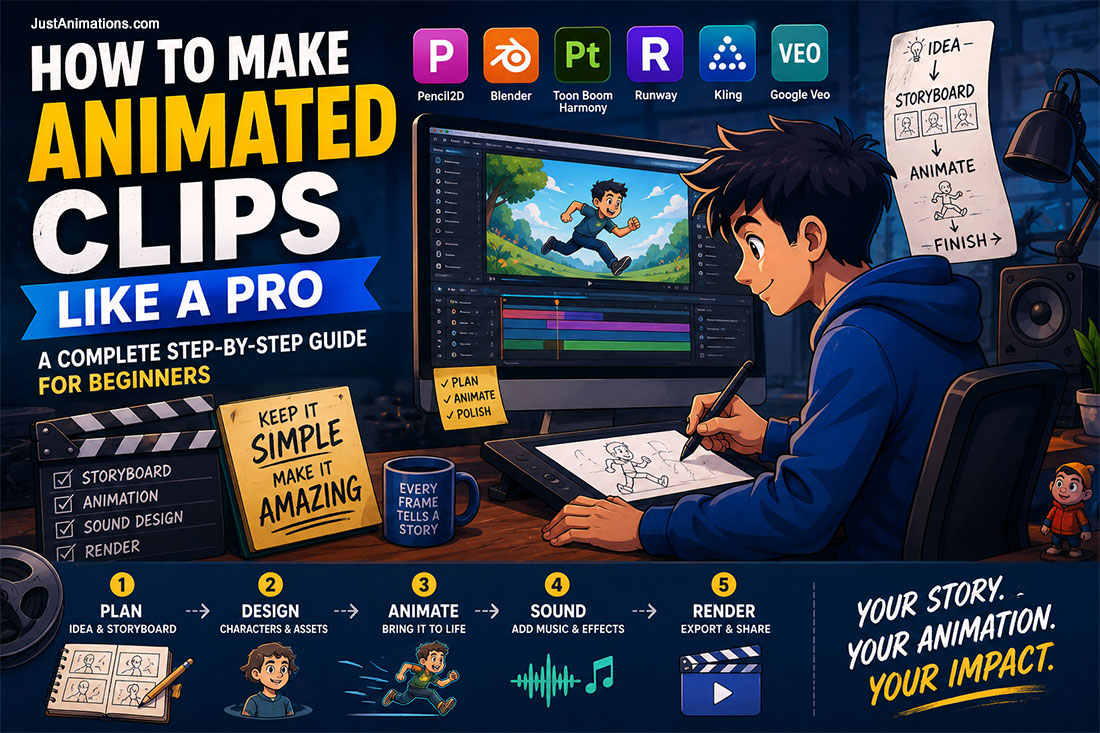
Learning how to make animated clips for beginners can feel overwhelming at first, especially when you are starting with a blank screen, a rough idea, and no clear production process. But short animation becomes much easier when you break it into simple stages: plan the idea, storyboard the scenes, choose the right tools, build the assets, animate in layers, add sound, and export the final video. Whether you are making social media content, explainer videos, educational clips, product demos, or short brand videos, the goal is the same. Keep the message clear. Keep the visuals focused. And make every second count.
The process of creating animated videos for beginners, no matter how small the ones, is quite terrifying for beginners to the whole thing. Nonetheless, if the right mindset, animation tools, and techniques are there, the result would be no less than professional in every way. Even modern animation studios are utilizing some of these AI animation tools for workflow mixing.
This guide walks through the beginner-friendly process of creating animated clips while also showing how modern animation studios use traditional techniques, AI animation tools, and structured workflows to produce cleaner, more professional results.
If you’re a beginner animator or content creator, this guide helps you build confidence in crafting short animations that capture attention.
“When structure carries the vision, creativity can soar unburdened.”
This kind of internal note helps teams stay focused: set structure first (story, layout, timing), then let creativity flow in the details. Use it in your own planning sessions as a reminder to respect the process.
Best Animated Clip Types For Beginners
Not every video animation project should start big.
Beginners often make the mistake of trying to create a full animated short film before they understand timing, pacing, storyboarding, and motion basics.
Start smaller.
A 10-second clip can teach more than an unfinished 5-minute project.
Short clips are easier to plan.
Easier to animate.
Easier to revise.
And easier to publish.
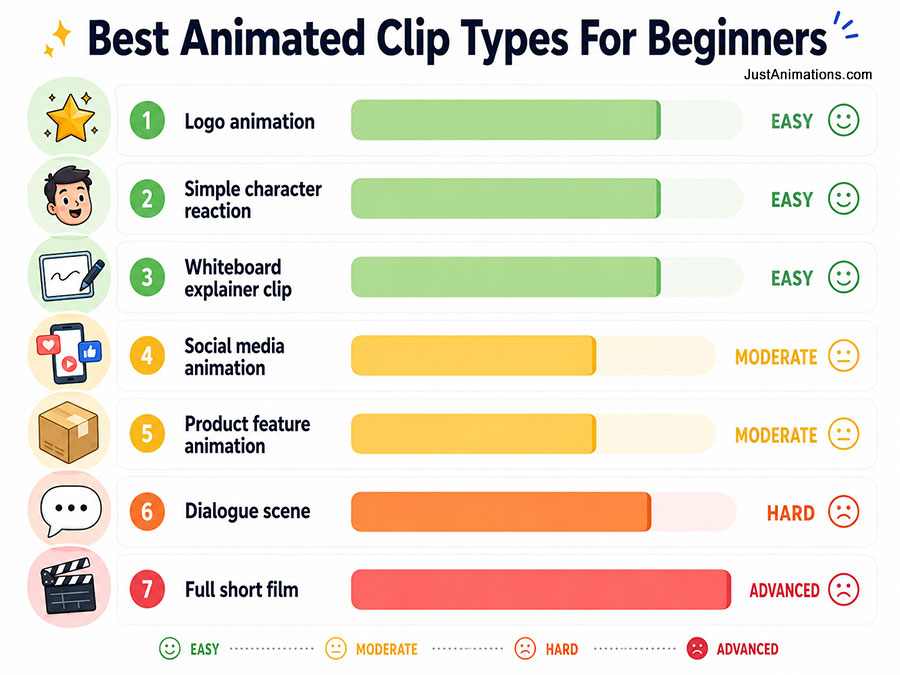
| Clip Type | Best For | Beginner Difficulty |
|---|---|---|
| Logo animation | Brand intros, YouTube intros, social videos | ███░░░░░░░ Easy |
| Simple character reaction | Learning emotion, expression, and timing | ████░░░░░░ Easy |
| Whiteboard explainer clip | Education, training, step-by-step content | ████░░░░░░ Easy |
| Social media animation | Reels, TikTok, Instagram, ads | █████░░░░░ Moderate |
| Product feature animation | Showing one product benefit clearly | ██████░░░░ Moderate |
| Dialogue scene | Lip sync, acting, timing, voiceover | ████████░░ Hard |
| Full short film | Story, pacing, scenes, sound, characters | ██████████ Advanced |
Simple Beginner Path
Start with a 5 to 10-second motion test.
Then make a 15-second social clip.
Then try a 30-second explainer.
Then build toward a full short animation.
That path builds skill without making the project too heavy too early.
Best First Animation Projects
- A bouncing ball with personality
- A logo reveal
- A character waving
- A simple product feature animation
- A short whiteboard explainer
- A 10-second social media loop
- A talking-head character clip
- A before-and-after transformation animation
The best beginner animation project is not the most impressive idea.
It is the idea you can actually finish.
1. Planning & Storyboarding: The Blueprint for Your Clip
Before you ever animate a single frame, planning is essential. A strong foundation makes the rest of the work far smoother.
Define Your Purpose and Duration
Decide what the clip is for (social media, explainer videos, teaser) and how long it should be. Short animations, 10 to 60 seconds, are easier to produce and share. Knowing your goal early keeps you from overreaching.
Craft a Simple Script or Outline
Determine key beats: what happens first, what the emotional or informational arc is, and how it ends. In short clips, clarity is more important than complexity.
Storyboard Key Frames
Sketch out your visual beats, key poses, transitions, and camera moves. The storyboard acts as a roadmap for timing and visual flow. Label each frame with approximate timing and notes about movement, transitions, or expression.
Timing & Pacing
Decide how long each shot runs. Use rough numbers (2s, 1.5s, etc.) and leave space for flexibility. Good pacing ensures no scene drags or feels rushed.
A well-done storyboard is the single best investment you can make early on. It saves countless hours of rework later.
“Let the system handle the routine steps, let the artist shape the heart.”
This internal guideline encapsulates a hybrid mindset: use tools and automation for repetitive work, but keep creative decisions firmly in human hands. You can embed it in team training or production philosophy.
2. Choosing Your Tools: Manual, Hybrid, or AI Animation
Once your plan is in place, you need tools. Beginners have many options, from fully manual to AI-assisted workflows.
Manual & Traditional Options
These tools provide you with the highest level of control and, at the same time, teach you the basic principles:
- Pencil2D: an open-source and very friendly software for the creation of 2D frame-by-frame animations.
- Blender: a very powerful and free software that can work with both 2D and 3D animation workflows.
- Toon Boom Harmony: the 2D software with the highest market share, supporting rigging and cut-out workflows.
Hybrid & AI Animation Assistants
These help speed certain parts of the process, especially for beginners or small teams:
- Runway: good for generating quick animated visuals and interpolation.
- Kling: style transfer AI, or motion interpolation tools can fill in the in-betweens or assist with lip sync.
- Google Veo: Excellent for creating high quality and vibrant video animation clips
These hybrid tools let you focus on layout, timing, and emotional impact while offloading repetitive or tedious tasks.
What Studios Use
Even full animation studios adopt hybrid approaches. For example, Just Animations markets “AI animation” as part of its service offering alongside traditional animation.
They’ll often use AI features for in-betweening, clean-up, or consistency checks, but human animators refine, polish, and ensure emotional coherence.
3. Creating & Animating Assets
Now the work begins: building the visual elements and animating them.
Character Design & Asset Creation
Design your animation characters or elements. Consider clean line work, modular parts (limbs, heads, props), and layers (foreground, midground, background). If you’re working in 3D or rigged 2D, create skeletons or rigs so movement is easier.
Character animation and their characteristics are an important factor in communicating to your target audience through personality, emotion, and memorability.
Layout & Backgrounds
Place characters in scenes. Roughly define camera angles, depth, and background assets. Use layers so characters can move independently of the backdrop.
Key Frames & In-betweens
Animate in this order:
- Key frames: draw the main poses (start, middle, end)
- In-betweens: fill the gaps
- Refinement: polish arcs, adjust spacing, and refine motion
If using hybrid or AI tools, you might generate inbetweens automatically and then refine them.
Lip Sync & Expression
For clips with dialogue:
- Transcribe audio and break it into phoneme segments
- Animate visemes (mouth shapes) aligned with audio
- Add expression layers (eyebrows, eyes, cheeks)
- Use AI-assisted lip sync tools if available, but always check manually
Motion Refinement & Follow-Through
Add secondary motion: hair, clothing, accessories. Use principles of follow-through and overlap to make movements feel natural. Refine curves, motion arcs, and easing to smooth movement.
4. Sound Design, Effects & Rendering
Sound and finishing touches are critical to making your clip feel professional.
Sound Effects & Ambience
Add footsteps, rustle, background ambience, foley, whatever supports the action. Sound helps viewers suspend disbelief and connects visuals to feel.
Music & Voiceover
Find a piece of background music that suits the tone, and then mix it so that it enhances the sound but does not overpower it. If there is a speaker or voiceover, ensure the mix is performed in such a way that the sound layers are very clear and the voice is on top of the other sounds.
Final Rendering & Export
Select suitable formats (MP4, WebM, GIF). Render at high resolution (1080p is standard) and frame rate (24 or 30 fps). In case your animation software generates image sequences, use a timeline tool to composite them for final export.
Quality Check
Watch your clip several times fully. Check for frame glitches, lip sync mismatches, jittering motion, or visual artifacts. Correct before publishing.
5. How Animation Studios and AI Tools Speed Up Production
Large and small studios alike use workflows to make how to make animated clips more efficient.
Template & Asset Libraries
Studios often build libraries of characters, props, motions, and backgrounds they can reuse.
AI & Automation in Pipeline
AI tools assist in:
- Inbetweening (automatic interpolation)
- Clean-up or line smoothing
- Consistency checking across frames
- Lip sync and facial pose generation
- Style transfer (applying art direction in batches)
Human Oversight & Review
No matter how much AI is used, human review is essential. Studios will adjust AI output to ensure that tone, movement, and expression align with character goals and story.
Iteration & Feedback Loops
Because of faster processes, teams can iterate more: try alternate camera angles, re-time scenes, or test different expression sets. This iterative loop helps the clip reach more polished results.
Just Animations similarly blends storytelling, design, and technical execution in its workflow. They pitch themselves as a “creative animation studio” capable of handling concept to completion, including AI animation options when beneficial. Their portfolio shows the use of 2D, 3D, and AI-enhanced visuals.
Common Beginner Mistakes When Making Animated Clips
Most beginner animation problems happen before the animation even starts.
The idea is too big.
The script is too long.
The storyboard is missing.
The tools are too advanced.
The timing is unclear.
Or the creator starts animating before they know what the clip is supposed to say.
That creates messy results.
A professional-looking animated clip usually comes from a simple process done well.
| Mistake | What Happens | Better Approach |
| Starting without a storyboard | The clip feels random or unfinished | Sketch the main scenes first |
| Making the video too long | The project becomes hard to finish | Start with 10 to 30 seconds |
| Using too many effects | The message gets lost | Keep the visuals clean |
| Ignoring sound | The animation feels flat | Add music, voice, and sound effects |
| Choosing the wrong tool | Workflow becomes frustrating | Pick the tool based on the project |
| Skipping revisions | Motion feels stiff or rushed | Review and refine the animation |
| Overusing AI tools | The result may feel inconsistent | Use AI to assist, not replace judgment |
Beginner Production Reality Check
Planning
██████████ Most important
Storyboarding
█████████░ Saves time later
Tool Choice
███████░░░ Important, but not everything
Animation Polish
████████░░ Makes the clip feel professional
Sound Design
████████░░ Adds emotion and energy
AI Assistance
██████░░░░ Useful, but needs human review
The biggest mistake is thinking animation is only about movement.
It is not.
Even professional animation studios know that animation is about communication.
Movement is just the method.
Conclusion: How To Make Animated Clips With More Confidence

Making animated clips does not require you to master every animation tool at once.
It requires a clear process.
Start with the purpose.
Decide what the viewer should understand.
Write a simple outline.
Storyboard the key moments.
Choose the right animation tool.
Build only the assets you need.
Animate the main poses first.
Then refine the motion.
Then add sound.
Then review the full clip from the viewer’s perspective.
That is the process.
The more you follow a clear workflow, the less intimidating animation becomes.
For beginners, the best approach is to start small and finish often. A simple 10-second animation that is completed, polished, and published is more useful than a complicated project that never gets finished.
As your skills grow, you can experiment with more advanced techniques like character animation, lip sync, camera movement, 3D animation, AI-assisted inbetweening, motion graphics, and full animated storytelling.
Modern animation studios follow the same principle at a larger scale.
They plan first.
They storyboard.
They design assets.
They animate in stages.
They review.
They refine.
They use AI tools where helpful, but they keep human creativity in control.
That is how professional animation gets made.
The tools matter.
But the process matters more.
If you can build structure around your idea, even a short animated clip can feel polished, focused, and worth watching.
You now have a blueprint for how to make animated clips like a pro, even as a beginner. The keys:
- Invest early in planning and storyboarding
- Choose a toolset aligned with your goals (manual, hybrid, or AI animation)
- Build your assets thoughtfully, rig or modularize for flexibility
- Animate in phases (key, inbetween, refine), and always polish motion details
- Layer sound design, voice, and effects carefully
- Use AI tools where they help, but maintain human control
- Review thoroughly and iterate
FAQ
How Do I Make Animated Clips As A Beginner?
To make animated clips as a beginner, start with a short idea, write a simple script, create a storyboard, choose an animation tool, build your assets, animate the key movements, add sound, and export the final video. Keep the first clip short so you can finish and improve faster.
What Is The Best Animation Tool For Beginners?
The best animation tool depends on the type of clip you want to create. Pencil2D is useful for simple frame-by-frame 2D animation, Blender is strong for 2D and 3D animation, Doodly is good for whiteboard animation, and AI tools like Runway or Google Veo can help create quick visual concepts or AI-assisted video clips.
How Long Should A Beginner Animated Clip Be?
A beginner animated clip should usually be between 5 and 30 seconds. Short clips are easier to plan, animate, revise, and complete. Once you are more comfortable with timing, movement, sound, and storyboarding, you can move into longer animated videos.
Do I Need A Storyboard To Make An Animated Clip?
Yes, a storyboard is highly recommended. A storyboard helps you plan the main scenes, camera angles, timing, movement, and visual flow before you start animating. Even rough sketches can save hours of rework later.
Can AI Help Me Make Animated Clips?
Yes. AI animation tools can help with idea generation, motion interpolation, style testing, lip sync, visual references, and short video generation. However, AI should still be guided by human creative direction, especially when the clip needs clear storytelling, consistent characters, and emotional impact.
What Makes An Animated Clip Look Professional?
A professional animated clip usually has clear storytelling, strong timing, clean visuals, smooth motion, good sound design, readable text, and consistent style. The clip does not need to be complicated. It needs to feel intentional and easy to follow.
Should I Use 2D Or 3D Animation For Short Clips?
Use 2D animation if you want a simpler, faster, and more beginner-friendly workflow. Use 3D animation if your clip needs depth, product visuals, camera movement, or more realistic objects. Many beginners start with 2D before moving into 3D animation.
When Should I Hire An Animation Studio Instead Of Making Clips Myself?
You should hire an animation studio when the video needs to represent a brand professionally, support a product launch, explain a complex service, run in paid ads, appear on a business website, or be used in a sales or investor presentation. DIY animation is useful for learning and simple content, but a studio can provide strategy, scripting, design, animation, sound, and final polish.