
3D animation for trade shows helps enterprise brands attract attention, explain complex products, and create a stronger visual presence in busy event environments.
That is the simple answer.
The better answer is this: trade shows are not quiet sales rooms.
They are loud, crowded, fast-moving environments where buyers are walking past hundreds of booths, displays, screens, banners, demos, and competing messages. Especially in popular cities such as Las Vegas, New York, and Toronto.
At a trade show, attention is the first battle.
Understanding is the second.
A strong 3D animation can help with both.
It can stop people visually, show a product clearly, explain what makes it valuable, and support sales conversations without relying only on a rep standing at the booth repeating the same explanation all day.
For enterprise brands, 3D animation is not just a nice booth extra.
It can become a serious trade show asset.
3D Animation For Trade Shows: The Short Answer
3D animation is useful for trade shows because it can show products, systems, environments, machinery, devices, processes, and technical features in a way that is visually clear, polished, and easy to repeat on large screens.
A trade show 3D animation may include:
✓ Product reveal animation
✓ Exploded product views
✓ Internal component visuals
✓ Technical process animation
✓ Looping booth display video
✓ Large-screen motion graphics
✓ Sales presentation version
✓ No-voiceover event version
✓ Short social cutdowns
✓ Product demo visuals
✓ Animated commercial-style launch video
✓ Trade show teaser video
The goal is not just to make the booth look more impressive.
The goal is to make the brand easier to notice, easier to understand, and easier to remember.
Trade Show Animation Snapshot
| Trade Show Need | How 3D Animation Helps | Common Output |
|---|---|---|
| Attract Attention | Creates movement and visual impact | Looping booth animation |
| Explain Products | Shows details, parts, and features | 3D product explainer |
| Support Sales | Gives reps a repeatable visual asset | Sales presentation version |
| Show Internal Components | Reveals what live video cannot show | Exploded view animation |
| Launch A Product | Creates a premium reveal moment | Hero launch video |
| Educate Buyers | Simplifies technical information | Feature breakdown video |
| Create Social Content | Extends the event beyond the booth | Short cutdowns |
A trade show animation should be designed for the environment where it will be seen.
A video that works on a website may not automatically work on a 20-foot screen with no sound.
Why Trade Shows Need Strong Visual Assets
Trade shows are high-cost environments.
Companies spend money on booth space, travel, staff, displays, shipping, print materials, lead capture tools, sponsorships, demos, and follow-up campaigns.
Then they sometimes treat the video screen as an afterthought.
That is a mistake.
The booth screen may be one of the first things people see.
If it shows a generic slideshow, weak stock footage, or a confusing video, the brand loses an opportunity.
3D animation can help because it creates a controlled visual message.
It can show exactly what the audience needs to see.
No messy filming.
No unavailable product.
No difficult camera angles.
No crowded factory floor.
No need to physically disassemble the product.
No hoping people understand from a static image.
3D animation makes the product story visible.
Trade Show Value Scorecard
| Trade Show Factor | Importance | Visual Score |
|---|---|---|
| Visual Attention | 10/10 | ██████████ |
| Product Clarity | 10/10 | ██████████ |
| Large-Screen Impact | 9/10 | █████████ |
| Sales Team Usefulness | 9/10 | █████████ |
| No-Sound Communication | 8/10 | ████████ |
| Reusable Campaign Value | 8/10 | ████████ |
| Social Media Adaptability | 7/10 | ███████ |
| Lowest Cost | 3/10 | ███ |
At trade shows, the video needs to work fast.
People may only glance at the screen for a few seconds.
That means the animation must be clear before it is clever.
Best Uses For 3D Animation At Trade Shows
3D animation works especially well when the product or solution is difficult to explain quickly.
It is useful for:
- Machinery
- Manufacturing equipment
- Medical devices
- Industrial products
- Robotics
- Engineering systems
- Construction products
- Automotive technology
- Aerospace and aviation
- Energy and utilities
- SaaS-connected hardware
- Real estate developments
- Architecture and infrastructure
- Luxury products
- Consumer technology
The more complex, expensive, technical, or visually important the product is, the more useful 3D animation becomes.
Budget Ladder: 3D Animation For Trade Shows
$15K to $30K: Focused Trade Show Animation
This can support a short product loop, motion graphics piece, simple 3D visual, or focused feature animation.
$30K to $75K: Professional Trade Show Asset
This range can support stronger 3D modeling, product animation, feature callouts, no-voiceover versions, and sales-ready deliverables.
$75K to $150K+: Premium Enterprise Trade Show Animation
This can support cinematic product visuals, technical animation, large-screen booth loops, sales versions, teaser cutdowns, and high-end product launch assets.
$150K+: Full Trade Show Content System
At this level, the project may include hero animations, multiple product videos, looping booth screens, keynote visuals, sales presentation assets, social cutdowns, and post-event campaign content.
The goal is not always to spend more.
The goal is to match the animation scope to the event opportunity.
A small regional event may not need a massive production.
A major industry trade show with enterprise buyers walking the floor might.
Typical Pricing Breakdown For A Trade Show 3D Animation
A trade show 3D animation budget is usually spread across planning, production, and delivery.
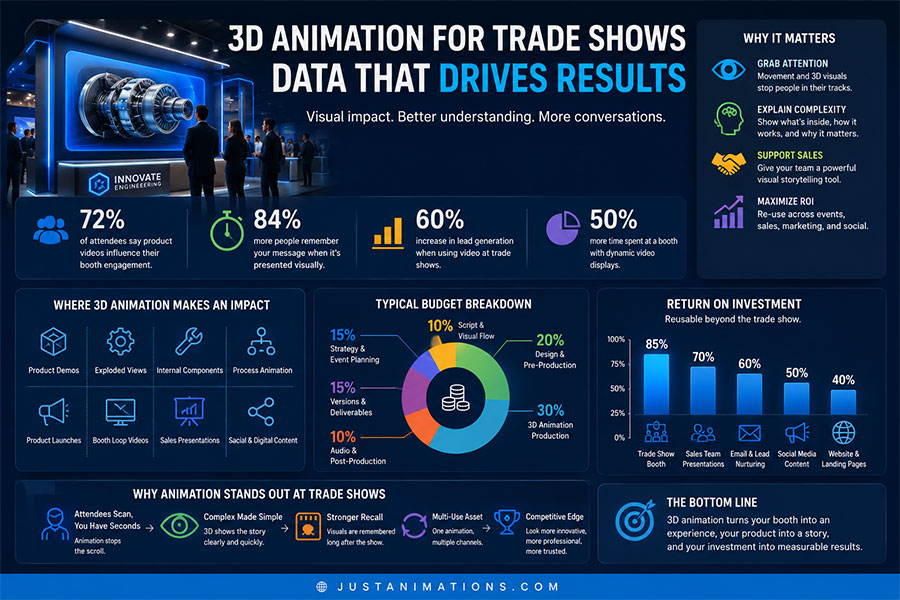
| Production Area | Typical Budget Share | What It Covers |
|---|---|---|
| Strategy & Event Planning | 15% | Booth goals, audience, screen use, message hierarchy |
| Script & Visual Flow | 10% | Sequence planning, feature order, on-screen messaging |
| Design & Pre-Production | 20% | Storyboards, style frames, product planning, screen layout |
| 3D Animation Production | 30% | Modeling, animation, lighting, rendering, motion |
| Audio & Post-Production | 10% | Music, sound design, editing, polish |
| Versions & Deliverables | 15% | Loops, no-sound versions, sales files, social cutdowns |
For a $75,000 trade show animation package, that could look roughly like:
| Production Area | Approximate Allocation |
|---|---|
| Strategy & Event Planning | $11,250 |
| Script & Visual Flow | $7,500 |
| Design & Pre-Production | $15,000 |
| 3D Animation Production | $22,500 |
| Audio & Post-Production | $7,500 |
| Versions & Deliverables | $11,250 |
The important part is that trade show animation is not only about the main video.
The versions matter.
A booth loop, sales version, social teaser, and no-voiceover display version may all need different pacing.
Trade Show Animation Decision Guide
| Business Goal | Best Animation Direction | Why It Works |
|---|---|---|
| Attract booth traffic | Looping 3D animation | Movement catches attention quickly |
| Explain product features | 3D product breakdown | Makes value easier to see |
| Show hidden components | Exploded view animation | Reveals internal structure clearly |
| Launch a product | Cinematic 3D reveal | Creates a premium first impression |
| Support sales meetings | Product demo animation | Gives reps a visual explanation tool |
| Present technical systems | 3D process animation | Simplifies complex workflows |
| Extend event content | Social cutdowns | Keeps the campaign active after the show |
This is why trade show animation should be planned before the event.
If the animation is only created as a last-minute booth filler, it usually misses the bigger opportunity.
Designing For Large Screens
A trade show screen is not the same as a laptop screen.
The animation may be viewed from across an aisle, at an angle, in bright lighting, with people walking by quickly.
That changes the design.
A strong trade show animation should use:
✓ Large visuals
✓ Clear product shots
✓ Minimal tiny text
✓ Strong contrast
✓ Slow enough pacing to understand
✓ Big feature callouts
✓ Visual storytelling without relying on sound
✓ Clean loops
✓ Short repeated message cycles
✓ Brand elements that are visible from a distance
A screen at a booth should not be treated like a mini website.
It should be treated like a visual magnet.
Cost Driver Meter
Here is what usually increases the cost of trade show 3D animation.
Custom 3D Product Modeling
Cost Impact: Very High
██████████
Technical Accuracy
Cost Impact: High
████████
Large-Screen Rendering Quality
Cost Impact: High
████████
Exploded Views And Cutaways
Cost Impact: High
█████████
Multiple Product Variations
Cost Impact: Medium to High
███████
No-Voiceover Loop Versions
Cost Impact: Medium
██████
Sales And Social Cutdowns
Cost Impact: Medium to High
███████
Rush Event Deadline
Cost Impact: High
████████
Event deadlines matter.
If the trade show date is fixed, the project needs to be planned early enough to allow strategy, approvals, production, revisions, and final testing.
Common Trade Show Animation Deliverables
| Deliverable | Best Use |
|---|---|
| Main Booth Loop | Large screen display, attention, brand presence |
| Product Feature Animation | Sales conversations and product explanation |
| No-Voiceover Version | Booth screens where audio is not practical |
| Short Teaser | Pre-show emails and social promotion |
| Sales Deck Version | Meetings during and after the event |
| Vertical Cutdown | Reels, Shorts, mobile social content |
| Square Cutdown | LinkedIn and paid social |
| Still Frames | Banners, thumbnails, booth graphics, follow-up emails |
This is where trade show animation becomes more valuable.
The same production can support the event before, during, and after the show.
Before, During, And After The Trade Show
A good 3D animation asset should not only live on the booth screen.
It can support the whole event campaign.
Before The Show
Use teaser clips, email previews, social posts, and product announcement visuals to build interest.
During The Show
Use booth loops, product animations, presentation versions, and screen visuals to attract and explain.
After The Show
Use sales follow-up videos, LinkedIn clips, email recaps, landing pages, and product education content to continue the conversation.
This is how one animation investment can work harder.
A trade show may last three days.
The content should support the business for much longer.
Cheap Trade Show Video Vs Professional 3D Animation
A cheap booth video may fill a screen.
But filling a screen is not the same as creating impact.
Cheap Trade Show Video
Lower upfront cost.
May look generic.
Often relies on text slides.
May not work well without sound.
May not explain the product clearly.
May be forgotten quickly.
Professional 3D Trade Show Animation
Higher upfront cost.
Shows the product visually.
Can work without sound.
Supports sales conversations.
Creates premium booth presence.
Can be reused after the event.
Trade shows are expensive.
If the booth experience is weak, the company may be wasting more than the video budget.
Buyer Readiness Checklist
Before creating a 3D animation for a trade show, prepare:
✓ Trade show name and date
✓ Booth screen size and layout
✓ Product details
✓ Product photos, CAD files, or 3D assets
✓ Key features to show
✓ Target audience
✓ Booth traffic goal
✓ Sales team needs
✓ Brand guidelines
✓ Example animation styles
✓ Required video length
✓ Audio or no-audio requirements
✓ Social cutdown needs
✓ Final file specs
✓ Budget range
The earlier this information is ready, the smoother the project will be.
Buyer Readiness Meter
| Buyer Input | Readiness Impact | Visual Score |
|---|---|---|
| Trade Show Date | Very High | ██████████ |
| Booth Screen Specs | Very High | ██████████ |
| Product Files Or CAD Assets | High | ████████ |
| Feature List | High | ████████ |
| Target Audience | High | ████████ |
| Brand Guidelines | High | ████████ |
| Sales Team Needs | Medium to High | ███████ |
| Social Cutdown Plan | Medium | ██████ |
Trade show animation has a practical side.
The creative needs to fit the screen, the event, the booth, the sales process, and the file requirements.
Red Flags To Avoid
Be careful if a vendor:
✕ Does not ask about the trade show screen size
✕ Ignores no-sound viewing conditions
✕ Uses too much tiny text
✕ Cannot work with product files or references
✕ Has weak 3D examples
✕ Does not plan for looping playback
✕ Provides only one final file
✕ Does not ask how sales teams will use the asset
✕ Treats trade show animation like a normal website video
✕ Leaves delivery too close to the event date
Trade show animation needs to be practical.
It is creative content, but it also has to function in a real event environment.
How Just Animations Approaches 3D Animation For Trade Shows
Just Animations creates 3D animation, product animation, motion graphics, animated commercials, explainer videos, corporate videos, training videos, AI-assisted animation, social media videos, and video production for businesses that need polished visual communication.
For trade shows, the focus is on visual clarity, booth impact, and reusable content.
The animation should attract attention on the floor, help sales teams explain the product, and continue creating value after the event ends.
That means planning for more than one screen.
A strong trade show animation can become a booth asset, sales asset, product asset, and marketing asset.
Final Thoughts
3D animation for trade shows and enterprise brands is valuable because it helps companies stand out, explain complex products, and create a stronger presence in crowded event environments.
It is especially useful for technical products, machinery, medical devices, industrial systems, real estate developments, SaaS-connected hardware, engineering solutions, and premium product launches.
The best trade show animation is not just visually impressive.
It is practical.
It works without sound.
It reads clearly on large screens.
It supports sales conversations.
It can be reused after the show.
It makes the product easier to understand.
That is what enterprise brands should look for. Not just booth video. A trade show animation asset that works.
FAQ
Why use 3D animation for trade shows?
3D animation is useful for trade shows because it attracts attention, explains products visually, works well on large screens, and can show features, internal components, and technical details that may be difficult to demonstrate live.
How much does 3D animation for trade shows cost?
3D animation for trade shows can cost from $15,000 to $75,000+ for many professional projects. Premium enterprise trade show animations, product launch visuals, and multi-deliverable content packages can cost $100,000 to $150,000+.
What should a trade show animation include?
A trade show animation should include strong visuals, clear product messaging, large-screen-friendly design, limited small text, loop-friendly pacing, no-sound usability, brand elements, and versions for booth screens, sales teams, and social media.
What types of companies benefit from trade show 3D animation?
Companies in manufacturing, medical devices, machinery, robotics, engineering, construction, aviation, automotive, energy, real estate, SaaS-connected hardware, and industrial technology often benefit from trade show 3D animation.
Should trade show animation have voiceover?
Not always. Many trade show environments are noisy, so the animation should work without voiceover. A voiceover version can still be useful for websites, sales presentations, and follow-up campaigns.