Knowing how to make an animation video starts long before anything begins moving on screen.
Professional animation production typically moves through a structured sequence:
Goal → concept → script → storyboard → design → assets → animation → sound → review → delivery
The exact process changes depending on whether the project is:
- A 2D explainer
- A 3D product demonstration
- A cartoon
- A motion graphics video
- An animated commercial
- A training video
- A social media animation
- A software demonstration
- A cinematic sequence
- An AI-assisted animation
But the underlying principle remains the same.
A strong animation is planned before it is animated.
Businesses sometimes begin by asking which software they should use.
That is usually the wrong first question.
Before choosing software, determine:
✓ What the video needs to accomplish
✓ Who needs to watch it
✓ What viewers should understand
✓ What animation style fits the message
✓ How long the video should be
✓ Where it will appear
✓ What the production budget is
✓ When the animation needs to be completed
This guide explains how to make animation videos from initial idea through final delivery, including professional production steps, DIY options, AI tools, animation costs, timelines, formats, and common mistakes.
What Do You Need to Make an Animation Video?
At a basic level, every animation video needs four things:
1. An Idea
What are you trying to communicate?
2. Visuals
What will the audience see?
3. Movement
How will those visuals change over time?
4. Timing
When will each action happen?
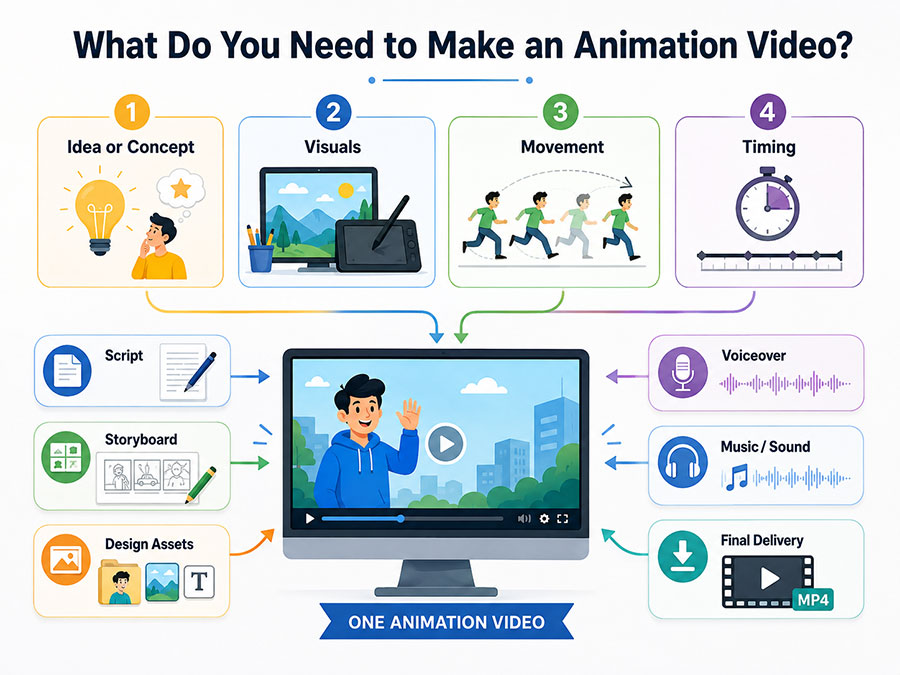
Most professional projects add several additional layers:
- Script
- Storyboard
- Illustration
- Character design
- Graphic design
- 3D modeling
- Voiceover
- Music
- Sound effects
- Editing
- Rendering
- Compositing
You do not necessarily need all of these.
A 10-second animated logo has very different requirements from a three-minute technical product animation.
The production method should match the objective.
How to Make an Animation Video Step by Step
A professional animation workflow can be divided into approximately 12 stages.
| Stage | Primary Objective |
|---|---|
| 1. Define the goal | Determine what the animation must accomplish |
| 2. Identify the audience | Understand who will watch |
| 3. Choose the format | Determine where the video will appear |
| 4. Select the animation style | Choose 2D, 3D, motion graphics, etc. |
| 5. Write the script | Define the message and narration |
| 6. Create the storyboard | Visually plan the video |
| 7. Develop the visual style | Establish colors, characters, and design |
| 8. Build production assets | Create illustrations, models, graphics, and scenes |
| 9. Animate | Add movement, timing, and performance |
| 10. Add voice and sound | Complete the audio experience |
| 11. Review and revise | Correct and refine |
| 12. Export and deliver | Prepare final platform-specific files |
The complexity inside each stage depends on the type of animation being produced.
Step 1: Define What the Animation Video Needs to Accomplish
Do not start with:
“We want something animated.”
Start with an objective.
Examples include:
“Explain our software to prospective customers.”
“Show how our new industrial machine operates internally.”
“Create a 30-second animated advertisement that generates product awareness.”
“Teach employees how to follow a new safety procedure.”
“Introduce a new brand at a trade show.”
The clearer the goal, the easier it becomes to make creative decisions later.
Define:
✓ Business objective
✓ Audience
✓ Primary message
✓ Viewer action
✓ Distribution platform
✓ Approximate duration
✓ Deadline
✓ Budget
An animation used to increase awareness may be visually different from one designed to train employees.
The objective should determine the production.
Step 2: Identify the Target Audience
Before deciding what your animation should look like, determine who needs to understand it.
Ask:
- What does the audience already know?
- What terminology do they understand?
- What problem do they have?
- What information matters most to them?
- Are they customers, employees, investors, or technical specialists?
- How much time are they likely to give the video?
Consider a cybersecurity animation.
A video for consumers might explain:
How online threats affect everyday accounts.
A video for enterprise IT executives might discuss:
Architecture, integrations, permissions, threat detection, and compliance.
The product may be the same.
The communication approach is different.
Step 3: Decide Where the Animation Will Be Used
Platform affects production.
A video designed for a website may need different dimensions and pacing from one created for television.
Possible platforms include:
- Website
- YouTube
- TikTok
- Television
- Streaming advertising
- Trade shows
- Sales presentations
- Internal training systems
- Mobile applications
- Digital signage
Determine this early.
A social campaign may require:
16:9 + 1:1 + 9:16
A trade-show video may need:
4K landscape + silent playback + oversized text
A website animation may require:
Compressed video + transparent version + mobile alternative
Knowing the platform before production avoids unnecessary reformatting later.
Step 4: Choose the Right Type and Style of Animation
There is no single best animation style.
The correct method depends on what needs to be communicated.
2D Animation
2D animation works well for:
- Explainer videos
- Characters
- Education
- Marketing
- Public information
- Social media
- Brand storytelling
It can range from simple graphic illustrations to detailed frame-by-frame animation.
3D Animation
3D is useful when the audience needs to understand:
- Physical products
- Machinery
- Architecture
- Medical devices
- Technical components
- Realistic environments
- Dimensional characters
A three-dimensional model can rotate, separate, reveal internal components, and be viewed from angles that would be difficult to film.
Motion Graphics
Motion graphics work especially well for:
- Typography
- Statistics
- Diagrams
- Charts
- Logos
- Business presentations
- Data
- Advertising
Character Animation
Characters are useful when:
- Emotion matters
- A story requires people
- A mascot represents the brand
- Training requires scenarios
- The audience benefits from a guide
Whiteboard Animation
Whiteboard animation can work well for:
- Training
- Education
- Processes
- Tutorials
- Simple explainers
AI-Assisted Animation
AI tools can support:
- Concept creation
- Image generation
- Backgrounds
- Characters
- Voice
- Scene generation
- Storyboards
Our guide to Animation Maker: Tools, Costs and Professional Solutions explores DIY, AI, software, and professional animation options in greater detail.
Step 5: Write the Animation Script
The script creates the verbal foundation for the video.
Even a highly visual animation benefits from a clear message structure.
A simple business animation might follow:
Problem → solution → explanation → benefit → call to action
For example:
Problem: Companies lose time manually preparing reports.
Solution: The software automates reporting.
Explanation: Data is collected and organized automatically.
Benefit: Teams spend less time preparing reports.
CTA: Schedule a demonstration.
The script does not need to describe every movement.
It should define what needs to be communicated.
How Long Should an Animation Script Be?
Narration speed varies, but a useful planning range is approximately 125–150 spoken words per minute for clear business narration.
That means:
| Video Length | Approximate Narration |
|---|---|
| 15 seconds | 30–40 words |
| 30 seconds | 60–75 words |
| 60 seconds | 125–150 words |
| 90 seconds | 190–225 words |
| 2 minutes | 250–300 words |
| 3 minutes | 375–450 words |
These are planning estimates.
Technical narration may need to be slower.
A high-energy advertisement may move faster.
The audience needs enough time to understand what is being said.
Write for What the Viewer Will See
Animation scripts should be written visually.
Instead of:
“Our platform connects all of your business systems.”
Consider:
Narration:
“Our platform connects your business systems in one workflow.”
Visual:
Separate software platforms appear, then connect into one central interface.
The animation should add information rather than simply repeat the narration word for word.
Step 6: Create the Storyboard
The storyboard is one of the most important parts of learning how to produce animation video effectively.
A storyboard is a sequence of frames representing what will happen throughout the animation.
Each frame may show:
- Composition
- Character position
- Camera angle
- Text
- Product orientation
- Interface screen
- Graphic element
- Transition
It may also include notes describing:
- Movement
- Voiceover
- Sound
- Timing
For example:
Scene 1
Voiceover:
“Managing five separate platforms slows your team down.”
Visual:
Five disconnected application windows appear.
Scene 2
Voiceover:
“Bring them together in one workspace.”
Visual:
The windows move inward and connect to a central dashboard.
The storyboard allows the client and animation team to evaluate the story before expensive animation begins.
Adobe similarly recommends starting animated-video projects with a script and storyboard before moving deeper into production. Businesses learning the process can review Adobe’s guide to creating animated videos.
Why Storyboarding Saves Time
Without a storyboard, clients may first see important creative decisions after they have already been animated.
That can create expensive revisions.
Changing a rough storyboard frame may take minutes.
Changing:
- A 3D environment
- A rendered product shot
- Character movement
- Camera animation
- Sound
can take substantially longer.
Storyboards provide an early approval checkpoint.
Step 7: Develop the Visual Style
Once the structure is approved, the creative team develops what the animation will look like.
This may include:
✓ Color palette
✓ Typography
✓ Illustration style
✓ Character style
✓ Product appearance
✓ 3D materials
✓ Lighting
✓ Environments
✓ Icons
✓ Interface graphics
A studio may create style frames before designing every asset.
A style frame is a polished still image representing the expected appearance of the finished animation.
This allows the client to approve the direction before complete production begins.
Match the Visual Style to the Brand
A cybersecurity company may want:
- Precise motion
- Dark technical environments
- Clean typography
- Controlled color
A children’s educational brand may use:
- Bright illustration
- Friendly characters
- Expressive movement
- Playful typography
A luxury brand may prefer:
- Minimal composition
- Slow motion
- Restrained color
- Elegant typography
Animation style should reinforce brand perception.
Step 8: Create the Animation Assets
Once the style is approved, production assets can be created.
2D Assets May Include:
- Characters
- Backgrounds
- Props
- Icons
- Typography
- Illustrations
- Charts
- Interface graphics
3D Assets May Include:
- Models
- Materials
- Textures
- Characters
- Environments
- Rigging
- Lighting setups
Motion Graphics Assets May Include:
- Titles
- Shapes
- Data
- Icons
- Brand elements
- Infographics
- Logos
This stage can require substantial production time.
A detailed 3D product may need to be modeled accurately before it can move.
A character may need dozens of design decisions before it is ready for animation.
Step 9: Record the Voiceover
If the animation contains narration, voiceover is often recorded before final animation.
Why?
Because the animation needs to synchronize with the spoken message.
The animator needs to know exactly how long each sentence takes.
Professional voiceover planning may consider:
- Gender
- Age range
- Accent
- Tone
- Energy
- Authority
- Personality
- Language
A financial animation may require calm, credible narration.
A children’s animation may require a more expressive performance.
A technical training video may prioritize clarity.
Temporary Voiceover vs. Final Voiceover
Some studios use temporary narration during early production.
That can help establish timing.
However, the final professional voiceover should generally be available before detailed timing and lip synchronization are finalized.
Changing narration later can require animation changes.
Step 10: Create the Animation
This is the stage most people imagine when they think about how to make an animation video.
The animator begins creating motion.
Depending on the style, this may involve:
- Keyframes
- Character poses
- Rig controls
- Motion paths
- Camera movement
- Transitions
- Physics
- Simulations
- Typography animation
- Shape animation
- Facial expressions
- Lip synchronization
But professional animation is not simply moving one object from point A to point B.
The animator considers:
Timing.
Weight.
Rhythm.
Acceleration.
Emotion.
Focus.
What Are Keyframes?
A keyframe defines an important state in an animation.
Imagine a circle moving across the screen.
At:
0 seconds: Circle is on the left.
At:
2 seconds: Circle is on the right.
Those two positions can be keyframes.
The software calculates or helps create the movement between them.
Animators then refine the motion.
Why Timing Matters
The same movement can communicate different meanings depending on timing.
A door closing slowly may feel:
Suspenseful.
A door slamming shut may feel:
Aggressive.
A logo appearing quickly may feel:
Energetic.
A logo appearing slowly may feel:
Premium.
Timing is an artistic decision.
Step 11: Add Music and Sound Design
Sound can dramatically change an animation.
Audio may include:
- Narration
- Music
- Sound effects
- Interface sounds
- Environmental sound
- Impacts
- Transitions
Imagine a product assembling on screen.
Without sound, the movement may feel clean.
Add subtle mechanical clicks and the product may feel more physical.
Add cinematic sound effects and it may feel powerful.
Sound helps establish:
✓ Scale
✓ Emotion
✓ Material
✓ Rhythm
✓ Impact
Does Every Animation Need Music?
No.
Music should support the communication goal.
Some technical animations may work better with:
Narration + subtle sound design
rather than dramatic music.
A social advertisement may rely heavily on music.
A silent trade-show video may need to communicate visually without any sound at all.
Step 12: Review and Revise the Animation
Professional projects generally include structured review stages.
The ideal workflow is:
Script approval → storyboard approval → design approval → animation review → final approval
This prevents earlier decisions from being reopened late in production.
Minor Revision
Examples:
- Adjusting text
- Changing a color
- Modifying timing
- Correcting a label
Major Revision
Examples:
- Rewriting the script
- Replacing the character
- Changing the product design
- Rebuilding a scene
- Changing the animation style
Major changes after approval can affect budget and schedule.
Consolidate Feedback
One of the simplest ways businesses can accelerate animation production is to consolidate feedback internally.
Instead of sending:
Marketing feedback Monday
Engineering feedback Tuesday
CEO feedback Wednesday
send one approved review containing all required changes.
This reduces contradictory revisions.
Step 13: Render and Composite
Some animation styles require rendering.
Rendering turns the production scene into final visual frames.
This is especially important in 3D animation.
Rendering calculations may include:
- Lighting
- Shadows
- Materials
- Reflections
- Depth
- Motion blur
- Atmospheric effects
Complex scenes can require substantial computing power.
After rendering, compositing may combine:
- Animation
- Effects
- Color correction
- Backgrounds
- Typography
- Additional graphics
into the finished image.
Step 14: Edit the Final Video
The completed animated scenes are assembled into the final video.
Editing may include:
✓ Scene timing
✓ Transitions
✓ Voiceover synchronization
✓ Music
✓ Sound effects
✓ Color adjustments
✓ Titles
✓ Captions
✓ End cards
✓ Calls to action
The final edit should be reviewed as a complete experience.
A scene may look excellent individually but feel too long when viewed inside the entire video.
Step 15: Export the Correct Formats
Animation videos may need different exports depending on where they will be used.
Common formats include:
- MP4
- MOV
- WebM
- GIF
- Image sequences
- Transparent video
- Vertical social video
- Square video
Typical resolutions include:
- 1080p
- 1440p
- 4K
Social platforms may require separate dimensions.
Never assume one master export will be optimal everywhere.
How to Make Animation Videos for Different Platforms
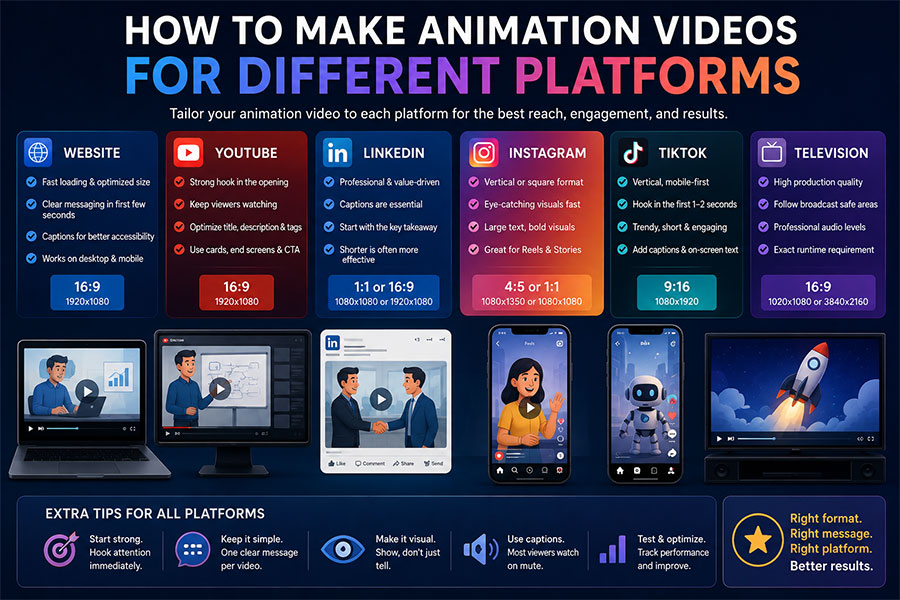
Website
Prioritize:
- Compression
- Fast loading
- Clear messaging
- Mobile compatibility
- Captions
- Appropriate autoplay behavior
YouTube
Prioritize:
- Strong opening
- Retention
- Clear thumbnails
- 16:9 format
- Search-friendly title and description
- Captions
Prioritize:
- Immediate business relevance
- Captions
- Clear opening text
- Professional presentation
Instagram and TikTok
Prioritize:
- Vertical formats
- Immediate visual hook
- Fast pacing
- Large text
- Short runtime
Television
Prioritize:
- Broadcast specifications
- Legal requirements
- Exact runtime
- Professional audio
- Safe areas
Trade Shows
Prioritize:
- Large text
- Silent comprehension
- Short loops
- High-resolution output
- Distance readability
What Software Do You Need to Make an Animation Video?
The software depends on animation style.
Professional production may use several applications rather than one.
Software categories include:
2D Animation Software
Used for:
- Drawing
- Character rigs
- Frame-by-frame animation
3D Software
Used for:
- Modeling
- Rigging
- Lighting
- Rendering
- Simulation
Motion Graphics Software
Used for:
- Typography
- Graphics
- Compositing
- Visual effects
Video Editing Software
Used to combine:
- Animation
- Narration
- Music
- Sound
- Titles
Audio Software
Used for:
- Voice cleanup
- Mixing
- Sound effects
- Music
The best software is the tool that fits the production.
Professional video production services may coordinate scripting, storyboarding, animation, voiceover, editing, music, and final delivery without requiring the client to manage every software platform individually.
Can You Make an Animation Video With AI?
Yes.
AI can now assist with several parts of animation production.
AI tools may help with:
✓ Script drafts
✓ Storyboards
✓ Concept art
✓ Character concepts
✓ Backgrounds
✓ Voiceovers
✓ Video generation
✓ Motion
✓ Lip synchronization
✓ Editing
However, AI production still requires direction.
Someone needs to decide:
- Which output is correct
- Which character is consistent
- Which visual fits the brand
- Whether the product is accurate
- Whether the movement communicates properly
- Whether the final video is commercially usable
AI can accelerate parts of production.
It does not remove the need for creative decision-making.
Can a Beginner Make an Animation Video?
Yes.
Beginner-friendly tools can produce:
- Social animations
- Presentations
- Simple explainers
- Animated text
- Basic characters
- Slideshows
- Logo intros
The learning curve increases as the project requires greater customization.
A beginner can often create a simple template-based animation within hours.
Creating:
- A realistic 3D machine
- A custom cinematic character
- A complex medical animation
- A professional television commercial
requires substantially more knowledge and production time.
DIY Animation vs. Professional Animation
| DIY Animation | Professional Animation |
|---|---|
| Lower initial cost | Higher investment |
| Templates available | Custom design |
| Faster for simple projects | Structured production |
| Limited complexity | Advanced capabilities |
| User manages everything | Production team can manage workflow |
| Best for low-risk content | Better for major public-facing content |
| Limited brand differentiation | Custom brand direction |
| Requires internal time | Outsourced production capacity |
DIY animation makes sense for some projects.
Professional production makes sense for others.
When DIY Animation Makes Sense
Consider creating the animation internally when:
✓ The content is simple
✓ The project is temporary
✓ The audience is internal
✓ Custom branding is unnecessary
✓ The budget is limited
✓ Someone on the team already understands animation tools
When Professional Animation Makes More Sense
Consider professional production when:
✓ The animation represents the company publicly
✓ It supports an important product launch
✓ The project requires custom characters
✓ 3D modeling is required
✓ Technical accuracy matters
✓ Several deliverables are required
✓ The campaign has significant advertising spend
✓ Executive stakeholders will review it
✓ The asset will be used for years
Technology companies, for example, frequently need to demonstrate software, SaaS platforms, AI systems, cybersecurity, hardware, automation, or data workflows that may be difficult to explain through live footage. Professional technology animation can visualize these systems while keeping the message accessible to both technical and nontechnical viewers.
How Long Does It Take to Make an Animation Video?
Production time depends heavily on complexity.
| Animation Project | Typical Planning Range |
|---|---|
| Simple animated asset | Several days–2 weeks |
| Short social animation | 1–3 weeks |
| Animated logo | 1–3 weeks |
| 30-second motion video | 2–5 weeks |
| 60-second 2D explainer | 4–8 weeks |
| Software demonstration | 3–6 weeks |
| 3D product animation | 6–12 weeks |
| Character animation | 6–14 weeks |
| Multi-video campaign | 8–20+ weeks |
| Cinematic production | Several months |
These are planning ranges.
A short video can require significant production if every second contains complex 3D or character animation.
What Can Make Animation Production Faster?
Production moves faster when:
✓ The goal is defined
✓ The script is approved
✓ Product information is accurate
✓ Brand files are organized
✓ One person controls approvals
✓ Feedback arrives quickly
✓ Stakeholders review early
✓ Existing models or assets are available
Rush production is possible for some projects.
But not every stage should be compressed.
Technical review, complex character animation, realistic rendering, and quality assurance require appropriate time.
How Much Does It Cost to Make an Animation Video?
Animation cost varies dramatically.
General professional planning ranges might look like:
| Animation Project | Approximate Budget |
|---|---|
| Simple animated asset | $1,000–$5,000 |
| Logo animation | $1,500–$8,000 |
| Short 2D animation | $3,000–$10,000 |
| Motion graphics video | $5,000–$20,000+ |
| Professional explainer | $7,500–$25,000+ |
| Software demonstration | $7,500–$25,000+ |
| 3D product animation | $10,000–$50,000+ |
| Character animation | $10,000–$60,000+ |
| Technical animation | $15,000–$75,000+ |
| Multi-video campaign | $25,000–$100,000+ |
| Cinematic production | $50,000–$150,000+ |
These are planning ranges, not fixed prices.
What Determines Animation Video Cost?
Duration
More seconds usually require more production.
Style
A simple motion graphic generally costs less than photorealistic 3D.
Asset Creation
Creating everything from scratch increases production requirements.
Character Complexity
Character design, rigging, acting, facial animation, and lip synchronization add time.
3D Modeling
Detailed products and environments require modeling before animation begins.
Technical Review
Engineering, healthcare, financial, and scientific projects may require specialized review.
Voiceover
Professional narration may require:
- Casting
- Recording
- Direction
- Editing
Sound Design
Music and sound effects add another layer of production.
Revisions
More revision rounds require additional time.
Multiple Formats
Vertical, horizontal, square, multilingual, and short-form versions increase deliverables.
How to Produce Animation Video for a Business
Businesses should approach animation as a communication project rather than only a creative project.
Start by determining:
What business problem is the animation solving?
Examples:
- Prospects do not understand the product.
- Sales teams need a consistent explanation.
- Employees need training.
- Trade-show visitors need to understand a machine quickly.
- Investors need to visualize a future product.
- Customers need onboarding.
Once that problem is clear, the creative decisions become easier.
A Business Animation Production Checklist
Before production:
Strategy
✓ Objective defined
✓ Audience defined
✓ Main message approved
✓ CTA approved
✓ Budget approved
✓ Deadline established
Creative
✓ Animation style selected
✓ References collected
✓ Script approved
✓ Storyboard approved
✓ Visual direction approved
Production
✓ Assets supplied
✓ Voiceover approved
✓ Animation produced
✓ Sound completed
✓ Revisions consolidated
Delivery
✓ Final master approved
✓ Platform formats exported
✓ Captions supplied if needed
✓ Source files addressed contractually
✓ Usage rights confirmed
Common Animation Production Mistakes
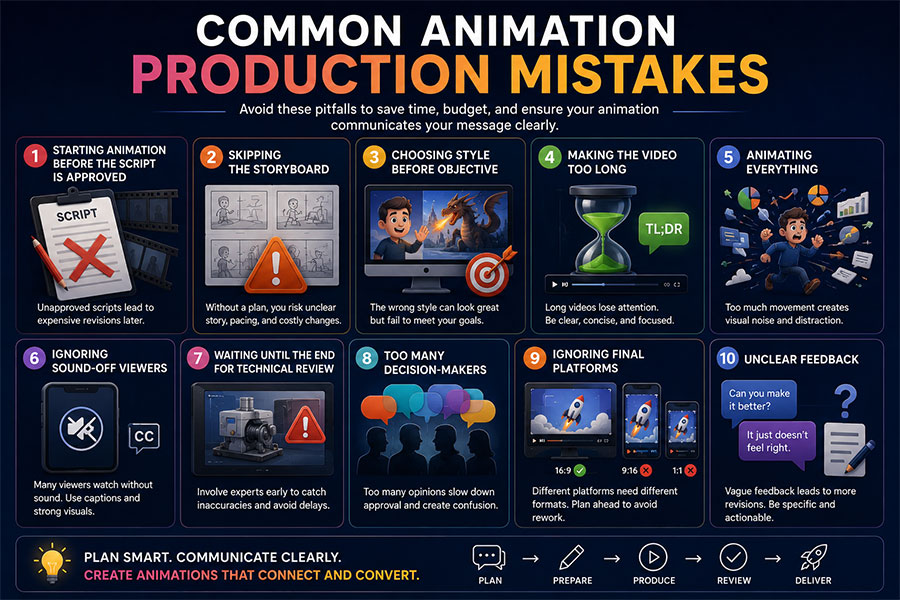
Starting Animation Before the Script Is Approved
This creates avoidable revisions.
Skipping the Storyboard
Important visual decisions then occur too late.
Choosing Style Before Objective
The animation may look impressive while failing to communicate.
Making the Video Too Long
Longer does not automatically mean more informative.
Animating Everything
Constant movement creates visual noise.
Ignoring Sound-Off Viewers
Social media and trade-show audiences may not hear narration.
Waiting Until the End for Technical Review
Engineers, medical experts, or product teams should review relevant stages earlier.
Using Too Many Decision-Makers
Conflicting feedback delays production.
Ignoring Final Platforms
A beautiful 16:9 animation may not work well when cropped vertically.
How Businesses Can Improve the Final Animation
Provide the animation team with:
- Brand guidelines
- Product materials
- Website
- Previous videos
- Technical documentation
- CAD files
- Interface screenshots
- Competitor examples
- Reference animations
- Approved terminology
Explain why you like references.
Instead of:
“Make it like this.”
Say:
“We like the pacing.”
“We like the way the product rotates.”
“We like the typography, but not the character style.”
Specific feedback is easier to use.
Should You Hire an Animator or Animation Studio?
A freelancer may be suitable when:
✓ The script already exists
✓ The style is straightforward
✓ One animation discipline is required
✓ The internal team can manage production
A studio may be better when the project requires:
- Strategy
- Scriptwriting
- Storyboarding
- Illustration
- Character design
- 2D animation
- 3D animation
- Motion graphics
- Voiceover
- Editing
- Sound
- Project management
Businesses in major technology and creative markets can also work with an Austin animation studio for animated product videos, explainers, technology visualization, advertising, business communication, and other custom animation projects.
How to Make an Animation Video That People Actually Watch
Production quality matters.
But the video also needs to hold attention.
Start Quickly
Do not spend 15 seconds displaying the company logo.
Give viewers a reason to continue.
Establish the Problem
Show why the subject matters.
Keep One Main Message
Trying to communicate ten equally important ideas makes none of them memorable.
Show Instead of Repeating
If narration says:
“Our machine contains a three-stage filtration system.”
show the product opening and reveal the three stages.
Maintain Visual Change
The screen should evolve.
That does not mean constant chaos.
It means giving viewers new visual information.
End Clearly
Tell the audience what to do next.
Possible CTAs include:
- Visit the website
- Schedule a demo
- Contact sales
- Request a quote
- Learn more
- Download a guide
How to Make Animation Videos That Can Be Reused
Think beyond one final video.
A 90-second animation may be adapted into:
✓ 30-second advertisement
✓ 15-second social clip
✓ Website hero loop
✓ Trade-show sequence
✓ Sales presentation asset
✓ Product-page animation
✓ Vertical social video
✓ GIF
✓ Still images
Plan reuse before production.
The animator can compose important elements so they work across multiple formats.
This can increase the long-term value of the project.
A Simple Animation Video Production Framework
Remember:
PLAN
Goal → audience → platform
WRITE
Message → script → CTA
DESIGN
Storyboard → style → assets
PRODUCE
Voice → animation → sound
REFINE
Review → revisions → QA
DELIVER
Export → formats → distribution
If you understand these six stages, you understand the foundation of how to make an animation video professionally.
Making Animation Videos With Just Animations
Just Animations creates custom animation videos for businesses, companies, enterprises, government agencies, NGOs, and public-sector organizations.
Projects may include:
✓ 2D animation
✓ 3D animation
✓ Explainer videos
✓ Motion graphics
✓ Character animation
✓ AI-assisted animation
✓ Product demonstrations
✓ Commercials
✓ Training animation
✓ Social video
✓ Website animation
✓ Technical visualization
Production can include:
- Strategy
- Scriptwriting
- Storyboarding
- Visual development
- Asset creation
- Animation
- Voiceover
- Music
- Sound design
- Editing
- Rendering
- Revisions
- Final delivery
Businesses can request an animation quote with their goals, project requirements, timeline, references, and intended platforms.
The Best Animation Videos Are Planned Before They Move
Learning how to make an animation video is not simply about learning animation software.
Professional production is a sequence of decisions.
The team needs to determine:
✓ Why the animation exists
✓ Who needs to watch it
✓ What viewers should understand
✓ What style communicates best
✓ What should happen in each scene
✓ How movement supports the story
✓ How audio supports the visuals
✓ Which final formats are required
The process begins with a goal.
It develops through scripts and storyboards.
It becomes visible through design.
It comes alive through animation.
It becomes complete through sound, editing, review, and delivery.
Whether you are learning how to produce animation video internally or evaluating how professional studios make animation videos, the most important principle remains the same:
Plan first. Animate second.
Frequently Asked Questions
How do you make an animation video?
Start by defining the video’s objective and audience. Choose an animation style, write the script, create a storyboard, develop the visual style, build the required assets, record narration, animate the scenes, add sound, review the video, make revisions, and export the final formats.
How do you produce an animation video professionally?
Professional animation production typically includes discovery, scripting, storyboarding, visual development, asset creation, voiceover, animation, sound design, editing, reviews, quality assurance, and final delivery. More complex productions may also require 3D modeling, rigging, rendering, simulations, compositing, or technical review.
How long does it take to make an animation video?
A simple animated asset may take several days to two weeks. A professional 60-second explainer may take approximately four to eight weeks, while detailed 3D, character, technical, multi-video, or cinematic productions can require several months.
How much does it cost to make an animation video?
Professional animation may range from approximately $1,000–$5,000 for simple assets to $7,500–$25,000 or more for professional explainers and $10,000–$75,000+ for complex 3D, character, or technical animation. Large campaigns and cinematic productions can exceed $100,000.
Can AI make an animation video?
Yes. AI can assist with scripts, concepts, images, storyboards, characters, voiceovers, video generation, motion, lip synchronization, and editing. Professional projects still benefit from human creative direction, consistency checks, technical review, editing, and quality control.