A high quality Animation for trade show booth enables companies to quickly grab attention from the isle or even across the other end of the trade show.
A trade show booth may have only a few seconds to earn attention.
People are walking.
Sales representatives are talking.
Competitors have:
- LED walls
- Product demonstrations
- Lights
- Signage
- Screens
- Giveaways
- Interactive displays
Every exhibitor is competing for the same thing:
Attention.
That is why animation for trade show booth displays should not be produced like an ordinary corporate video.
A visitor walking through a convention hall is unlikely to stand in front of a booth and watch a traditional three-minute company presentation from beginning to end.
Trade show animation needs to communicate differently.
It should be:
✓ Visually immediate
✓ Understandable from a distance
✓ Effective without sound
✓ Easy to enter at any point
✓ Focused on one or two ideas
✓ Designed for continuous looping
✓ Compatible with the actual booth display
An effective trade show booth animation can help a company:
- Stop passing attendees
- Demonstrate products
- Explain technology
- Create visual differentiation
- Support sales conversations
- Show products too large or complicated to bring physically
- Reinforce brand identity
- Generate curiosity
The best animation for trade shows is not simply attractive.
It gives visitors a reason to stop, understand what the company does, and begin a conversation.
What Is Animation for a Trade Show Booth?
Animation for a trade show booth is animated visual content specifically designed for screens, LED walls, displays, kiosks, presentations, and other digital surfaces used within an exhibition environment.
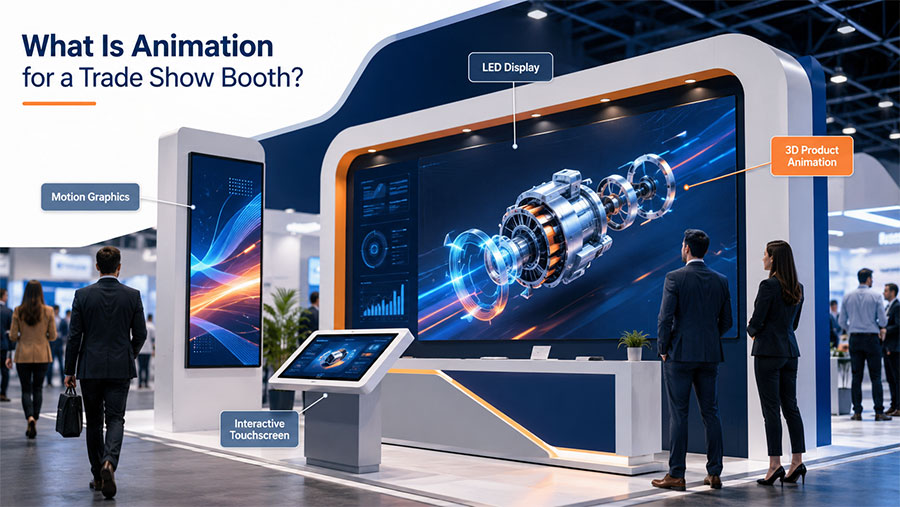
It may include:
- 2D animation
- 3D animation
- Motion graphics
- Product animation
- Animated typography
- Software demonstrations
- Explainer sequences
- Logo animation
- Data visualization
- AI-assisted animation
- Interactive content
The final animation may play on:
✓ Large LED walls
✓ Standard television displays
✓ Vertical screens
✓ Video walls
✓ Interactive kiosks
✓ Touchscreens
✓ Overhead displays
✓ Projection systems
The physical environment should influence how the animation is designed.
A video playing on a 55-inch television six feet from the visitor can contain more detail than a 20-foot LED wall intended to attract people from across an exhibition hall.
Why Trade Show Videos Need a Different Strategy
Trade shows are not controlled viewing environments.
When someone intentionally opens a video on a website or YouTube, they have already chosen to watch.
At a trade show, animation has to compete with the environment itself.
The audience may be:
- Walking quickly
- Talking to colleagues
- Looking at another booth
- Checking a phone
- Carrying materials
- Searching for a meeting
- Surrounded by hundreds of displays
This creates a different communication problem.
A traditional corporate video might begin:
Logo → introduction → company history → product → benefits → CTA
A trade show video may need to begin immediately with:
PRODUCT IN MOTION
or:
WHAT PROBLEM DO YOU SOLVE?
or:
A VISUAL SO UNUSUAL THAT PEOPLE LOOK TWICE
There may be no time for a long introduction.
What Makes a Trade Show Animation Attention Grabbing?
Attention is created by contrast.
Something has to look different from what surrounds it.
That may come from:
Movement
A large object rotating, transforming, separating, assembling, or moving across the display naturally attracts the eye.
Scale
Oversized visual elements can be understood from across the room.
Contrast
Strong separation between:
- Light and dark
- Product and background
- Text and image
- Stillness and movement
makes the display easier to read.
Simplicity
Simple does not mean boring.
Simple means:
The visitor understands the message quickly.
Surprise
Unexpected visual events can interrupt normal scanning behavior.
Examples include:
- Product exploding apart
- Impossible camera movement
- Large 3D transformations
- Anamorphic effects
- Objects appearing to leave the screen
Relevance
Attention has little value if the animation attracts the wrong audience.
A successful booth video should make the right attendee think:
“That is relevant to me.”
The First Five Seconds Matter
Imagine someone approaching an aisle.
They see ten booths.
Your animation should communicate something meaningful almost immediately.
Within approximately five seconds, the screen should ideally communicate one or more of the following:
- What the product is
- What category the company operates in
- What problem it solves
- What makes it visually interesting
- Why the attendee should stop
This does not mean every video needs five seconds of rapid cuts.
A slow cinematic product reveal can be highly effective.
The point is that the screen should become visually meaningful quickly.
Avoid opening with:
- Long logo animations
- Corporate mission statements
- Paragraphs of text
- Generic stock imagery
- Slow introductory slides
The visitor has not committed to watching yet.
Earn the attention first.
Trade Show Animation Should Work Without Sound
Exhibition halls are noisy.
Visitors may hear:
- Conversations
- Stage presentations
- Music
- Public announcements
- Equipment
- Competing booth audio
Even when your screen has speakers, the audio may be difficult to hear clearly.
That means trade show animation should usually be understandable without depending on narration.
Use:
✓ Large text
✓ Visual demonstrations
✓ Product movement
✓ Clear diagrams
✓ Icons
✓ Short benefit statements
✓ Captions where necessary
Sound can enhance the experience when booth design permits it.
But the core message should survive without audio.
How Long Should a Trade Show Booth Animation Be?
There is no universal length.
However, many booth animations benefit from being much shorter than traditional corporate videos.
Typical planning ranges include:
| Trade Show Animation | Typical Length |
|---|---|
| Logo / brand loop | 5–15 seconds |
| Product feature loop | 10–30 seconds |
| Motion graphics loop | 15–45 seconds |
| Product demonstration | 30–90 seconds |
| Software demo | 30–90 seconds |
| Main booth video | 45–120 seconds |
| Detailed presentation video | 2–4 minutes |
The important factor is loopability.
A visitor should not need to start at second zero to understand what is happening.
Design the Animation as a Loop
Trade show videos frequently repeat continuously.
A poorly designed loop feels obvious.
The video ends.
The screen goes black.
The logo appears again.
Then the same introduction begins.
A stronger loop feels more natural.
For example:
Product rotates → components separate → benefits appear → product reassembles → camera returns to opening position
The end naturally reconnects with the beginning.
This allows someone to start watching at almost any point.
The Best Types of Animation for Trade Show Booths
Different booth objectives benefit from different animation styles.
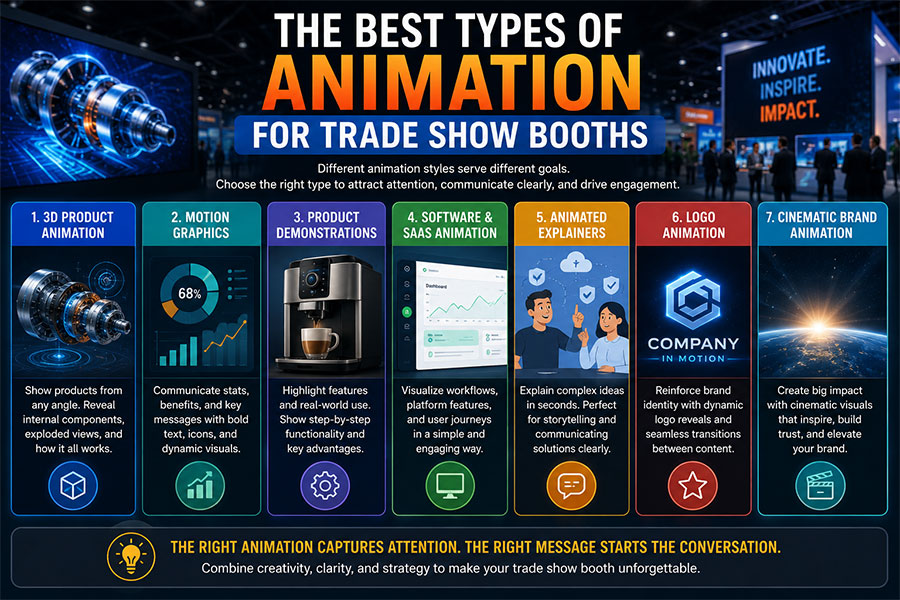
1. 3D Product Animation
3D is one of the strongest options when exhibiting a physical product.
A professional 3D animation can show products in ways that may be impossible on the actual exhibition floor.
The animation can:
✓ Rotate the product
✓ Open it
✓ Explode it apart
✓ Reveal internal components
✓ Show transparent sections
✓ Demonstrate moving mechanisms
✓ Visualize fluids or airflow
✓ Reassemble the product
This is particularly valuable for:
- Manufacturing
- Industrial equipment
- Aerospace
- Medical devices
- Automotive
- Electronics
- Construction technology
- Energy
- Engineering
Our existing guide to 3D Animation for Trade Shows and Enterprise Brands explores how dimensional animation can help businesses explain complex products in crowded event environments.
2. Motion Graphics
Motion graphics are effective when the company needs to communicate:
- Data
- Statistics
- Benefits
- Features
- Process steps
- Brand messaging
- Technology workflows
Large animated typography can work especially well on booth displays.
Instead of displaying:
“Our platform reduces processing time by automating repetitive workflow tasks across multiple systems.”
the screen might show:
LESS MANUAL WORK
then:
FASTER WORKFLOWS
then:
ONE CONNECTED PLATFORM
Shorter messages are easier to understand while walking.
3. Animated Product Demonstrations
A product demonstration does not always need photorealistic 3D.
It might combine:
Product photography + motion graphics
or:
2D diagrams + animated labels
or:
Live footage + animation overlays
The important question is:
What does the attendee need to understand?
4. Software and SaaS Animation
Software companies face a unique trade-show challenge.
A static screenshot rarely explains why software matters.
Animation can show:
- User takes an action.
- Data enters the platform.
- Automation processes it.
- Another system receives the result.
- The user sees the benefit.
Motion makes the workflow visible.
5. Animated Explainer Loops
A short explainer can communicate:
Problem → solution → result
without requiring voiceover.
This can work for:
- Financial services
- Technology
- Consulting
- Healthcare
- Professional services
- Government solutions
6. Logo Animation
Logo animation is useful for:
- Booth transitions
- Holding screens
- Sponsor displays
- Entrance displays
- Overhead signage
But it should usually support the booth rather than dominate the entire content strategy.
Visitors already see the company name on the booth.
The screen should give them additional information.
7. Cinematic Brand Animation
Some trade shows are primarily about brand perception.
Luxury, automotive, entertainment, technology, aerospace, and premium consumer brands may use cinematic animation to create:
- Scale
- Atmosphere
- Excitement
- Innovation
- Prestige
These videos may communicate less information but create a stronger emotional impression.
How 3D Animation Can Make a Booth Stand Out
3D animation works particularly well on large displays because visual depth can create a sense of scale.
Imagine a 15-foot LED wall.
A product appears life-sized.
Then it moves toward the viewer.
The exterior separates.
Internal components float outward.
The camera travels through the assembly.
Everything reassembles.
Even without sound, someone across the aisle can understand:
This company makes something technical.
And:
The product is worth looking at.
Companies preparing for major convention markets can also review our guide to Las Vegas 3D Animation for Trade Shows and Exhibits for additional event-specific planning considerations.
What Is Anamorphic Trade Show Animation?
Anamorphic animation creates the illusion that content extends beyond the physical screen.
When designed for the correct viewing position, a flat or curved LED wall may appear to contain:
- A physical box
- Deep dimensional space
- Objects emerging outward
- Products floating beyond the display
This effect has become popular on:
- Large LED walls
- Corner displays
- Curved displays
- Outdoor digital screens
Anamorphic animation can be extremely attention grabbing.
However, it requires careful planning.
The production team needs:
- Screen dimensions
- Pixel resolution
- Physical geometry
- Viewing angle
- Display configuration
before production begins.
Freeman, one of the major companies in the exhibitions and events industry, has highlighted the use of curved LED walls and anamorphic video to create larger, more immersive exhibit experiences.
The broader exhibitions industry is also increasingly emphasizing video as part of event engagement strategy. The International Association of Exhibitions and Events discusses how video is transforming event engagement, including its expanding role beyond pre-event marketing into the event experience itself.
Large LED Wall Animation
Large LED displays change how animations should be designed.
A visitor may view the screen from:
- 10 feet away
- 30 feet away
- Across the exhibition hall
That means:
Use Large Visual Elements
Tiny interface details disappear.
Use Large Text
Text designed for a laptop may be unreadable at booth scale.
Reduce Clutter
More screen space does not mean you should add more information.
Consider Viewing Distance
Test the design by shrinking it dramatically on your monitor.
If the message becomes impossible to understand when small, it may be too complicated.
Use the Entire Canvas
Large displays create opportunities for:
- Wide camera movement
- Panoramic environments
- Full-size products
- Large typography
Animation for Vertical Trade Show Screens
Vertical displays can work well for:
- Product showcases
- Fashion
- Human characters
- Mobile applications
- Product specifications
- Digital signage
However, vertical content should usually be designed specifically for that orientation.
Cropping a landscape video to portrait may remove important visual information.
Recommended production approach:
Design for the actual display.
Do not rely entirely on cropping afterward.
Multi-Screen Trade Show Animation
Some booths use multiple screens.
These can operate independently or work together.
Independent Screens
Each screen might communicate one topic:
Screen 1: Product
Screen 2: Benefits
Screen 3: Customer industries
Synchronized Screens
Content travels across displays.
For example:
A product begins on the left screen.
It moves into the center.
Components separate.
The final benefit appears on the right.
This can create a strong sense of scale and movement.
Trade Show Animation for Product Launches
Trade shows frequently serve as product-launch venues.
Animation can be particularly useful when:
✓ The product is not yet fully manufactured
✓ Only one prototype exists
✓ Internal features cannot be seen physically
✓ The product is too large to transport
✓ Several configurations need to be presented
A 3D model can visualize:
- Product design
- Features
- Internal systems
- Colors
- Materials
- Alternate configurations
before full production begins.
Trade Show Animation for Manufacturing
Manufacturers may have some of the strongest use cases for booth animation.
A machine may be:
- Too heavy
- Too large
- Too dangerous
- Too complicated
- Too expensive
to demonstrate completely inside a booth.
Animation can show:
Input → process → internal operation → output
The screen becomes a virtual demonstration environment.
Trade Show Animation for Technology Companies
Technology companies can use animation to visualize:
- Software
- APIs
- AI
- Cybersecurity
- Cloud platforms
- Infrastructure
- Automation
- Data
Many of these concepts have no obvious physical appearance.
Animation creates a visual language for them.
A cloud workflow can become moving data.
Cybersecurity can become layers of protection.
Automation can become a sequence of connected actions.
Trade Show Animation for Healthcare and Medical Devices
Medical-device companies can use animation to demonstrate:
- Device operation
- Product positioning
- Internal mechanisms
- Treatment workflows
- Anatomy
- Procedures
3D animation can reveal internal functions that would be difficult to demonstrate safely or clearly on a convention floor.
Trade Show Animation for Construction and Architecture
Companies may visualize:
- Buildings
- Infrastructure
- Construction systems
- Building products
- Installation methods
- Future developments
Projects that do not yet physically exist can still be presented convincingly.
Trade Show Animation for Automotive and Transportation
Animated displays can show:
- Vehicles
- Interiors
- Components
- Electric systems
- Charging
- Engines
- Safety systems
- Transportation infrastructure
A vehicle can be visualized without physically occupying booth space.
Trade Show Animation for Government and Public Sector
Government agencies and public-sector organizations may exhibit at:
- Industry conferences
- Technology events
- Procurement events
- Defense exhibitions
- Infrastructure conferences
- Economic-development events
Animation can communicate:
- Programs
- Infrastructure
- Technology
- Public services
- Initiatives
- Data
The tone should emphasize clarity and credibility rather than unnecessary spectacle.
How Much Text Should Be on a Trade Show Screen?
Usually less than you think.
Visitors should not be expected to read paragraphs.
Good trade-show text tends to be:
Short.
Large.
Specific.
Examples:
SEE INSIDE THE SYSTEM
40% FASTER PROCESSING
AUTOMATE THE WORKFLOW
BUILT FOR EXTREME CONDITIONS
Longer explanations belong in:
- Sales conversations
- Brochures
- Product sheets
- Websites
- Follow-up materials
The screen’s job is often to start the conversation.
Use One Main Message at a Time
A common booth-video mistake is trying to communicate everything.
The company wants to include:
- History
- Products
- Services
- Values
- Testimonials
- Industries
- Features
- Locations
- Awards
The result becomes visual overload.
Instead, structure the loop around a few strong messages.
For example:
Scene 1
WHAT IT IS
Scene 2
WHY IT MATTERS
Scene 3
HOW IT WORKS
Scene 4
WHAT MAKES IT DIFFERENT
Then repeat.
Trade Show Animation and the Sales Team
The animation should help sales representatives.
It should not compete with them.
A strong booth video can become a visual sales assistant.
A salesperson can point at the display and say:
“That animation is showing what happens inside the system.”
or:
“Watch this section—the three components separate so you can see how maintenance works.”
This makes animation useful even after it has already attracted the visitor.
Animation as a Conversation Starter
Some animations should deliberately create questions.
For example:
Show a machine accomplishing something unusual.
Do not immediately explain every detail.
The attendee asks:
“How does it do that?”
Now the sales conversation begins.
This can be more effective than putting every answer on the screen.
Trade Show Booth Video and Lead Generation
Animation does not generate a lead by itself.
It creates an opportunity for interaction.
The broader booth needs to convert attention into engagement.
That may involve:
- Product demonstration
- Sales representative
- QR code
- Touchscreen
- Appointment booking
- Lead scanner
- Giveaway
- Interactive experience
Cvent’s current trade-show guidance likewise emphasizes that crowded show floors require exhibitors to give attendees a reason to stop, then build experiences and conversations around a clear problem or topic.
Animation can be the first step:
Notice → stop → understand → interact
Should You Add a QR Code to Trade Show Animation?
Sometimes.
QR codes can support:
- Product information
- Downloads
- Demonstrations
- Meeting scheduling
- Campaign landing pages
But a QR code should remain visible long enough to scan.
Do not animate it constantly.
Do not make it tiny.
Do not place it over complicated moving backgrounds.
A better structure is:
Animation → short CTA screen → stable QR code → animation
Designing Trade Show Animation for Reuse
One of the smartest ways to increase value is to plan for multiple uses.
A trade-show animation can often be repurposed for:
✓ Website
✓ LinkedIn
✓ YouTube
✓ Sales presentations
✓ Product pages
✓ Email campaigns
✓ Investor presentations
✓ Future events
A large 16:9 booth animation might also generate:
- 30-second social edit
- 15-second teaser
- Website product loop
- Vertical social version
- GIF
- Still frames
Plan these deliverables before production.
Trade Show Animation Before, During, and After the Event
Animation does not need to exist only inside the booth.
Before the Show
Use clips to announce:
“See us at Booth 420.”
During the Show
Use the full booth content.
After the Show
Reuse the animation in:
- Sales follow-up
- LinkedIn posts
- Email campaigns
- Product pages
- Presentations
IAEE notes that video increasingly serves a year-round content role around exhibitions rather than functioning only as event promotion.
This makes modular production particularly valuable.
Animation for Major Las Vegas Trade Shows
Las Vegas hosts major conventions across industries including:
- Technology
- Automotive
- Construction
- Consumer electronics
- Healthcare
- Hospitality
- Manufacturing
The visual competition can be substantial.
Companies planning content for this market can review both our Las Vegas animation studio page and our dedicated trade-show animation resources when considering display formats, product visualization, and event content strategy.
Trade Show Animation in New York
New York events can involve industries such as:
- Finance
- Technology
- Advertising
- Fashion
- Media
- Healthcare
- Professional services
Our guide to the Best New York Animation Studio for Trade Show Videos explains why animation intended for a busy exhibition environment should emphasize rapid comprehension, visual clarity, and booth-specific production rather than simply reusing an ordinary corporate video.
Should You Reuse Your Existing Corporate Video?
Sometimes.
But do not automatically play the same video used on your website.
Ask:
Does it work without sound?
Can someone understand it from 20 feet away?
Does it make sense if they begin watching halfway through?
Is the text large enough?
Does something meaningful happen immediately?
If the answer is no, adapt it.
You may be able to reuse:
- 3D models
- Product footage
- Illustrations
- Graphics
- Brand elements
while creating a shorter booth-specific edit.
Common Trade Show Animation Mistakes
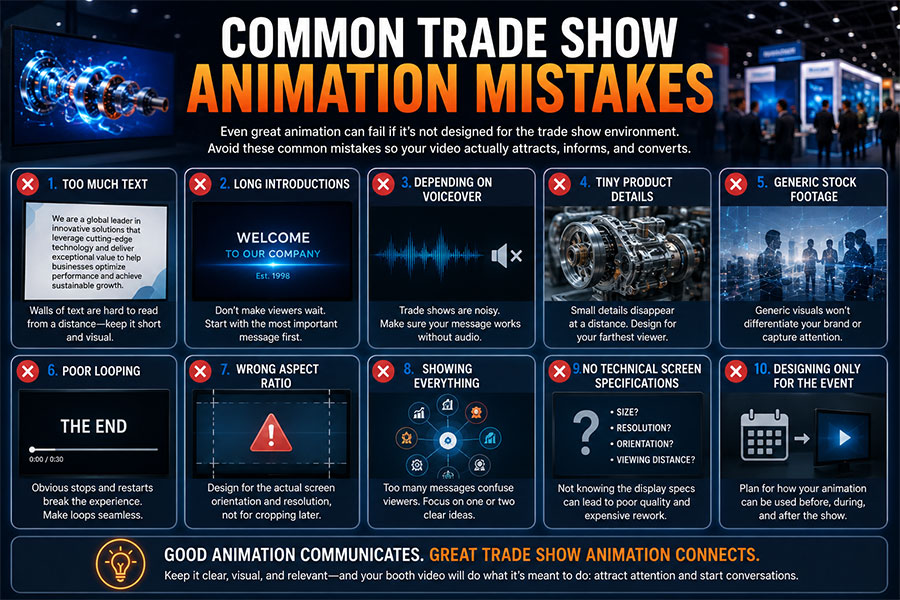
1. Too Much Text
Visitors cannot comfortably read paragraphs while walking.
2. Long Introductions
Do not make the viewer wait for the point.
3. Depending on Voiceover
The exhibition environment may make narration useless.
4. Tiny Product Details
They disappear at distance.
5. Generic Stock Footage
It may fail to differentiate the booth.
6. Poor Looping
Obvious stops and restarts make the content feel less polished.
7. Wrong Aspect Ratio
Design for the screen actually being used.
8. No Technical Screen Specifications
Get display requirements before production.
9. Showing Everything
Focus is stronger than completeness.
10. Designing Only for the Event
Consider how assets can be reused afterward.
What Information Does an Animation Studio Need?
Before creating trade-show animation, supply:
Event Information
- Event name
- Event dates
- Venue
- Booth number if relevant
Display Information
- Screen size
- Pixel resolution
- Orientation
- Aspect ratio
- LED wall dimensions
- Number of displays
Viewing Environment
- Approximate viewing distance
- Booth size
- Indoor or outdoor
- Expected sound availability
Product Information
- CAD files
- Photos
- Engineering data
- Brand files
- Existing videos
Content Objectives
- Main message
- Audience
- Desired viewer action
- Products to feature
The earlier these specifications are confirmed, the easier production becomes.
How Long Does Trade Show Animation Take to Produce?
General planning ranges include:
| Project Type | Typical Production Time |
|---|---|
| Simple animated loop | 1–3 weeks |
| Motion graphics booth video | 2–5 weeks |
| 2D explainer loop | 3–6 weeks |
| 3D product animation | 5–10 weeks |
| Detailed technical 3D | 6–12+ weeks |
| Multi-screen environment | 6–12+ weeks |
| Large anamorphic display | 8–16+ weeks |
These are planning estimates.
Rush production may be possible depending on scope.
How Much Does Animation for a Trade Show Booth Cost?
Pricing depends heavily on complexity and display requirements.
General professional planning ranges may look like:
| Trade Show Animation | Approximate Range |
|---|---|
| Simple branded animation | $1,500–$5,000 |
| Motion graphics loop | $3,000–$10,000 |
| 2D trade-show animation | $5,000–$20,000+ |
| 3D product demonstration | $10,000–$40,000+ |
| Technical 3D animation | $15,000–$60,000+ |
| Multi-screen content | $15,000–$75,000+ |
| Anamorphic LED animation | $20,000–$100,000+ |
| Large enterprise content package | $30,000–$150,000+ |
These are general planning ranges rather than fixed rates.
Cost depends on:
- Duration
- Animation style
- 3D modeling
- Number of products
- Display resolution
- Screen configuration
- Technical complexity
- Revisions
- Number of versions
A Trade Show Booth Animation Planning Checklist
Before production begins, confirm:
Objective
✓ What should the animation accomplish?
Audience
✓ Who will be walking past the booth?
Message
✓ What is the one thing they should understand?
Display
✓ What screen will play the animation?
Distance
✓ How far away will viewers be?
Sound
✓ Must the video work silently?
Loop
✓ Can someone understand it from any starting point?
Style
✓ Should the animation use 2D, 3D, motion graphics, or a combination?
Reuse
✓ Can the assets support marketing after the event?
A Simple Trade Show Animation Framework
Think of trade-show animation as four stages:
ATTRACT
Create movement or imagery strong enough to earn attention.
EXPLAIN
Show what the company, product, or technology does.
PROVE
Demonstrate features, performance, processes, or results.
SUPPORT
Give sales representatives a visual tool they can use during conversations.
This is more useful than treating the screen as a digital brochure.
What Is the Best Animation for a Trade Show Booth?
The best animation for a trade show booth is the animation that communicates clearly in the physical environment where it will actually be viewed.
For a manufacturer, that may be:
3D machinery visualization.
For a SaaS company:
Animated software workflows.
For a consulting company:
Motion graphics.
For a new consumer product:
Cinematic product animation.
For a large LED wall:
Anamorphic 3D content.
The technique should follow the communication objective.
Animation for Trade Show Booths Should Earn Attention
Trade shows create one of the most competitive visual environments a business encounters.
Your animation does not have the luxury of waiting for someone to click play.
It must earn attention while people are already moving.
The strongest trade-show animation typically does several things well:
✓ Communicates immediately
✓ Uses movement deliberately
✓ Works without sound
✓ Remains readable at distance
✓ Demonstrates something worth seeing
✓ Loops naturally
✓ Supports sales conversations
✓ Fits the actual display
✓ Creates reusable assets
An attention grabbing trade show video is not simply louder, faster, or more complicated than every neighboring display.
It is clearer.
More intentional.
More relevant.
And visually strong enough to make the right person stop walking.
Frequently Asked Questions
What is animation for a trade show booth?
Animation for a trade show booth is animated visual content designed specifically for screens, LED walls, displays, kiosks, and other digital surfaces used at exhibitions. It can include 2D animation, 3D product visualization, motion graphics, software demonstrations, animated typography, explainers, and branded video loops.
What type of animation works best for trade shows?
The best style depends on the exhibitor. 3D animation works particularly well for physical products, machinery, technical systems, and large LED displays. Motion graphics work well for data, benefits, software, and corporate messaging. Many booth videos combine several animation techniques.
How long should a trade show booth video be?
Many trade-show videos work well between approximately 15 seconds and two minutes, depending on their purpose. Short product loops may run for 15–30 seconds, while more detailed demonstrations may last 60–120 seconds. The most important consideration is making the video understandable from multiple entry points as it loops.
Should trade show animation work without sound?
Yes. Trade-show environments can be noisy, and visitors may not be able to hear narration clearly. Important messages should therefore be communicated through visuals, large typography, animation, diagrams, captions, and product demonstrations without depending entirely on audio.
How much does animation for a trade show booth cost?
Simple professional booth animations may begin around a few thousand dollars, while custom 2D, 3D, technical, multi-screen, and anamorphic LED projects may range from $10,000 to $100,000 or more. Cost depends on style, complexity, length, screen configuration, asset creation, and the number of final versions required.