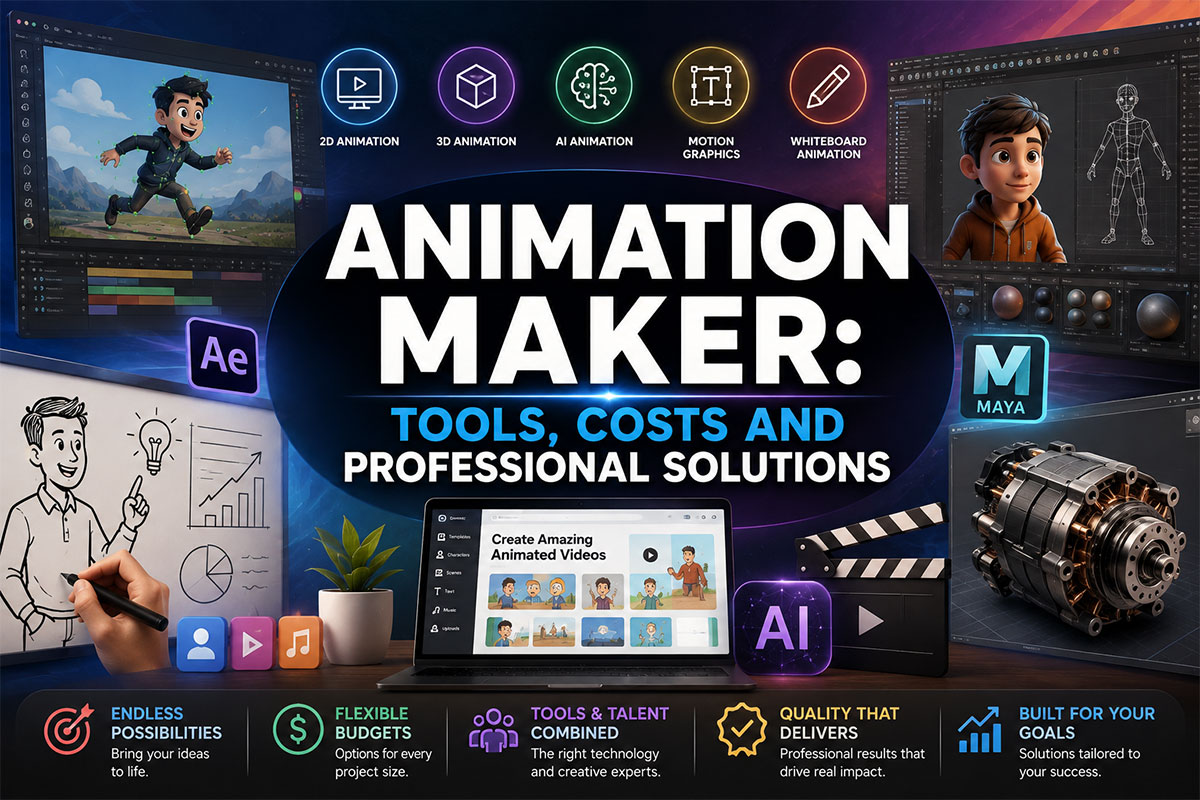
An animation maker can mean very different things depending on who is using the term.
For one person, an animation maker may be a simple online tool used to create a short social media video.
For another, it may refer to professional animation software used by experienced artists.
A business may use the term when searching for:
- An online animation maker
- An AI animation maker
- A video animation maker
- A cartoon animation maker
- A 2D animation maker
- A 3D animation maker
- An animated logo maker
- An explainer video maker
- A professional animator
- A full-service animation studio
The right solution depends on what needs to be created.
A simple promotional clip may be produced with a template-based animation maker. A custom product demonstration, branded character, technical visualization, cinematic sequence, or enterprise explainer may require professional animation production.
This guide explains what animation makers are, how different tools work, what they can create, when DIY animation makes sense, what professional animation costs, and when businesses should hire an animator or studio instead.
What Is an Animation Maker?
An animation maker is a tool, platform, software application, individual animator, or professional production service used to create animated content.
The term has become broader as animation technology has become more accessible.
Animation makers now range from beginner-friendly browser tools to sophisticated professional production software.
They may be used to create:
✓ Animated social media posts
✓ Business videos
✓ Animated presentations
✓ Explainer videos
✓ Character animation
✓ Logo animation
✓ Motion graphics
✓ Product demonstrations
✓ Training content
✓ 2D cartoons
✓ 3D visualization
✓ Website animation
✓ Educational videos
✓ Video game assets
✓ AI-generated animation
The most important distinction is not whether something is technically an animation maker.
It is whether the tool or production method can create the quality, originality, accuracy, and control required for the project.
The Main Types of Animation Makers
Animation makers generally fall into several categories.
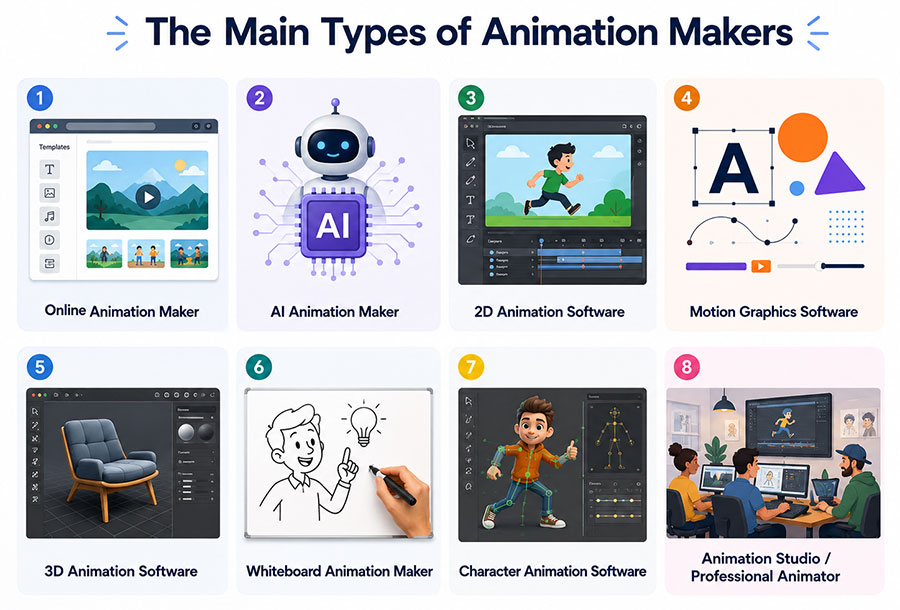
| Animation Maker Type | Best For | Typical Skill Level |
|---|---|---|
| Template-based animation maker | Simple marketing content | Beginner |
| Online video animation maker | Social and short-form content | Beginner |
| AI animation maker | Rapid concepts and generated scenes | Beginner to advanced |
| 2D animation software | Illustration and character animation | Intermediate to professional |
| Motion graphics software | Branding, graphics, typography | Intermediate to professional |
| 3D animation software | Products, characters, environments | Advanced |
| Whiteboard animation maker | Educational and explainer content | Beginner to intermediate |
| Character animation software | Animated characters and dialogue | Intermediate to professional |
| Professional animator | Custom animation projects | Professional |
| Animation studio | Complex, multi-stage production | Professional team |
These options can overlap.
For example, a professional animator may use AI tools during part of the production process while still completing the final animation manually.
Likewise, an animation studio may use several different software packages on the same project.
Online Animation Makers
Online animation makers are browser-based tools designed to make animation accessible without requiring extensive production experience.
They commonly include:
- Templates
- Stock characters
- Icons
- Backgrounds
- Music
- Transitions
- Text animation
- Simple effects
- Drag-and-drop editing
- Preset scenes
- Export tools
These platforms can be useful for businesses creating straightforward content quickly.
Common uses include:
✓ Social media posts
✓ Internal announcements
✓ Basic advertisements
✓ Presentations
✓ Event promotions
✓ Simple explainers
✓ Short educational clips
Their biggest advantage is speed.
The biggest limitation is customization.
When thousands of users have access to the same characters, scenes, templates, and transitions, it becomes difficult to create a distinctive visual identity.
AI Animation Makers
AI animation makers use artificial intelligence to generate or assist with animated video production.
Depending on the platform, AI may help generate:
- Video scenes
- Characters
- Backgrounds
- Motion
- Voiceovers
- Scripts
- Images
- Storyboards
- Transitions
- Lip synchronization
- Visual effects
- Alternate versions
AI has significantly changed how quickly early animation concepts can be explored.
A prompt can sometimes produce a visual idea in seconds that previously required a designer to sketch manually.
However, generating animation quickly is not the same as creating a finished professional production.
AI-generated animation can still present challenges involving:
✗ Character consistency
✗ Brand consistency
✗ Product accuracy
✗ Complex movement
✗ Fine art direction
✗ Text rendering
✗ Continuity between scenes
✗ Precise technical visualization
✗ Predictable revisions
✗ Ownership and licensing considerations
Professional AI animation services can combine generative tools with human creative direction, editing, compositing, motion graphics, and traditional animation techniques.
Our guide to AI Animation: How Businesses Use Animation AI Video Tools explores where AI can support production and where professional oversight remains important.
2D Animation Makers
A 2D animation maker creates movement across a two-dimensional visual plane.
This may include:
- Characters
- Illustrations
- Icons
- Backgrounds
- Typography
- Diagrams
- Shapes
- Story scenes
2D animation can be created frame by frame or through digital rigs, keyframes, tweening, and motion systems.
Common business applications include:
✓ Explainer videos
✓ Educational videos
✓ Advertisements
✓ Brand storytelling
✓ Product explanations
✓ Corporate communication
✓ Social media
✓ Training
✓ Character-led content
Professional 2D animation services are typically used when a company needs custom artwork and animation rather than prebuilt assets.
The creative flexibility of 2D makes it useful for both serious and playful subjects.
A financial company can use restrained diagrams and typography.
A children’s brand can use expressive characters.
A technology company can use abstract illustrations to explain software or data.
The style can change dramatically while the underlying production method remains two-dimensional.
3D Animation Makers
A 3D animation maker works with objects that have depth, volume, surfaces, lighting, and camera perspective.
Professional 3D production may involve:
- Modeling
- Texturing
- Rigging
- Lighting
- Camera setup
- Animation
- Simulation
- Rendering
- Compositing
Three-dimensional animation is particularly useful when the audience needs to understand the physical form or movement of something.
Applications include:
- Product visualization
- Machinery
- Architecture
- Medical devices
- Vehicles
- Characters
- Environments
- Engineering systems
- Scientific visualization
- Cinematic production
Businesses requiring detailed visualization can use 3D animation services to recreate products, components, environments, or ideas that may be difficult or impossible to film.
For example, a manufacturer may want to show the interior of a machine while it operates.
A medical company may need to visualize a process occurring inside the human body.
An architecture firm may need to present a building that has not yet been constructed.
These projects require considerably more control than most simple online animation makers provide.
Motion Graphics Animation Makers
Motion graphics focus on animated graphic design.
Instead of relying primarily on characters, motion graphics often use:
- Typography
- Shapes
- Icons
- Logos
- Charts
- Numbers
- Diagrams
- Interface elements
- Brand graphics
Motion graphics are widely used in business communication because they can turn information into visual movement.
Examples include:
✓ Animated statistics
✓ Product benefits
✓ Corporate presentations
✓ Promotional videos
✓ Brand introductions
✓ Software features
✓ Financial information
✓ Timelines
✓ Process explanations
Professional motion graphics services can create custom animation systems that follow an organization’s existing visual identity.
This is especially useful for businesses that want animation to feel like a natural extension of their brand rather than a separate creative style.
Explainer Video Makers
An explainer video maker is designed specifically to create videos that explain an idea, product, process, or service.
A typical explainer may combine:
- Scriptwriting
- Voiceover
- Storyboarding
- Illustration
- Characters
- Motion graphics
- Music
- Sound effects
- Editing
Simple explainer makers may provide templates and stock scenes.
Professional explainer video animation is more appropriate when the message, storytelling, visual style, and brand presentation need to be customized.
A strong explainer should answer:
What is this?
Why should I care?
How does it work?
What should I do next?
The animation should support those answers rather than simply decorate the narration.
Cartoon Animation Makers
Cartoon animation makers are used to create illustrated characters, environments, and stories.
They may support:
- Character templates
- Facial expressions
- Lip synchronization
- Pose libraries
- Walk cycles
- Background scenes
- Props
- Voiceovers
Template cartoon makers can work well for informal educational or social content.
Professional cartoon animation allows businesses to develop original characters and visual worlds that belong specifically to the brand.
Custom cartoon animation can be used for:
✓ Advertising
✓ Education
✓ Entertainment
✓ Corporate storytelling
✓ Brand mascots
✓ Social media
✓ Public awareness campaigns
✓ Training
The difference between a generic cartoon maker and professional cartoon animation often becomes most obvious in character design.
A custom character can develop recognizable proportions, colors, expressions, personality, movement, and visual language that can be reused across multiple campaigns.
Logo Animation Makers
An animated logo maker adds motion to an existing logo.
Simple tools may offer effects such as:
- Fade
- Zoom
- Spin
- Reveal
- Glow
- Particle effects
- Shape transitions
These can work for temporary or low-budget applications.
Professional logo animation services approach the logo differently.
Rather than asking which effect can be applied, the animator considers:
- What the company represents
- How the logo is constructed
- Which elements should move
- How long the animation should last
- Where it will be used
- How the movement should feel
A technology company’s logo animation may be precise and geometric.
A children’s company may use energetic and playful motion.
A luxury brand may benefit from slower, restrained movement.
Good logo animation reflects the identity of the organization.
Whiteboard Animation Makers
Whiteboard animation combines drawings, text, narration, and visual sequencing to explain information.
It is often used for:
- Training
- Education
- Internal communication
- Processes
- Tutorials
- Public information
- Service explanations
Template-based whiteboard tools can make basic content relatively quickly.
Professional whiteboard animation services can provide custom drawings, pacing, branding, narration, and storytelling.
Whiteboard animation is particularly effective when information can be introduced progressively.
The viewer sees each concept appear as it is discussed, which can create a natural visual structure.
Character Animation Makers
Character animation is more demanding than simply moving an illustrated figure around the screen.
Good character animation considers:
- Acting
- Timing
- Weight
- Emotion
- Facial expression
- Body mechanics
- Eye direction
- Lip synchronization
- Personality
Professional character animation may involve a rig that controls the character’s body and face.
In 3D production, this can become highly detailed.
Businesses may use characters for:
✓ Brand mascots
✓ Training
✓ Advertising
✓ Product demonstrations
✓ Games
✓ Entertainment
✓ Education
✓ Website experiences
Our guide to 3D Character Animation: Design, Costs, and Studio Guide explains how character design, modeling, rigging, animation, and rendering affect production.
Website Animation Makers
Website animation makers create motion specifically for websites and web applications.
This may include:
- Animated icons
- Hero animation
- Product loops
- Microinteractions
- Interface demonstrations
- Scroll animation
- Animated illustrations
- Motion graphics
- Interactive graphics
Website animation must consider more than visual appearance.
It may also need to account for:
✓ File size
✓ Loading performance
✓ Mobile layouts
✓ Browser support
✓ Interaction behavior
✓ Accessibility
✓ Reduced motion
✓ Transparent backgrounds
The guide Website Animation Services: Costs, Types, and Studio Guide explores these requirements in greater detail.
Social Media Animation Makers
Social animation is typically designed around fast communication.
The viewer may decide whether to continue watching within seconds.
Animated social content can include:
- Product announcements
- Promotions
- Short explainers
- Animated statistics
- Logo reveals
- Character clips
- Motion typography
- Reels
- Stories
- Paid advertisements
Businesses can use social media video animation when content needs to be created specifically for social platforms and campaign requirements.
One long animation can also be adapted into shorter clips when this is planned during production.
What Can a Beginner Create With an Animation Maker?
Beginner animation tools have become capable of producing useful content without professional animation experience.
A beginner may be able to create:
✓ Simple animated presentations
✓ Short social videos
✓ Animated text
✓ Basic character clips
✓ Logo intros
✓ Educational videos
✓ Promotional posts
✓ Product announcements
✓ Slideshows
✓ Simple explainers
For internal or low-risk content, this may be enough.
The important question is whether the output needs to represent the company publicly.
A temporary internal training clip does not necessarily require the same production quality as a homepage video viewed by thousands of prospective customers.
What Can Professional Animation Software Do?
Professional animation software gives artists more control over movement, design, timing, effects, and output.
For example, Adobe’s current animation ecosystem includes tools for creating character animation, motion graphics, interactive content, and other animated media. Adobe Express also offers a simpler browser-based character animation tool that can animate characters from recorded or uploaded audio.
Professional tools generally give creators deeper control over:
- Keyframes
- Timing
- Curves
- Layers
- Masks
- Compositing
- Character rigs
- Effects
- Cameras
- Lighting
- Rendering
- Audio synchronization
- Export formats
The important distinction is that software provides capability.
It does not automatically provide artistic judgment.
A professional animator and a beginner may use the same software and produce dramatically different results.
Is an Animation Maker the Same as an Animator?
No. An animation maker is often a tool.
An animator is a person who understands how to create and control movement.
This distinction matters.
Software may provide:
✓ Templates
✓ Automated movement
✓ AI generation
✓ Preset transitions
✓ Character libraries
✓ Export tools
A professional animator provides:
✓ Creative judgment
✓ Timing
✓ Storytelling
✓ Composition
✓ Acting
✓ Visual hierarchy
✓ Problem-solving
✓ Brand interpretation
✓ Technical decision-making
✓ Quality control
The tool can accelerate production.
The animator decides what should be created.
DIY Animation Maker vs. Professional Animator
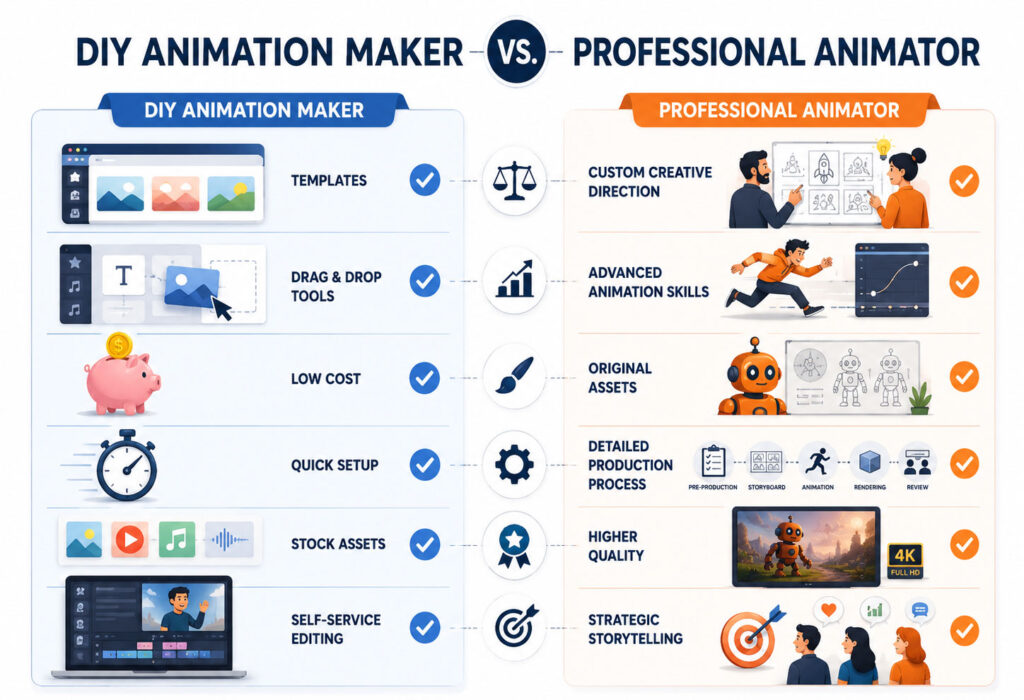
| DIY Animation Maker | Professional Animator |
|---|---|
| Lower initial cost | Higher investment |
| Faster for simple content | More planning and production |
| Template-based | Custom creative direction |
| Limited customization | Greater visual control |
| Easy to learn | Requires specialist skills |
| Useful for internal content | Suitable for public-facing campaigns |
| Stock characters and assets | Original assets possible |
| User manages production | Animator manages animation execution |
| Limited technical complexity | Can handle complex production |
Neither option is automatically right or wrong.
The choice depends on the importance of the animation.
When an Online Animation Maker Makes Sense
Using an online animation maker may be practical when:
✓ The project is simple
✓ The animation is temporary
✓ The budget is limited
✓ The content is for internal use
✓ The company needs something quickly
✓ Brand uniqueness is not essential
✓ A template already fits the message
✓ Technical accuracy is not required
For example, an HR team may create a quick animated reminder about an internal event.
There may be little reason to commission a custom production for that purpose.
When a Professional Animator Makes More Sense
Professional production becomes more valuable when:
✓ The animation represents the brand publicly
✓ The campaign has a large media budget
✓ The product is complex
✓ The subject is technical
✓ Characters must remain consistent
✓ The animation will be reused
✓ Several versions are required
✓ Custom illustration is needed
✓ The work must match existing brand guidelines
✓ Executives or stakeholders will review it
✓ The animation is connected to sales or marketing performance
A company launching a new technology platform should generally expect more control and customization than a template can provide.
When an Animation Studio Is the Better Choice
A studio becomes especially useful when several disciplines are required at the same time.
A complete production might require:
- Strategy
- Scriptwriting
- Creative direction
- Storyboarding
- Illustration
- 3D modeling
- Character design
- Animation
- Voiceover
- Music
- Sound design
- Editing
- Rendering
- Project management
Instead of hiring each specialist independently, an animation studio can coordinate the entire workflow.
Our guide on how to hire a professional animator for a project explains how businesses can compare freelancers, animators, and animation studios.
Animation Maker Costs
Animation maker costs can fall into very different categories.
Free Animation Makers
Some tools provide free entry-level versions.
These may include:
- Limited templates
- Lower export resolution
- Watermarks
- Limited asset libraries
- Restricted export formats
- Reduced AI generation
- Usage limitations
Free tools can be useful for testing ideas.
Subscription Animation Makers
Online animation platforms commonly operate through monthly or annual subscriptions.
Businesses may pay for:
- Premium templates
- Stock assets
- Higher-resolution exports
- Brand controls
- Team collaboration
- AI features
- Additional storage
- Commercial-use options
Professional Software
Professional artists may pay for multiple software packages as part of their production environment.
The software cost is only one part of professional animation.
Hardware, rendering, plugins, storage, sound, asset libraries, and specialist labor can represent much larger investments.
Professional Animation Production
The following are general planning ranges for professionally produced animation.
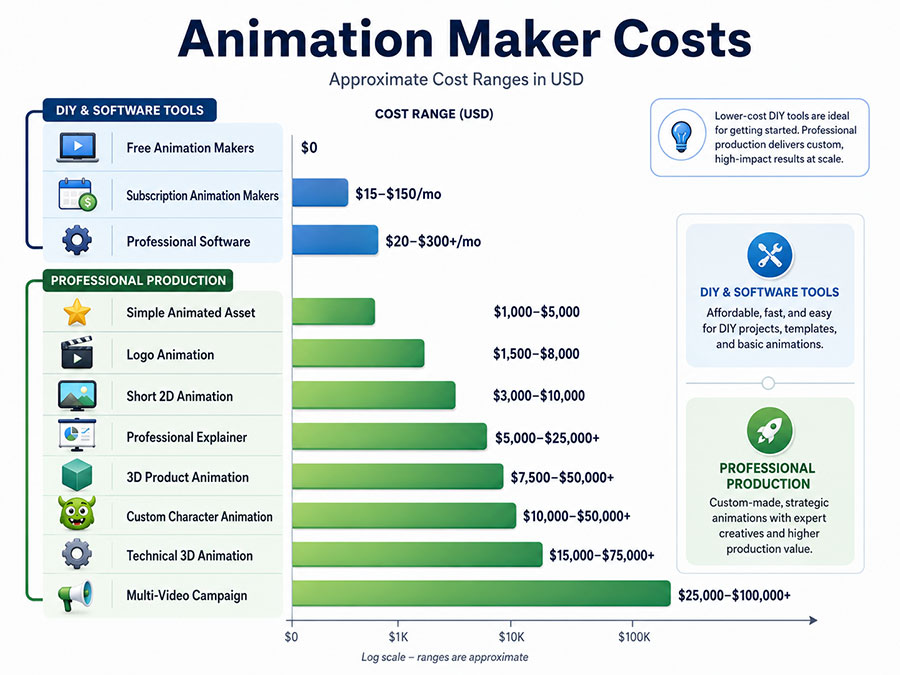
| Project Type | Approximate Planning Range |
|---|---|
| Simple animated asset | $1,000–$5,000 |
| Logo animation | $1,500–$8,000 |
| Short 2D animation | $3,000–$10,000 |
| Professional explainer | $5,000–$25,000+ |
| Motion graphics project | $5,000–$25,000+ |
| 3D product animation | $7,500–$50,000+ |
| Custom character animation | $10,000–$50,000+ |
| Technical 3D animation | $15,000–$75,000+ |
| Multi-video campaign | $25,000–$100,000+ |
| Large cinematic production | $50,000–$150,000+ |
These are planning ranges rather than fixed prices.
The actual cost depends on complexity.
What Makes Professional Animation Cost More?
Custom Design
Original visual development requires more work than selecting existing templates.
Asset Creation
The animator may need to create:
- Characters
- Illustrations
- Environments
- 3D models
- Products
- Interfaces
- Props
- Icons
Animation Complexity
A title fading onto a screen is fundamentally different from animating a realistic human character.
Duration
Longer projects usually require more production.
However, duration is not the only cost factor.
A technically complex 20-second sequence may cost more than a simple two-minute explainer.
Rendering
Detailed 3D animation may require significant rendering time and computing resources.
Technical Review
Animations created for industries such as manufacturing, engineering, finance, healthcare, or government may require subject-matter review.
Revisions
Projects involving several stakeholder groups may require additional review cycles.
Versions
Businesses may need:
- Horizontal video
- Vertical video
- Square video
- Multiple languages
- Alternate calls to action
- Shorter edits
- Transparent versions
Each variation adds production requirements.
Animation Maker Costs vs. Animation Studio Costs
The price difference between a software subscription and a professional animation project can appear enormous.
But the two products are not equivalent.
A software subscription gives the user access to tools.
A professional studio may provide:
✓ Strategy
✓ Creative direction
✓ Custom artwork
✓ Animation expertise
✓ Project management
✓ Voiceover coordination
✓ Sound design
✓ Quality control
✓ Revisions
✓ Final delivery
The business is not simply paying for access to animation software.
It is paying for a production process.
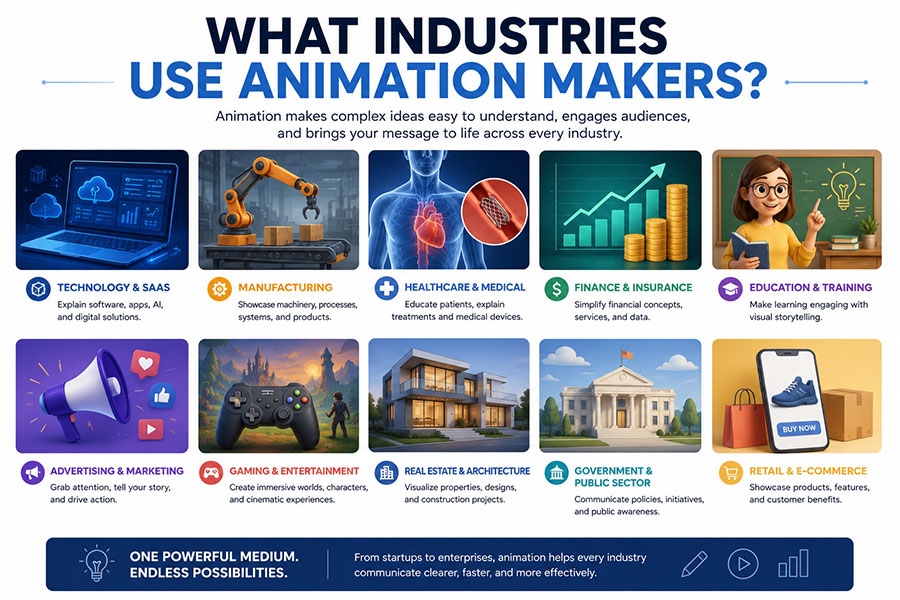
What Industries Use Animation Makers?
Animation is used across nearly every sector. Different industries use it for different reasons.
Technology and SaaS
A technology animation can explain:
- Software
- AI
- Cloud systems
- Cybersecurity
- Applications
- APIs
- Automation
- Data workflows
Software products are often difficult to communicate through photography.
Animation can show relationships that cannot physically be filmed.
Manufacturing
A manufacturing animation may demonstrate:
- Machinery
- Assembly
- Internal components
- Industrial processes
- Robotics
- Automation
- Installation
- Maintenance
3D animation can reveal areas that cameras cannot easily access.
Healthcare and Medical
Healthcare companies can use animation for:
- Patient education
- Medical devices
- Procedures
- Anatomy
- Treatment explanations
- Training
- Research communication
Professional accuracy becomes particularly important when the animation communicates medical information.
Finance
Financial companies may use animation to explain:
- Payments
- Insurance
- Banking
- Investments
- Risk
- Fraud prevention
- Financial technology
- Data
Motion graphics can make abstract financial information easier to follow.
Education
An education animation can transform lessons into visual explanations.
Animation is especially useful for subjects involving:
✓ Processes
✓ Timelines
✓ Science
✓ History
✓ Mathematics
✓ Systems
✓ Abstract concepts
Advertising
An advertising animation may use highly visual, short-form motion to attract attention quickly.
Animated ads may appear on:
- Websites
- Social platforms
- Streaming platforms
- Digital displays
- Presentations
- Events
Gaming
A gaming animation can involve:
- Characters
- Creatures
- Environments
- Cutscenes
- Interface motion
- Promotional trailers
- Game assets
Game animation requires specialized production methods and often differs considerably from standard corporate animation.
Enterprise
Enterprise companies may use animation across several departments.
Applications include:
✓ Sales
✓ Marketing
✓ Internal communications
✓ Investor relations
✓ Employee training
✓ Product launches
✓ Events
✓ Recruitment
A larger organization may also need a repeatable animation system so multiple pieces of content maintain a consistent visual language.
How Businesses Should Choose an Animation Maker
Do not begin by choosing software.
Begin by defining the project.
Ask:
What Are We Creating?
Is it:
- A social post?
- A product animation?
- A training video?
- A brand campaign?
- A website experience?
- A 3D demonstration?
- A character series?
Who Will See It?
A temporary internal audience has different expectations than prospective customers.
How Important Is Originality?
If visual differentiation matters, templates may not be enough.
How Technically Accurate Must It Be?
Technical, medical, engineering, manufacturing, financial, and government content may require greater control and review.
How Long Will the Asset Be Used?
Investing in a custom animation makes more sense when the asset will remain useful for years.
Does the Team Have Animation Skills?
Buying advanced software does not automatically make production efficient.
If someone must spend weeks learning it for one project, outsourcing may be more economical.
How Many Deliverables Are Required?
One animated post may suit a DIY tool.
A campaign with ten videos, several aspect ratios, voiceover, 3D assets, and stakeholder approvals may require professional production.
A Simple Animation Maker Decision Guide
| Project Situation | Recommended Approach |
|---|---|
| Quick internal announcement | Online animation maker |
| Simple social post | Template or online tool |
| Basic animated presentation | DIY animation maker |
| Short AI concept | AI animation maker |
| Branded social campaign | Professional motion designer |
| Custom explainer | Animator or animation studio |
| Original brand character | Character animator or studio |
| Technical product demonstration | Professional 3D animator |
| Machinery visualization | Technical animation studio |
| Enterprise campaign | Full-service animation studio |
| Cinematic sequence | Specialized production team |
| Reusable branded animation system | Professional studio |
The more important the animation becomes to the business, the more valuable creative control becomes.
Can AI Replace an Animation Maker?
AI animation can replace some individual production tasks.
It can already accelerate:
- Ideation
- Storyboard exploration
- Background creation
- Image generation
- Voice production
- Scene generation
- Motion experiments
- Versioning
But an animation project still requires decisions.
Someone must determine:
What should the viewer see?
What should happen first?
Which visual style fits the company?
Is the product represented accurately?
Does the character remain consistent?
Does the animation communicate the right message?
Is the final quality acceptable?
AI can be part of the animation-making process.
It does not eliminate the need for creative direction.
Animation Maker vs. Video Editor
These terms are sometimes confused.
A video editor primarily assembles and modifies existing video, audio, graphics, and footage.
An animation maker creates movement that may not exist in recorded footage.
A project may require both.
For example:
- An animator creates a custom product sequence.
- A motion designer creates animated graphics.
- A video editor combines the animation with interviews and live footage.
- A sound designer completes the audio mix.
Professional productions frequently involve several tools and specialists.
Animation Maker vs. Motion Graphics Designer
A motion graphics designer specializes in animated graphic design.
They commonly work with:
- Typography
- Logos
- Shapes
- Icons
- Data
- Graphic systems
An animator may specialize more broadly in:
- Characters
- Acting
- Physical movement
- 2D scenes
- 3D scenes
There is significant overlap between the professions.
The correct specialist depends on the visual style.
Animation Maker vs. Animation Studio
An animation maker tool helps someone create animation.
An animation studio provides the people and process required to deliver a finished production.
This is an important distinction for businesses.
Animation Maker
Provides:
- Software
- Templates
- Automation
- Editing features
- Asset libraries
Animation Studio
Provides:
- Creative strategy
- Artists
- Animators
- Production management
- Technical expertise
- Quality control
- Revisions
- Delivery
The studio may use many animation makers internally.
The client generally does not need to manage them.
Questions to Ask Before Choosing an Animation Maker
Before purchasing software or hiring a professional, ask:
- What type of animation do we need?
- Does it need to be completely custom?
- Who is the audience?
- Where will the animation appear?
- How long will it be used?
- Does the tool support our required format?
- Can we create original characters?
- Can we import our brand assets?
- Can we create multiple aspect ratios?
- Are commercial usage rights clear?
- Is there a watermark?
- Are source files available?
- Can the animation be revised easily?
- Does our team know how to use the software?
- Would outsourcing cost less than the internal time required?
- Do we need voiceover?
- Do we need 3D?
- Is technical accuracy important?
- Will several stakeholders review it?
- Will this animation represent the company publicly?
The answers can quickly determine whether a DIY tool is realistic.
Professional Animation Can Be Reused
Custom animation can become more valuable when it is planned for multiple uses.
A business may commission one major animation and create:
✓ Website clips
✓ Social media edits
✓ Sales presentation sequences
✓ Trade-show videos
✓ Advertising variations
✓ Training assets
✓ Product-page loops
✓ Animated GIFs
✓ Vertical videos
✓ Short-form clips
This should be discussed before production.
The studio can then design scenes and assets with reuse in mind.
Choosing an Animation Maker Based on Value, Not Just Price
The cheapest production method is not always the least expensive business decision.
Imagine two options.
Option A: A company spends $200 on an animation platform and 40 internal hours producing a video.
Option B: The company spends more on a professional animator who manages production and delivers a reusable custom asset.
The correct choice depends on the situation.
Internal time has value.
Brand perception has value.
Reuse has value.
Creative consistency has value.
The decision should account for the total outcome, not merely the software subscription.
When Custom Animation Is Worth the Investment
Custom animation is especially valuable when:
✓ The product is difficult to explain
✓ The company needs to differentiate itself
✓ The animation supports sales
✓ The asset will be reused for years
✓ A new brand is launching
✓ Technical accuracy matters
✓ The animation appears on a major website
✓ The project supports a high-value product
✓ Multiple campaign assets are required
✓ The audience includes enterprise or government decision-makers
In these situations, animation becomes more than content.
It becomes part of the company’s communication infrastructure.
How Just Animations Approaches Professional Animation
Just Animations creates custom animation for businesses, companies, enterprises, government agencies, NGOs, and public-sector organizations.
Depending on the project, production can involve:
✓ Creative planning
✓ Scriptwriting
✓ Storyboarding
✓ Illustration
✓ 2D animation
✓ 3D animation
✓ AI-assisted production
✓ Character animation
✓ Motion graphics
✓ Logo animation
✓ Voiceover
✓ Sound design
✓ Editing
✓ Final delivery
Our animation services cover projects ranging from individual animated assets to complete professional productions.
The objective is not simply to use an animation maker.
It is to select the production techniques and specialists that best communicate the idea.
Businesses can request an animation quote with information about the project, audience, style, budget, deadline, and required deliverables.
The Best Animation Maker Depends on What You Need to Make
There is no single animation maker that is right for every project.
An online animation tool may be ideal for a simple internal presentation.
An AI animation maker may help create rapid concepts.
Professional 2D software may be needed for illustrated character work.
Three-dimensional software may be necessary for product visualization.
A professional animator may be the best choice for a custom marketing video.
A complete animation studio may be the right solution for a complex campaign.
Start with the business objective rather than the software.
Ask:
✓ What needs to be communicated?
✓ Who needs to understand it?
✓ How original must it be?
✓ How accurate must it be?
✓ Where will it be viewed?
✓ How long will it remain useful?
Then choose the animation maker, animator, or studio capable of delivering that result.
Frequently Asked Questions
What is an animation maker?
An animation maker is a tool, software application, online platform, AI system, animator, or production service used to create animated content. Animation makers range from beginner-friendly template tools to professional software and full-service animation studios.
What is the best animation maker for businesses?
The best animation maker depends on the project. Online tools can work well for simple social or internal content, while professional animators or studios are generally more appropriate for custom explainers, 3D product animation, technical visualization, branded characters, and major marketing campaigns.
Can I make animation without professional experience?
Yes. Many online animation makers provide templates, characters, stock assets, transitions, and AI features that allow beginners to create simple animated content. More complex custom animation generally requires additional artistic and technical experience.
How much does professional animation cost?
Professional animation may cost from approximately $1,000–$5,000 for smaller assets to $25,000–$100,000 or more for complex 3D, technical, character, campaign, or cinematic productions. Pricing depends on animation style, length, complexity, asset creation, revisions, and deliverables.
Is an AI animation maker better than a professional animator?
AI animation makers can generate concepts and scenes quickly, but professional animators provide creative judgment, consistency, customization, technical control, storytelling, and quality assurance. Many professional workflows now combine AI-assisted tools with traditional animation and human creative direction.