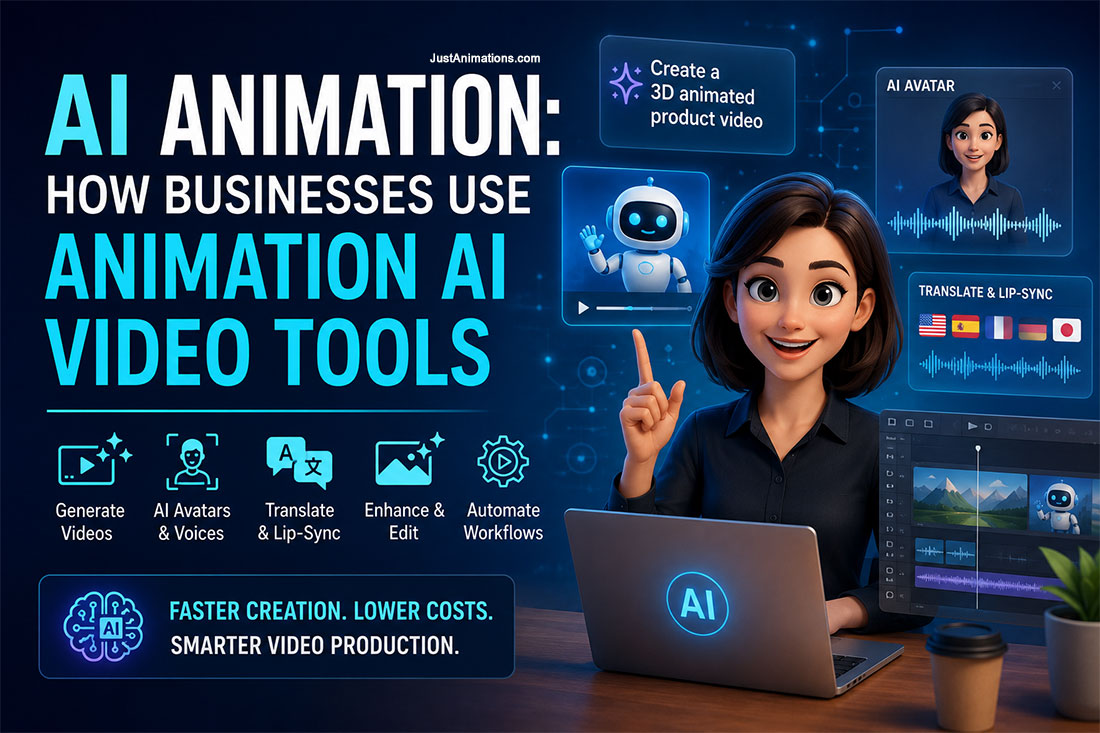
AI animation tools are changing how businesses plan, produce, edit, translate, and distribute video content.
A company can now enter a text prompt to generate a short video clip, animate an existing image, create an AI presenter, translate a video into several languages, replace part of a scene, or generate supporting visuals without organizing a traditional video shoot.
However, AI animation is not a single production method.
The term includes several technologies with different strengths, costs, limitations, and business uses. Some tools create short cinematic clips. Others create avatar-led presentations, automate lip synchronization, generate voices, build storyboards, or assist professional animators during production.
Businesses should therefore begin with the communication goal rather than selecting a tool because it is new.
The best results often come from combining AI video tools with human scriptwriting, creative direction, animation, editing, sound design, and brand management.
Quick Answer: What Is AI Animation?
AI animation is the use of artificial intelligence to generate, modify, animate, translate, or enhance video and animated content.
Businesses can use animation AI video tools to:
- Generate video from written prompts
- Animate still images
- Create AI presenters or avatars
- Produce synthetic voiceovers
- Translate and lip-sync existing videos
- Generate backgrounds and visual effects
- Create social media variations
- Remove or replace objects
- Develop storyboards and concepts
- Assist with editing and post-production
Current platforms support different combinations of text-to-video, image-to-video, video editing, synthetic presenters, audio generation, translation, and visual-reference controls. OpenAI, Google Veo, Adobe, Runway, Synthesia, and HeyGen are among the companies offering tools in these categories.
AI animation can reduce the time required for certain production tasks.
It does not automatically replace professional animation production.
AI Animation Overview
| Project Element | Typical Requirement |
|---|---|
| Primary purpose | Generate or assist with animated video production |
| Common inputs | Text, images, video, audio, documents and presentations |
| Typical outputs | Short clips, avatar videos, B-roll, translations and visual variations |
| Common users | Marketing, training, sales, communications and creative teams |
| Main advantage | Faster experimentation and content variation |
| Main limitation | Inconsistent results and reduced creative control |
| Best approach | Combine AI generation with human planning, editing and approval |
What Are Animation AI Video Tools?
Animation AI video tools are software platforms that use machine learning models to create or modify moving images.
The user may provide a prompt such as:
A close-up product shot of a modern water bottle rotating slowly against a clean studio background.
The tool interprets the prompt and generates a short clip based on the requested subject, movement, camera position, lighting, and visual style.
Other platforms work differently.
An AI avatar platform may allow the business to paste a script, choose a digital presenter, select a voice, and generate a completed presentation.
An image-to-video tool may animate a product photograph or concept image.
A video-to-video system may change the style, background, color, movement, or objects within existing footage.
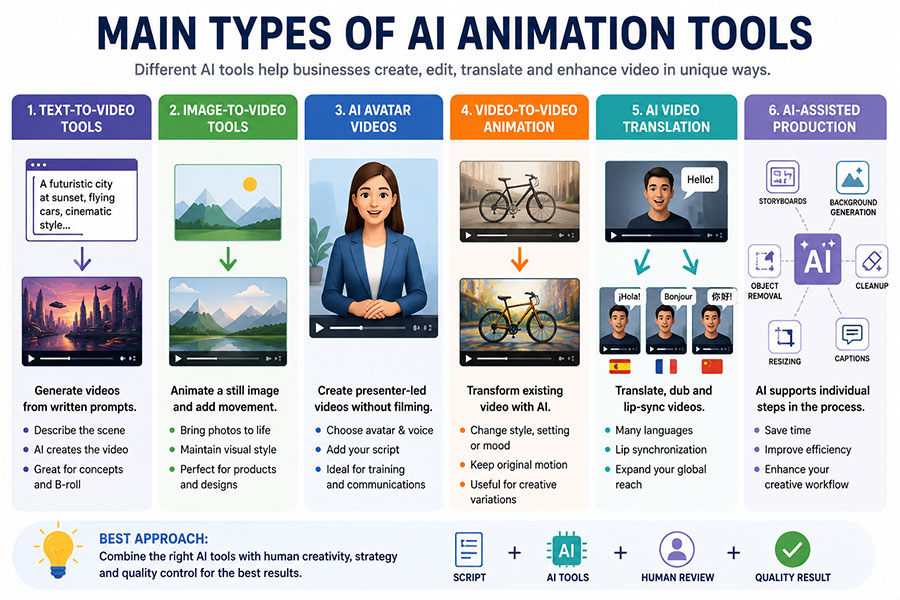
Main Types of AI Animation Tools
Text-to-Video Tools
Text-to-video tools generate a video clip from a written description.
The prompt may include:
- Subject
- Environment
- Camera movement
- Lighting
- Visual style
- Character action
- Mood
- Duration
- Aspect ratio
- Audio direction
OpenAI’s video API can generate video with synchronized audio from natural-language or image inputs. Google’s Veo models can also generate high-resolution video with audio from text or images.
Text-to-video is useful for concept development, atmospheric footage, advertisements, visual effects, product ideas, and short promotional scenes.
Image-to-Video Tools
Image-to-video tools add movement to a still image.
A business might animate:
- A product photograph
- A digital illustration
- A building rendering
- A character design
- A social media graphic
- A campaign mood board
- An AI-generated image
Adobe Firefly allows users to convert photos, graphics, and AI images into video clips. Adobe identifies product imagery, B-roll, and animated mood boards as common applications.
Image-to-video can provide greater visual consistency than starting with a text prompt because the first image establishes the subject, colors, composition, and style.
AI Avatar Videos
AI avatar platforms create presenter-led videos without filming a person for every version.
The user generally selects or creates an avatar, enters a script, chooses a voice and language, and adds branded graphics.
Synthesia positions its platform for training, communications, and business video, while HeyGen supports avatar presentations, narration, templates, translation, and lip synchronization.
AI avatars are commonly used for:
- Employee training
- Software tutorials
- Customer onboarding
- Internal announcements
- Sales presentations
- Frequently updated information
- Multilingual communication
Video-to-Video Animation
Video-to-video tools modify existing footage.
They may change the visual style, environment, subject appearance, lighting, or selected objects while retaining the movement of the original clip.
Runway’s video-to-video tools, for example, can restyle footage using a prompt or input image.
This approach can be useful when the business already has suitable camera movement or actor performance but wants a different visual treatment.
AI Video Translation
AI translation tools can create additional language versions of an existing video.
Depending on the platform, the process may include:
- Script translation
- Synthetic dubbing
- Voice cloning
- Subtitle generation
- Lip synchronization
- Timing adjustments
Synthesia currently promotes video translation in more than 160 languages, while HeyGen offers translation with dubbing and lip synchronization.
Human review is still important.
Industry terminology, product names, cultural references, legal statements, and calls to action may not translate accurately without subject-matter review.
AI-Assisted Animation Production
AI can also support individual stages of a traditional animation workflow.
It may help with:
- Idea generation
- Script outlines
- Storyboards
- Concept artwork
- Background creation
- Voice tests
- Motion references
- Cleanup
- Object removal
- Captions
- Resizing
- Translation
- Versioning
This is often the most practical business use of AI animation.
Instead of asking one platform to generate the entire finished video, the production team uses AI selectively to accelerate specific tasks.
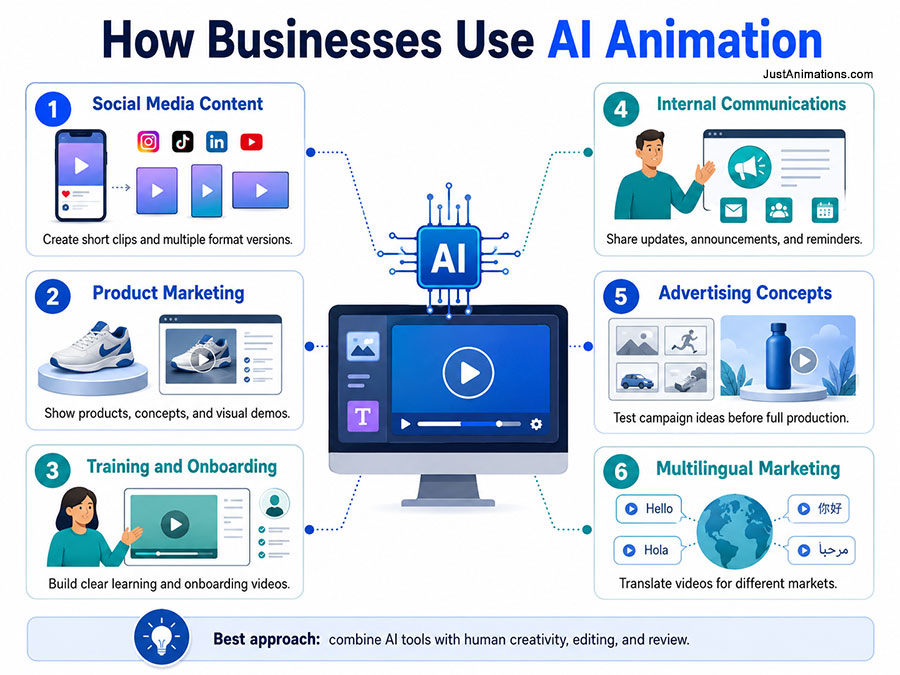
How Businesses Use AI Animation
Social Media Content
Businesses can create several short versions of the same campaign for different platforms.
A horizontal website video may be adapted into square and vertical variations.
AI-generated B-roll, backgrounds, transitions, and product scenes can support short-form content without requiring a new shoot for every post.
Product Marketing
AI animation can help demonstrate product concepts before physical prototypes are available.
A team may generate:
- Lifestyle scenes
- Product environments
- Camera concepts
- Visual effects
- Packaging ideas
- Short product reveals
Generated footage should not misrepresent a product’s real appearance, features, performance, or availability.
Training and Onboarding
AI presenters can turn scripts, documents, or presentations into structured training videos.
This can be useful when content changes regularly.
The company can update a policy, replace one section, translate the video, and generate a revised version without filming the entire presentation again.
Internal Communications
Organizations can use AI avatar videos for executive updates, policy announcements, project summaries, safety reminders, and department communications.
The approach is most appropriate when the presentation is clearly authorized and the avatar does not misleadingly imply that a real person recorded words they never approved.
Advertising Concepts
Creative teams can use AI video generation to test visual directions before committing to full production.
Several environments, camera styles, or campaign ideas can be explored quickly.
The selected concept can then be rebuilt, refined, or combined with professional animation.
Website Content
Short AI-generated loops can add movement to:
- Website banners
- Service pages
- Product sections
- Backgrounds
- Calls to action
- Case studies
Website animation should remain compressed, accessible, and optional where excessive movement could affect usability.
Multilingual Marketing
AI translation can help businesses adapt videos for several markets.
The production team can create one approved master video and produce localized versions with translated narration, captions, and synchronized mouth movement.
Current AI Video Tool Categories
| Tool Category | Examples | Common Business Use |
|---|---|---|
| Cinematic video generation | Sora, Veo and Runway | Advertising concepts, visual effects and B-roll |
| Creative video generation | Adobe Firefly | Product clips, image animation and editing support |
| AI avatar platforms | Synthesia and HeyGen | Training, onboarding and presentations |
| Translation and lip-sync | Synthesia and HeyGen | Multilingual video versions |
| AI-assisted production | Firefly, Runway and editing platforms | Cleanup, replacement, resizing and visual variations |
The platforms and model capabilities continue to change.
Businesses should test outputs using their actual brand, product, security, and delivery requirements before choosing a long-term system.
AI Animation vs. Traditional Animation
AI animation and traditional animation are not direct substitutes in every situation.
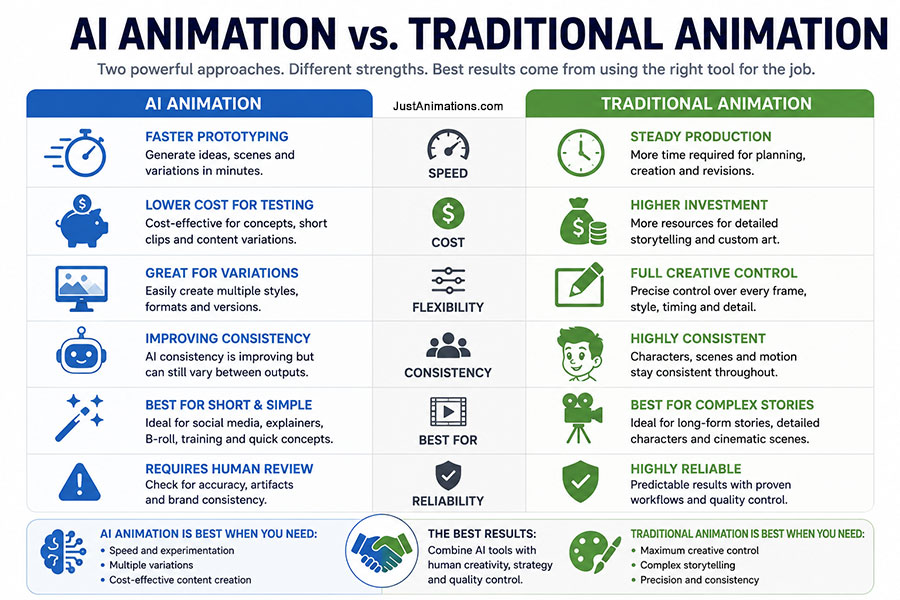
| Requirement | AI Animation | Traditional Animation |
|---|---|---|
| Rapid concept testing | Excellent | Moderate |
| Precise frame control | Limited | Excellent |
| Character consistency | Improving | Excellent |
| Fast visual variation | Excellent | Moderate |
| Complex brand storytelling | Limited alone | Excellent |
| Low-cost experimentation | Excellent | Limited |
| Long-form continuity | Challenging | Excellent |
| Technical accuracy | Requires review | Highly controllable |
| Unique art direction | Variable | Highly controllable |
| Revisions | Can be unpredictable | Structured |
AI generation is strongest when speed and exploration are priorities.
Traditional animation remains stronger when the business needs precise character performance, technical accuracy, repeatable design, controlled storytelling, or consistent scenes across a longer video.
When Should a Business Use AI Animation?
AI animation may be appropriate when the business needs:
✓ Fast campaign concepts
✓ Short social media clips
✓ Supporting B-roll
✓ Internal training content
✓ Frequently updated presentations
✓ Multilingual video versions
✓ Animated product photography
✓ Backgrounds or visual effects
✓ Several format variations
✓ A lower-cost prototype before full production
AI animation may be less appropriate when the project requires:
- A highly recognizable recurring character
- Exact technical demonstrations
- Regulated medical or financial claims
- Detailed industrial processes
- Long narrative continuity
- Precise product dimensions
- Confidential information entered into an unapproved system
- A guaranteed visual result before production begins
How Much Does AI Animation Cost?
AI animation costs depend on whether the business is using a self-service platform or hiring a professional team to create a complete video.
Platform pricing may be based on subscriptions, credits, generation length, resolution, number of users, or enterprise agreements. Adobe uses generative credits for Firefly features, while Runway offers credit-based plans and custom enterprise packages.
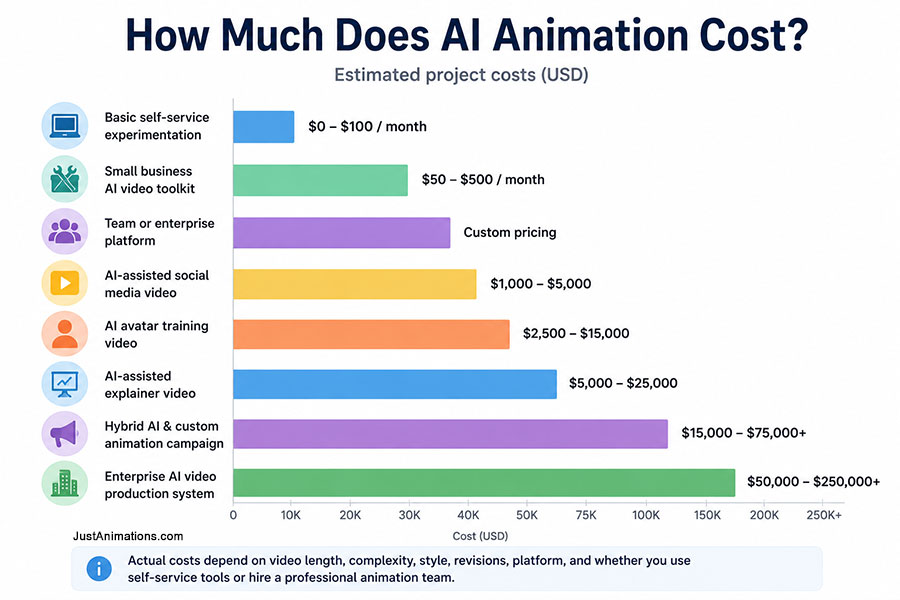
The following figures are general project-planning estimates rather than platform quotes.
| AI Animation Project | Estimated Cost |
|---|---|
| Basic self-service experimentation | $0–$100 per month |
| Small business AI video toolkit | $50–$500 per month |
| Team or enterprise platform | Custom pricing |
| AI-assisted social media video | $1,000–$5,000 |
| AI avatar training video | $2,500–$15,000 |
| AI-assisted explainer video | $5,000–$25,000 |
| Hybrid AI and custom animation campaign | $15,000–$75,000+ |
| Enterprise AI video production system | $50,000–$250,000+ |
Paying for the tool is only one part of the budget.
Professional production may still require strategy, scriptwriting, prompting, asset preparation, editing, design, voice direction, quality control, compliance review, and project management.
AI Animation Cost Comparison
Self-service AI tools
██ $0–$500 monthly
AI-assisted social video
████ $1,000–$5,000
AI avatar training project
████████ $2,500–$15,000
AI-assisted explainer video
████████████ $5,000–$25,000
Hybrid animation campaign
████████████████ $15,000–$75,000+
Enterprise video system
████████████████████ $50,000–$250,000+
AI can reduce the cost of some individual tasks.
It does not make creative planning, review, accuracy, and professional finishing unnecessary.
The AI Animation Production Process
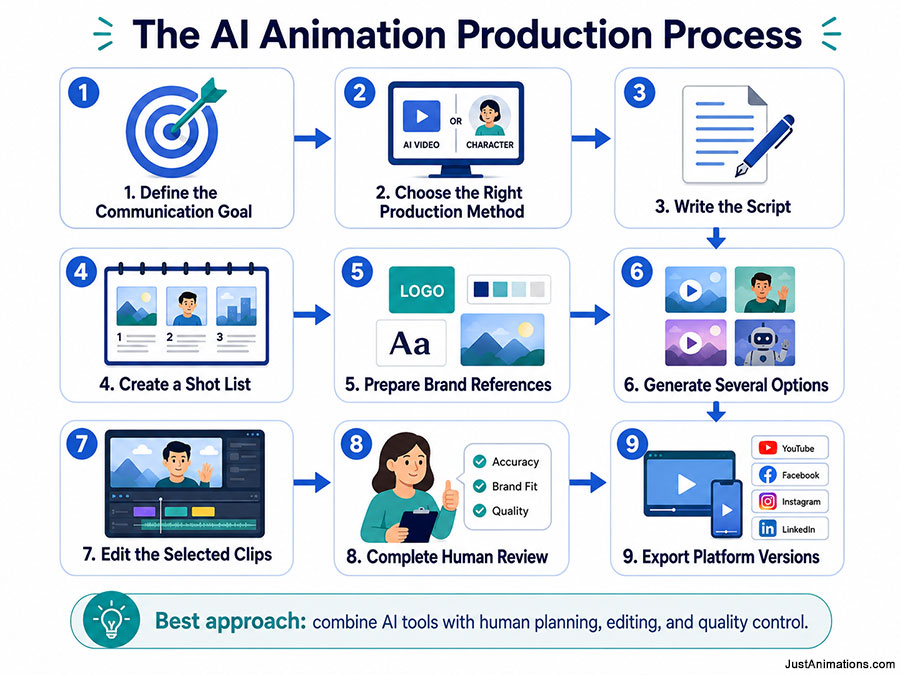
1. Define the Communication Goal
Identify the audience, message, platform, desired action, deadline, and budget.
2. Choose the Right Production Method
Determine whether the project needs text-to-video, image animation, an AI avatar, traditional animation, or a hybrid approach.
3. Write the Script
The script should be approved before expensive generations or editing begin.
4. Create a Shot List
Break the script into individual scenes.
Each shot should describe the subject, movement, camera, setting, duration, and required text.
5. Prepare Brand References
Gather logos, colors, product images, approved characters, fonts, environments, and visual examples.
Runway’s reference-based generation is designed to help maintain subjects, locations, and styles across generated assets, although consistency still requires testing and review.
6. Generate Several Options
The first generation should not automatically become the final clip.
Create variations and compare:
- Accuracy
- Movement
- Brand fit
- Product appearance
- Composition
- Continuity
- Unwanted details
7. Edit the Selected Clips
Generated scenes are assembled into a structured video.
The editor may add voiceover, music, labels, transitions, logos, captions, and calls to action.
8. Complete Human Review
Review the video for visual errors, incorrect claims, distorted products, inconsistent branding, cultural concerns, and unauthorized content.
9. Export Platform Versions
Produce the required horizontal, square, vertical, captioned, muted, translated, and high-resolution versions.
How to Write Better AI Video Prompts
A useful video prompt should describe more than the subject.
Include:
- What appears in the scene
- What the subject is doing
- Where the action takes place
- How the camera moves
- How the scene is lit
- What visual style is required
- What emotion or tone it should communicate
- What should remain unchanged
For example:
A clean studio product video of a stainless-steel water bottle on a white pedestal. The camera slowly moves from left to right. Soft commercial lighting, realistic reflections, minimal background, premium advertising style. The product shape and label remain unchanged.
Clear prompts improve the probability of a usable result.
They do not guarantee exact control.
Risks and Limitations of AI Animation
Visual Inconsistency
Characters, products, clothing, text, and environments may change between clips.
Incorrect Product Details
An AI model may modify buttons, labels, dimensions, materials, or mechanical components.
Unreliable Text
Generated signs, packaging, interface text, and labels may contain errors.
Unpredictable Movement
Hands, object interactions, physical movement, and camera behavior may not follow the prompt precisely.
Copyright and Ownership Questions
The legal treatment of AI-generated content varies by jurisdiction and depends partly on the level of human creative contribution.
The U.S. Copyright Office has stated that copyright protection continues to depend on human authorship, while human selection, arrangement, editing, and other creative contributions may still be protectable.
Businesses should review platform terms, model-training policies, commercial-use permissions, source materials, and ownership provisions.
Voice and Likeness Consent
A company should not clone an employee, customer, executive, actor, or public figure without clear authorization.
Regulators have highlighted the fraud, impersonation, and consumer risks associated with unauthorized voice cloning and digital replicas.
Misleading Marketing
AI-generated visuals should not create false product claims, fake endorsements, invented demonstrations, or misleading representations.
The Competition Bureau of Canada states that businesses cannot market goods or services to Canadians in a materially false or misleading way, and it has specifically identified synthetic media as a potential tool for deceptive marketing.
Should Businesses Disclose AI-Generated Video?
Disclosure may be appropriate when a reasonable viewer could otherwise misunderstand what is real, who is speaking, or whether an event occurred.
Examples include:
- AI-generated spokespersons
- Synthetic customer testimonials
- Recreated events
- Cloned executive voices
- Artificial product demonstrations
- Realistic footage of people
- News or public-interest communication
Content Credentials provide one method of attaching information about whether media was captured, edited, or generated using AI. Adobe describes them as an industry-standard form of durable metadata.
How to Choose an AI Animation Company
Look for a team that understands both AI tools and traditional production.
The company should be able to explain:
- Which parts will use AI
- Which parts will be created manually
- How brand consistency will be maintained
- How product accuracy will be reviewed
- Which platform terms apply
- How confidential information will be handled
- Whether voices and likenesses are authorized
- How revisions will be managed
- Which source files will be delivered
- Who owns the finished project
An AI animation company should not rely on one-click generation for every project.
Just Animations can combine AI-assisted workflows with scriptwriting, custom animation, editing, voiceover, sound design, and human quality control when AI provides a practical advantage.
The objective should be to use AI where it improves the production process without sacrificing accuracy, brand quality, or audience trust.
Conclusion
AI animation gives businesses new ways to create, update, translate, and test video content.
Text-to-video tools can generate short scenes.
Image-to-video systems can animate static assets.
AI avatars can present training and internal communications.
Translation tools can create multilingual versions.
AI-assisted editing can accelerate individual stages of professional production.
The technology is most effective when it supports a clear creative strategy.
Businesses still need strong scripts, approved brand assets, human review, accurate claims, editing, sound, and quality control.
AI animation should therefore be viewed as a flexible production resource rather than an automatic replacement for animators, designers, editors, actors, or creative directors.
The strongest business videos will use the right combination of artificial intelligence and human creativity for the specific audience, message, and platform.
Frequently Asked Questions
What is AI animation?
AI animation is the use of artificial intelligence to generate, animate, modify, translate, or enhance video content. It includes text-to-video generation, image-to-video animation, AI avatars, synthetic voiceovers, video translation, visual effects, and AI-assisted editing.
How do businesses use animation AI video tools?
Businesses use animation AI video tools for social media, product marketing, training, onboarding, internal communications, advertising concepts, website visuals, multilingual content, storyboards, and supporting video footage.
Is AI animation cheaper than traditional animation?
AI animation can reduce the cost of concept development, short clips, visual variations, translation, and certain editing tasks. However, professional projects still require planning, scripts, prompting, editing, brand control, accuracy review, sound design, and project management.
Can AI create a complete animated explainer video?
AI can generate individual clips, avatars, voices, backgrounds, and visual elements for an explainer video. A polished business explainer usually still benefits from human scriptwriting, scene planning, editing, animation, sound design, and quality control.
What are the risks of using AI-generated video?
Common risks include inconsistent characters, inaccurate products, distorted movement, incorrect text, copyright uncertainty, unauthorized voice or likeness use, confidential-data exposure, and misleading advertising. Businesses should use approved tools and complete a human review before publishing.