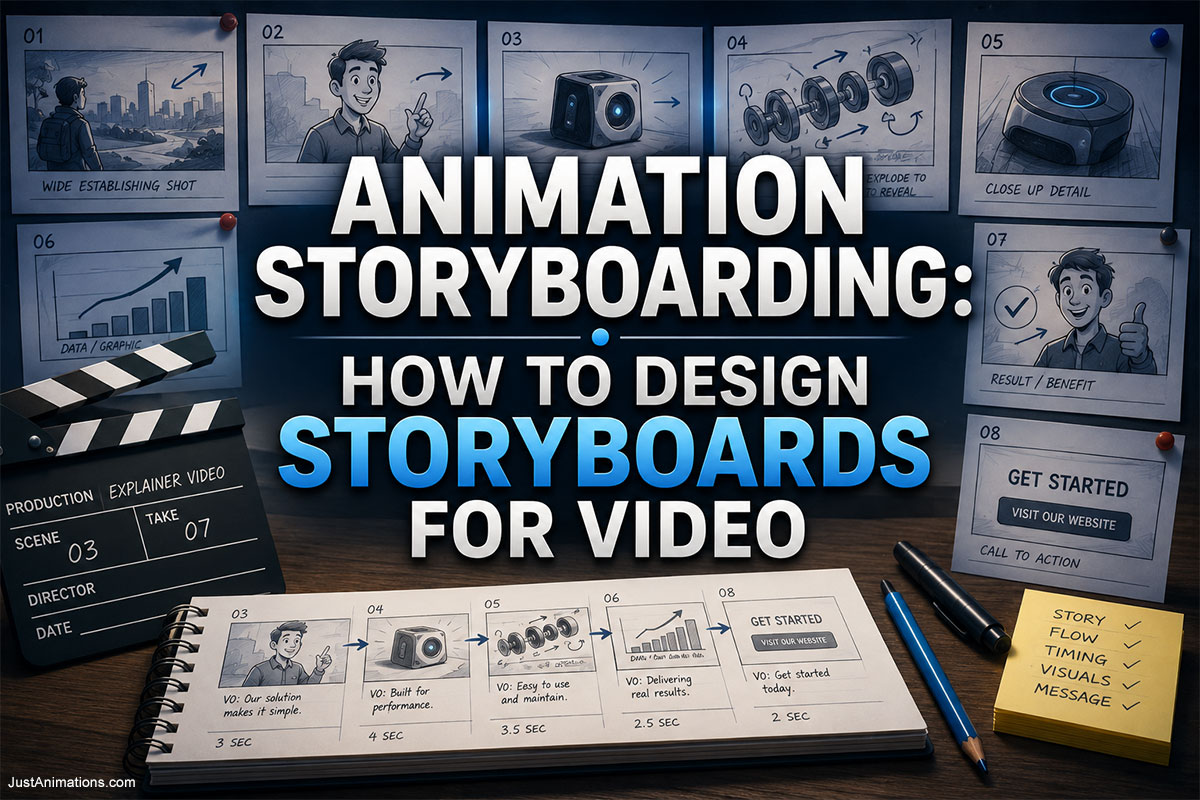
Animation storyboarding is the process of visually planning an animated video before full production begins.
Instead of moving directly from a script into finished animation, the production team first creates a sequence of storyboard panels showing:
- What appears in each shot
- Where characters and objects are positioned
- What the camera sees
- How scenes connect
- Where important movements happen
- When text appears
- How the story progresses
A storyboard is essentially the visual blueprint for an animation.
It allows businesses, filmmakers, animation studios, agencies, enterprises, government organizations, and production teams to see how a video is expected to work before time and budget are committed to final animation.
This is important because animation becomes increasingly expensive to change as production advances.
Moving a product to the opposite side of a frame may take seconds in a storyboard.
Changing the same composition after:
- 3D modeling
- Rigging
- Character animation
- Lighting
- Rendering
- Compositing
can require substantially more work.
That is why effective video storyboarding is not merely an artistic exercise.
It is a production-planning tool.
A strong storyboard helps answer one central question:
Does the animation work before we animate it?
What Is Animation Storyboarding?
Animation storyboarding is the creation of sequential visual panels that represent the planned shots, actions, camera angles, transitions, dialogue, and important movements in an animated video.
The storyboard sits between the script and final animation.
A simplified production sequence may look like:
Concept → Script → Storyboard → Animatic → Design → Animation → Sound → Delivery
Each storyboard panel usually represents:
- A shot
- A major action
- A visual change
- A camera change
- A storytelling beat
Panels may contain:
- Rough sketches
- Characters
- Products
- Environments
- Graphics
- Camera arrows
- Motion arrows
- Dialogue
- Timing notes
- Scene descriptions
The artwork does not necessarily need to be beautiful.
It needs to be clear.
Adobe similarly describes storyboards as a sequence of drawings that translates a script into something production teams can understand visually. You can review Adobe’s guide to getting started with storyboarding for additional background on storyboards, shot selection, and visual storytelling.
Animation Storyboarding at a Glance
| Storyboard Element | What It Communicates |
|---|---|
| Panel | One important visual moment |
| Shot number | Identifies the shot |
| Character position | Where people or characters appear |
| Product position | Where products or objects appear |
| Camera angle | What the viewer sees |
| Camera movement | Pan, tilt, zoom, orbit, dolly |
| Motion arrows | Direction of movement |
| Dialogue | Spoken content associated with the shot |
| Voiceover | Narration associated with the scene |
| Action notes | What happens in the shot |
| Timing | Approximate duration |
| Transition | How one shot connects to another |
| Sound cue | Important sound or music event |
| Graphics | Text, labels, charts, icons |
| Revision notes | Changes requested during review |
A storyboard does not need every possible production detail.
It needs enough information for the team to understand what should happen.
Why Are Storyboards Important in Animation?
Animation involves making thousands of decisions.
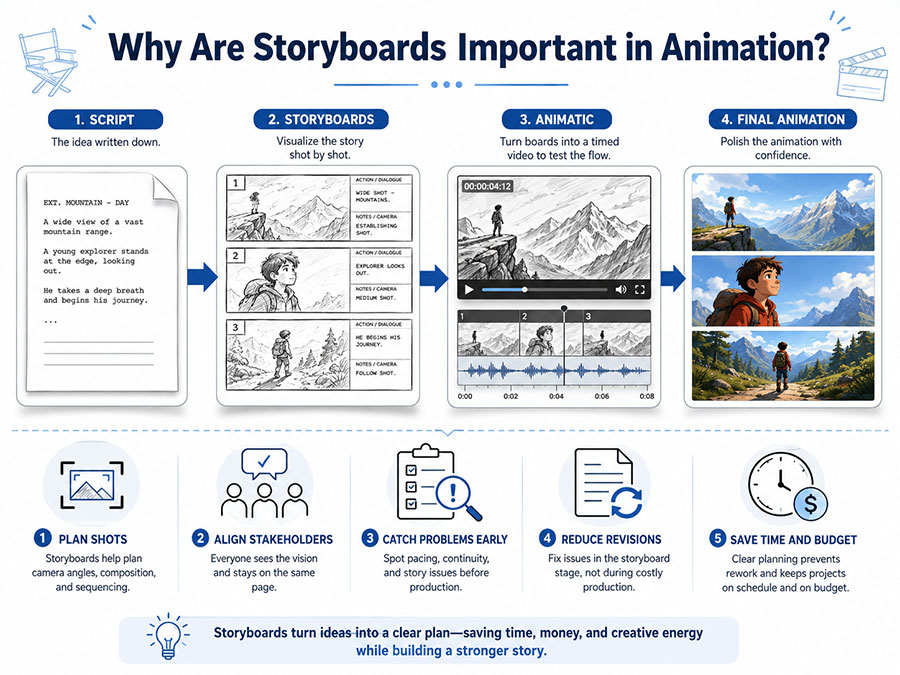
Those decisions include:
- Composition
- Camera angle
- Character position
- Timing
- Movement
- Lighting
- Text
- Transitions
- Sound
- Editing
If those decisions are postponed until final animation, changes can become expensive.
Storyboards move many of those decisions earlier.
This provides several major advantages.
1. Storyboards Identify Problems Early
A scene may look good in a script but fail visually.
For example:
The script says:
“The machine separates to reveal three internal components.”
The storyboard may reveal that:
- The camera is too far away
- The components overlap
- Labels have nowhere to appear
- The product fills too little of the screen
These problems can be corrected before animation begins.
2. Storyboards Align Stakeholders
A written script can be interpreted differently by different people.
A storyboard makes the proposed visual direction much more concrete.
Executives, marketers, engineers, government reviewers, subject-matter experts, and animation teams can react to the same visual plan.
3. Storyboards Improve Storytelling
Panels allow teams to evaluate:
- Sequence
- Pacing
- Emotional progression
- Visual variety
- Scene continuity
4. Storyboards Reduce Rework
Changing a rough storyboard panel is generally easier than rebuilding finished animation.
5. Storyboards Improve Estimates
Once the team knows:
- Number of shots
- Number of characters
- Product views
- Environments
- Visual effects
the production scope becomes clearer.
Storyboard vs Script: What Is the Difference?
A script describes what happens.
A storyboard shows what happens.
Consider this script:
A technician approaches the machine. The exterior cover becomes transparent, revealing the internal motor. The motor begins spinning.
The storyboard might turn that into four shots.
Shot 1
Wide shot of technician beside machine.
Shot 2
Camera pushes toward machine.
Shot 3
Exterior becomes transparent.
Shot 4
Close-up of motor spinning.
The script contains the idea.
The storyboard determines how the audience will see it.
Storyboard vs Animatic
These terms are related but different.
Storyboard
A sequence of static panels.
Animatic
Storyboard panels placed into a timed video sequence.
An animatic can include:
- Temporary voiceover
- Music
- Sound effects
- Rough transitions
- Timing
- Camera movement
Think of the storyboard as:
Visual plan
and the animatic as:
Timed visual plan
The animatic is especially useful because it allows teams to evaluate pacing before full production.
Why Animatics Matter
Imagine a storyboard with 30 panels.
Everything looks good individually.
But when the panels are timed against voiceover, the team discovers:
- Scene 3 is too short
- Scene 7 is too long
- The product reveal occurs too late
- The CTA disappears too quickly
An animatic reveals these problems.
It allows the production team to test:
Does the video actually flow?
before expensive animation begins.
How to Design a Storyboard for Animation
A professional storyboard can be developed through a structured process.
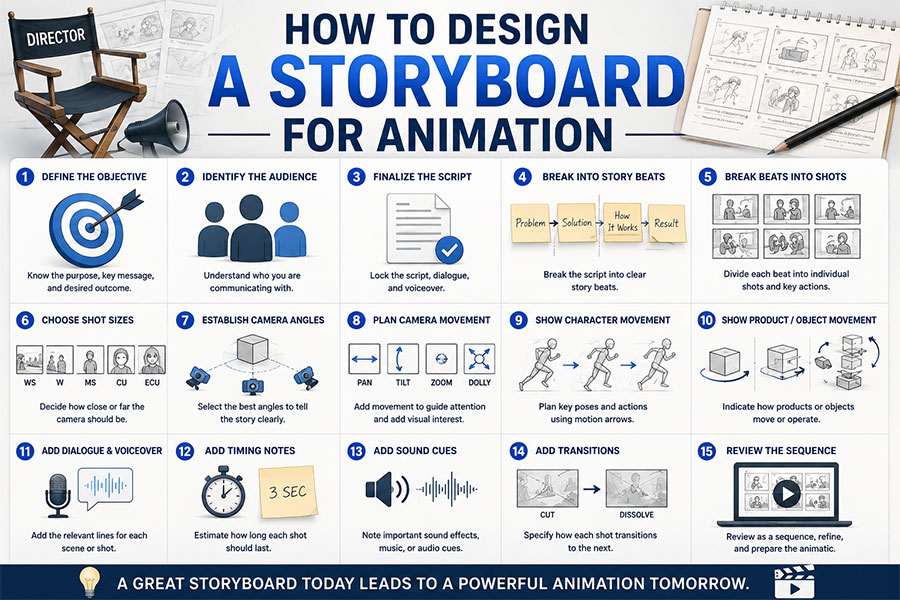
Step 1: Define the Objective
Do not start by drawing.
Start by defining what the video needs to accomplish.
Ask:
- What should viewers understand?
- What should they remember?
- What should they feel?
- What should they do afterward?
Examples:
Product Video
Objective: Explain how a new filtration system works.
Corporate Video
Objective: Explain a digital transformation initiative.
Government Video
Objective: Explain how citizens can access a new public service.
Commercial
Objective: Make a new consumer product memorable.
The storyboard should support the objective.
Step 2: Identify the Audience
The same subject may require different storyboards for different audiences.
Consider a medical device.
Doctors
May need:
- Technical detail
- Anatomy
- Procedure steps
Patients
May need:
- Simpler explanation
- Less technical terminology
- More reassuring pacing
Investors
May need:
- Product differentiation
- Market positioning
- Technology benefits
The audience influences:
- Visual complexity
- Camera choices
- Pacing
- Text
- Tone
Step 3: Finalize the Script
Storyboarding works best when the script is reasonably stable.
Constantly changing narration while storyboards are being designed creates unnecessary rework.
The script should establish:
- Dialogue
- Voiceover
- Main messages
- Scene order
- CTA
Some visual discoveries will still cause script changes.
That is normal.
But major narrative decisions should generally happen early.
Step 4: Break the Script Into Story Beats
A story beat is a meaningful change.
For example:
Customer encounters problem
↓
Problem becomes worse
↓
Solution appears
↓
Solution operates
↓
Result improves
Each beat can become one or several storyboard shots.
Step 5: Break Beats Into Shots
Now decide what the viewer sees.
Consider this narration:
“Our automated system identifies the package and routes it to the correct destination.”
Possible storyboard:
Shot 1
Package enters conveyor.
Shot 2
Sensor scans package.
Shot 3
Data graphic appears.
Shot 4
Routing mechanism changes position.
Shot 5
Package moves toward correct lane.
One sentence becomes five visual moments.
Step 6: Choose Shot Sizes
Shot size determines how much information viewers see.
Extreme Wide Shot
Useful for:
- Large environments
- Establishing scale
- Cities
- Factories
Wide Shot
Useful for:
- Characters in environments
- Machinery
- Full products
Medium Shot
Useful for:
- Character actions
- Product demonstrations
- Conversations
Close-Up
Useful for:
- Product details
- Facial expressions
- Important controls
Extreme Close-Up
Useful for:
- Tiny components
- Eyes
- Buttons
- Critical technical details
Shot variety helps maintain visual interest.
Step 7: Establish Camera Angles
Camera angle affects perception.
Eye Level
Neutral and natural.
Low Angle
Can make something feel:
- Powerful
- Large
- Important
High Angle
Can reveal:
- Layout
- Scale
- Relationships
Top-Down
Useful for:
- Processes
- Maps
- Products
- Workflows
Isometric
Useful for:
- Technology
- Architecture
- Process diagrams
Camera choices should serve communication.
Step 8: Plan Camera Movement
Animation offers extensive camera freedom.
Possible camera movements include:
- Pan
- Tilt
- Zoom
- Dolly
- Orbit
- Crane
- Tracking
- Push-in
- Pull-back
But camera movement should answer a question.
For example:
Orbit
Understand the object’s shape.
Push In
Look closer.
Pull Back
Understand the larger system.
Track
Follow the action.
Random camera movement can create visual activity without better storytelling.
Step 9: Show Character Movement
Characters should not suddenly teleport between storyboard panels unless that is intentional.
Use motion arrows to indicate:
- Walking
- Turning
- Reaching
- Looking
- Jumping
- Sitting
Important poses should be represented.
For character-heavy animation, consider:
- Starting pose
- Anticipation
- Main action
- Reaction
- End pose
This makes the movement easier for animators to interpret.
Step 10: Show Object and Product Movement
Product storyboards may include:
- Rotation
- Assembly
- Disassembly
- Exploded views
- Transparency
- Cutaways
- Internal movement
Arrows can communicate direction.
For example:
Housing → moves left
Motor → remains center
Impeller → moves right
Now the animator understands the intended exploded view.
Step 11: Add Camera Arrows
Camera movement should be clearly distinguished from object movement.
For example:
Arrow around product = camera orbit
versus:
Arrow attached to product = product rotation
Ambiguous arrows can create misunderstandings.
Use labels if necessary.
Step 12: Add Dialogue and Voiceover
Storyboard panels should identify relevant spoken content.
This helps reviewers see whether:
- Visuals support narration
- Scenes contain too much information
- Dialogue timing is realistic
You do not necessarily need the entire script repeated under every panel.
Use the relevant lines.
Step 13: Add Timing Notes
Timing is particularly important in animation.
Possible notes include:
- Hold 2 seconds
- Camera push: 1 second
- Product rotation: 3 seconds
- Pause before reveal
- Text visible: 4 seconds
These notes become useful when building the animatic.
Step 14: Add Sound Cues
Important sound events can also be identified.
Examples:
SFX: mechanical click
SFX: notification
MUSIC: build begins
SFX: impact
This helps coordinate sound and movement.
Step 15: Add Transitions
Specify important transitions.
Examples:
- Cut
- Fade
- Dissolve
- Wipe
- Match cut
- Graphic transition
- Object transition
Not every transition needs an elaborate effect.
In many cases, a clean cut is stronger.
Step 16: Review the Entire Sequence
Do not review panels only as individual drawings.
Review them as a sequence.
Ask:
- Is the story understandable?
- Is visual information repeated unnecessarily?
- Are there enough shot changes?
- Does the viewer always know where to look?
- Does each scene move the story forward?
What Should a Professional Animation Storyboard Include?
A typical panel may include:
Shot Number
Example:
SHOT 08
Visual Panel
A drawing showing the main composition.
Action
Example:
Housing separates into three components.
Camera
Example:
Camera slowly pushes toward center assembly.
Dialogue / Voiceover
Example:
“Designed for faster maintenance.”
Timing
Example:
4 seconds
Sound
Example:
Mechanical release sound
Not every production needs every field.
The format should match the complexity of the project.
How Detailed Should a Storyboard Be?
There is no universal level of detail.
A storyboard can range from:
Stick figures
to:
Highly polished illustrations.
The right level depends on what needs to be approved.
Rough Storyboards
Useful when:
- Ideas are changing quickly
- Internal creative teams are reviewing
- Composition matters more than art
Detailed Storyboards
Useful when:
- Clients need visual clarity
- Complex products are involved
- Multiple stakeholders are reviewing
- Technical accuracy matters
- Film production needs precise shot planning
The guiding principle is:
Use enough detail to eliminate important uncertainty.
Storyboards Do Not Need to Look Like Final Animation
This is a common misconception.
A black-and-white storyboard may represent a finished animation that will eventually contain:
- Realistic 3D products
- Full lighting
- Textures
- Characters
- Special effects
- Color grading
The storyboard’s job is to communicate:
Composition and sequence.
Visual style is often refined later through:
- Style frames
- Character designs
- Concept art
- 3D look development
What Are Style Frames?
A style frame is a polished still image showing what the finished animation should look like.
Storyboard:
What happens?
Style frame:
What does it look like?
A project may use:
Storyboard panel → style frame → finished animation
Style frames can establish:
- Color
- Typography
- Lighting
- Character style
- Product materials
- Background design
- Graphic language
This is particularly useful when stakeholders need confidence in the final aesthetic.
Storyboard vs Style Frame
| Storyboard | Style Frame |
|---|---|
| Plans sequence | Establishes final visual style |
| Usually rough | Usually polished |
| Many panels | Often only several key frames |
| Focuses on storytelling | Focuses on appearance |
| Shows camera and action | Shows design quality |
| Changes frequently | Usually approved as visual direction |
Both can be important.
Storyboarding 2D Animation
2D animation storyboards may focus heavily on:
- Character poses
- Facial expressions
- Composition
- Backgrounds
- Transitions
- Typography
A character scene might include:
Wide shot → medium shot → close-up reaction
The storyboard determines the visual rhythm before character animation begins.
Businesses considering illustration-driven animation can also review Just Animations’ 2D animation services to see how storyboarding fits within the broader production workflow.
Storyboarding 3D Animation
3D animation introduces additional planning considerations.
The storyboard may need to indicate:
- Camera orbit
- Depth
- Product orientation
- Environment scale
- Lighting intent
- Exploded views
- Internal cutaways
A technical 3D storyboard should make it obvious:
What is moving?
Where is the camera?
What should viewers understand?
This becomes especially valuable before time is spent on rendering.
Storyboarding Product Animation
Product animation often depends on precise visual sequencing.
A typical storyboard might include:
Shot 1
Hero product reveal.
Shot 2
Product rotates 45 degrees.
Shot 3
Camera approaches top section.
Shot 4
Housing becomes transparent.
Shot 5
Internal mechanism highlighted.
Shot 6
Mechanism operates.
Shot 7
Performance metric appears.
Shot 8
Product reassembles.
Shot 9
Closing hero shot.
The storyboard prevents the animation from becoming a random collection of attractive product views.
Each shot has a communication purpose.
Storyboarding Explainer Videos
Explainer storyboards should focus on:
- Message clarity
- Sequence
- Visual metaphor
- Characters
- Icons
- Data
- Text
A simple explainer structure might be:
Problem → Consequence → Solution → How It Works → Benefit → CTA
The storyboard converts each stage into visible action.
Storyboarding Motion Graphics
Motion graphics storyboards may look different because the animation may involve:
- Shapes
- Typography
- Charts
- Icons
- Data
Instead of character poses, panels may show:
Text appears
↓
Chart enters
↓
Number increases
↓
Graphic transforms
Motion-graphics storyboards should still establish hierarchy.
The viewer should know what to look at first.
Storyboarding Film Animation
Film animation may require more cinematic planning.
Storyboards can establish:
- Shot scale
- Camera angle
- Character blocking
- Visual effects
- Live-action integration
For hybrid productions, the storyboard can identify where:
Live action ends
and:
CGI begins
or where both appear simultaneously.
Our guide to Film Animation for Documentaries, TV Commercials & Movies looks more closely at animation used within documentary, advertising, and cinematic production.
Storyboarding Animation for Advertising
Advertising requires efficiency.
Every second may matter.
Storyboard panels help teams decide:
- When the product first appears
- When the brand appears
- How benefits are demonstrated
- When the CTA appears
Consider a 15-second commercial.
If the storyboard spends the first eight seconds establishing a generic scene, there may be only seven seconds left for:
- Product
- Benefit
- Brand
- CTA
Storyboarding exposes this problem early.
Storyboarding for Social Media Video
Social media creates additional requirements.
Videos may need:
- Immediate visual impact
- Vertical formats
- Large text
- Silent viewing
- Short duration
Storyboard with the final platform in mind.
A landscape composition may not work when cropped to 9:16.
Important characters or products may disappear from the frame.
Storyboarding Vertical Video
Vertical storyboards should be created vertically.
Do not assume a horizontal storyboard can simply be cropped later.
Vertical compositions often need:
- Larger subjects
- Different camera framing
- Different text placement
- More stacking
- Less horizontal movement
This matters for:
- TikTok
- Instagram Reels
- YouTube Shorts
- Mobile advertising
Storyboarding Animation for Websites
Website animation may involve:
- Hero animations
- Scroll sequences
- Product demonstrations
- Interface animation
- Interactive graphics
Storyboards should show not only what the animation does, but sometimes what triggers it.
Example:
User scrolls
↓
Product rotates
↓
Component separates
↓
Text appears
Now the storyboard documents interaction as well as movement.
Storyboarding Government Animation
Government agencies and public-sector organizations often have multiple reviewers.
Potential stakeholders may include:
- Communications teams
- Program managers
- Legal reviewers
- Policy experts
- Accessibility teams
- Leadership
A storyboard creates a common review document.
Teams can approve:
- Visual accuracy
- Terminology
- Representation
- Sequence
- Tone
before full animation.
This can be particularly useful for:
- Public-service explainers
- Infrastructure videos
- Emergency preparedness
- Health communication
- Training
- Civic education
Storyboarding Manufacturing Animation
Manufacturing storyboards may require technical accuracy.
Production teams may need:
- CAD references
- Engineering drawings
- Product photographs
- Process diagrams
The storyboard should identify:
- Correct product orientation
- Correct assembly order
- Relevant components
- Internal movement
- Safety considerations
Engineers can review these panels before animation begins.
This can reduce technically incorrect finished visuals.
Storyboarding Healthcare Animation
Healthcare animation may involve:
- Anatomy
- Medical devices
- Procedures
- Treatment
- Education
Storyboards should be reviewed for:
- Anatomical accuracy
- Product accuracy
- Appropriate visual detail
- Patient sensitivity
- Clarity
A rough storyboard is much easier to revise than a fully rendered medical sequence.
Storyboarding Complex Technology
Technology can be difficult to visualize because many concepts have no obvious physical form.
Storyboards may need to define visual metaphors for:
- Artificial intelligence
- Cybersecurity
- APIs
- Cloud computing
- Data
- Automation
For example:
Data request → API → processing layer → external system → response
Once the metaphor is established, the rest of the animation can remain visually consistent.
How Storyboarding Supports Animation Psychology
Storyboarding determines where the audience looks.
That makes it closely related to visual attention.
For each panel, ask:
What should viewers notice first?
Then:
What should they notice second?
This may be controlled through:
- Composition
- Movement
- Contrast
- Timing
- Character gaze
The principles discussed in Animation Psychology: Why Motion Captures Human Attention can therefore be applied before animation begins.
A good storyboard already contains the intended attentional hierarchy.
Storyboarding and Visual Continuity
Continuity helps viewers understand where:
- Characters
- Products
- Cameras
- Objects
exist relative to one another.
Imagine:
Shot 1
Character stands on the left.
Product is on the right.
Shot 2
Without explanation, product suddenly appears on the left.
The viewer may become momentarily confused.
Storyboards help identify these continuity problems.
The 180-Degree Principle
In dialogue and spatial scenes, filmmakers often establish an imaginary line between subjects.
Keeping cameras generally on one side of that line helps maintain consistent screen direction.
Crossing it without deliberate visual explanation can make positions appear reversed.
Animation does not have to obey every live-action convention rigidly.
But understanding screen direction helps create clarity.
Composition in Storyboards
Strong composition directs attention.
Useful considerations include:
- Subject placement
- Negative space
- Balance
- Foreground
- Background
- Scale
- Contrast
If text needs to appear beside a product, leave room for it in the storyboard.
Do not compose a beautiful full-screen object and only later discover there is nowhere to place the label.
Leave Space for Typography
Text is frequently added during animation.
Storyboard panels should anticipate it.
Possible layout:
Product left
Benefit text right
or:
Character lower right
Headline upper left
Planning typography early prevents overcrowding.
Storyboarding Camera Changes
Changing camera angle can reset attention.
For example:
Wide → close-up
The viewer immediately understands:
This detail matters.
But excessive camera cuts can feel chaotic.
Use shot changes where they:
- Reveal information
- Increase emotion
- Improve clarity
- Maintain pacing
When Should a Storyboard Use Close-Ups?
Close-ups are useful when viewers need to see:
- Product feature
- Facial reaction
- Button
- Mechanical component
- Text
- Interface detail
If the important information occupies 5% of the screen, move the camera closer.
When Should a Storyboard Use Wide Shots?
Wide shots establish:
- Environment
- Scale
- Geography
- Relationships
Use them when the audience needs context.
Then move closer when detail becomes important.
How Long Should Each Storyboard Shot Be?
There is no universal duration.
A shot may last:
- Less than one second
- Several seconds
- Much longer
Duration depends on:
- Information complexity
- Voiceover
- Motion
- Emotion
- Platform
A technical diagram may need longer.
A quick advertising transition may need less.
The animatic is the best place to test timing.
How Many Storyboard Panels Are Needed?
There is no fixed panel count.
A 60-second animation might contain:
- 12 panels
- 30 panels
- 60+ panels
depending on shot complexity.
The key question is:
Does every important visual change have enough documentation?
Fast character action generally requires more panels.
A slow rotating product may require fewer.
How Long Does Storyboarding Take?
General planning ranges might include:
| Project | Typical Storyboarding Time |
|---|---|
| 15-second simple animation | 1–3 days |
| 30-second commercial | 2–5 days |
| 60-second explainer | 3–7 days |
| 2-minute corporate animation | 1–2 weeks |
| Technical product animation | 1–3 weeks |
| Character-heavy animation | 2–4+ weeks |
| Complex cinematic sequence | 2–6+ weeks |
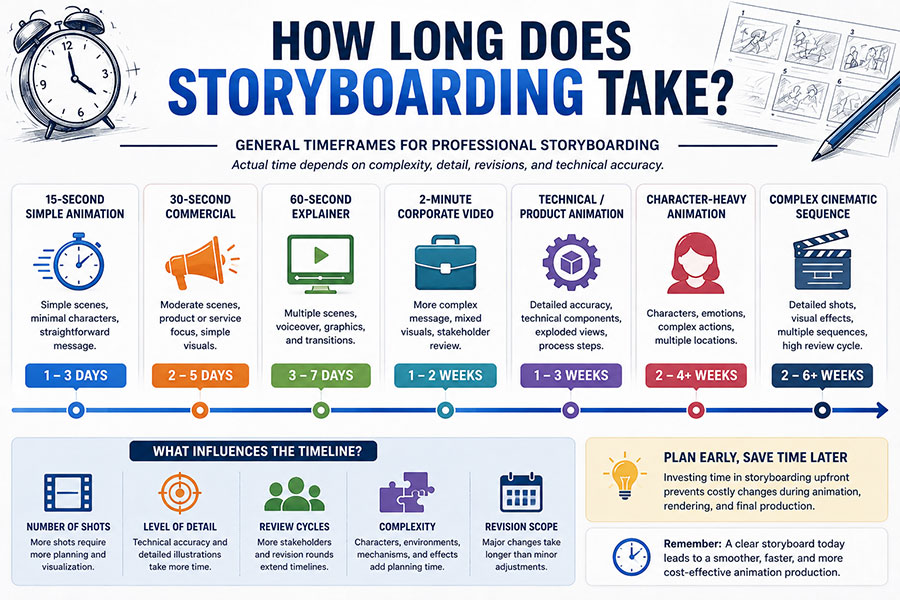
These are general planning ranges, not fixed schedules.
Time depends on:
- Number of shots
- Detail
- Complexity
- Client review
- Technical accuracy
- Revisions
How Much Does Animation Storyboarding Cost?
Storyboard pricing depends on scope.
Broad professional planning ranges may include:
| Storyboard Type | Approximate Planning Range |
|---|---|
| Simple short storyboard | $500–$1,500 |
| 30–60 second commercial | $1,000–$3,500+ |
| 60–90 second explainer | $1,500–$5,000+ |
| Detailed product storyboard | $2,000–$7,500+ |
| Character-heavy storyboard | $3,000–$10,000+ |
| Complex film sequence | $5,000–$20,000+ |
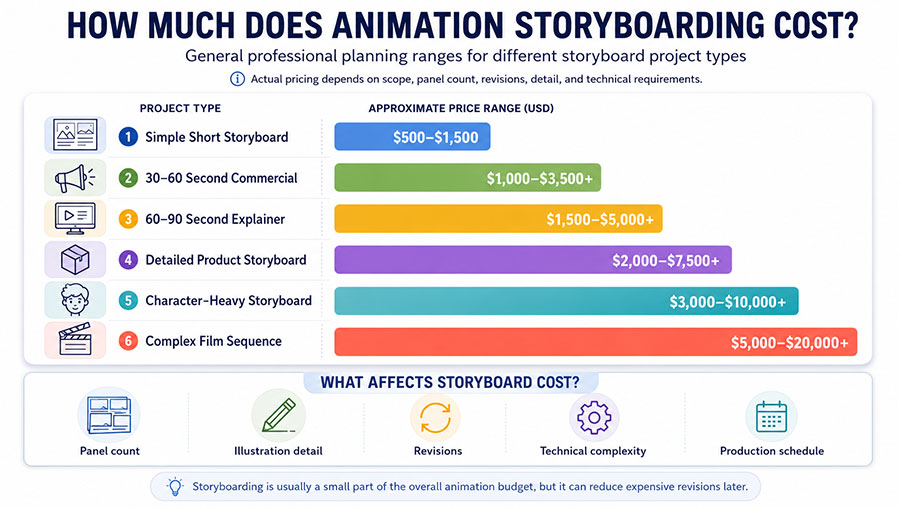
These are general industry planning ranges rather than fixed Just Animations pricing.
Costs vary according to:
- Panel count
- Illustration quality
- Revisions
- Technical detail
- Character complexity
- Production schedule
Storyboarding is usually a relatively small part of the overall animation budget but can influence the efficiency of the much more expensive production stages that follow.
Storyboard Review: What Should Clients Look For?
Clients sometimes focus too heavily on drawing quality.
Instead, review:
Story
Does the sequence make sense?
Message
Is the correct information being communicated?
Product
Is it represented accurately?
Camera
Are the important areas visible?
Timing
Does enough time exist for each idea?
Text
Is there space for necessary labels?
Character
Are actions and expressions appropriate?
Brand
Does the overall direction fit the company?
The storyboard is the best stage for major structural feedback.
Who Should Approve the Storyboard?
Approvals should come from people responsible for important requirements.
Depending on the project:
Marketing
Reviews messaging and brand.
Product Team
Reviews features.
Engineer
Reviews technical accuracy.
Legal
Reviews regulated claims.
Government Program Team
Reviews policy or public information.
Executive
Reviews strategic direction.
Whenever possible, consolidate feedback.
Conflicting comments arriving in separate rounds can extend production considerably.
How Many Storyboard Revision Rounds Are Normal?
There is no universal number.
Many projects establish a defined revision process.
For example:
Round 1: Structure and composition
Round 2: Requested changes
Round 3: Final refinements
The objective should be to reach meaningful approval before animation.
Do not approve a storyboard while expecting major structural changes later.
Common Animation Storyboarding Mistakes
1. Starting Before the Script Is Ready
Constant script revisions force unnecessary storyboard revisions.
2. Drawing Before Defining the Objective
A visually attractive storyboard can still communicate the wrong message.
3. Using the Same Shot Repeatedly
Visual monotony can make a video feel static.
4. Moving the Camera Without Purpose
Camera movement should provide information or emotion.
5. Forgetting Text Placement
Leave room for graphics.
6. Ignoring Timing
A storyboard can look good but still be impossible to fit into the target duration.
7. Showing Too Much at Once
Break complicated information into stages.
8. Ignoring Final Aspect Ratio
Storyboard for the actual format.
9. Approving Technical Errors
Subject-matter experts should review relevant panels.
10. Treating Storyboard Art as Final Art
Judge structure and communication first.
AI and Animation Storyboarding
AI-assisted tools are beginning to support parts of storyboarding.
Potential uses include:
- Generating rough concepts
- Exploring compositions
- Creating visual references
- Testing camera angles
- Producing temporary panels
Adobe, for example, currently offers workflow tools for generating storyboard concepts and experimenting with frame composition.
However, AI does not remove the need to decide:
- What the story is
- What the audience needs
- Why a shot exists
- What information matters
- Whether continuity works
- Whether technical details are correct
The value of a storyboard comes primarily from decision-making, not drawing speed.
Can You Storyboard Without Drawing Skills?
Yes.
Storyboards can use:
- Stick figures
- Shapes
- Photos
- Screenshots
- 3D blockouts
- Reference images
- AI-generated concepts
Clarity matters more than artistic polish.
A simple rectangle labeled:
PRODUCT
may be enough during early planning.
Professional illustrators can refine boards later if necessary.
Can Storyboards Change During Production?
Yes.
Storyboards are plans, not laws.
A better idea may appear.
A technical limitation may arise.
A client requirement may change.
But each major storyboard change made before full animation generally creates less disruption than the same change made afterward.
Animation Storyboarding vs Improvising During Production
Some experimentation during animation is valuable.
But relying entirely on improvisation can create:
- Scope growth
- Inconsistent storytelling
- Repeated revisions
- Wasted rendering
- Unclear approvals
Storyboarding does not eliminate creativity.
It creates a structure within which creative production can happen efficiently.
How Storyboarding Fits Into the Full Animation Process
A strong workflow may look like:
1. Strategy
Define objective and audience.
2. Script
Develop the message.
3. Storyboard
Plan visual sequence.
4. Animatic
Test timing.
5. Style Development
Establish visual appearance.
6. Asset Production
Create characters, products, and environments.
7. Animation
Create movement.
8. Sound
Add voice, music, and effects.
9. Final Delivery
Export all required formats.
Our broader guide to How to Make an Animation Video: Step-by-Step Production explains how these stages fit together across a complete animated-video project.
Existing Storyboarding Resources
For readers looking specifically for a shorter step-by-step introduction, Just Animations also has an existing guide on How to Storyboard in Animation covering basic panels, shot direction, timing notes, dialogue, and storyboard preparation.
This article expands the subject further into:
- Business review
- Technical animation
- Product animation
- Government
- Film
- Advertising
- Cost
- Timing
- Client approvals
- Animatics
- AI-assisted workflows
Animation Storyboarding Is Where Expensive Decisions Become Cheap Decisions
One of the greatest advantages of a storyboard is economic.
During the storyboard stage:
Move the camera?
Change a drawing.
Remove a scene?
Delete a panel.
Change product orientation?
Redraw it.
Reorder the story?
Move panels.
After full production:
those same decisions may affect:
- Animation
- Lighting
- Rendering
- Sound
- Compositing
- Editing
This is why professional animation production benefits from spending enough time in pre-production.
A Simple Animation Storyboarding Checklist
Before approving a storyboard, confirm:
Objective
✓ Does the sequence achieve the video’s purpose?
Audience
✓ Is the communication appropriate for viewers?
Story
✓ Does every scene have a reason to exist?
Message
✓ Are the important points clear?
Composition
✓ Is there a clear focal point?
Camera
✓ Do camera choices help understanding?
Motion
✓ Is movement clearly indicated?
Text
✓ Is enough space available?
Timing
✓ Can the scenes fit the target duration?
Technical Accuracy
✓ Are products and processes correct?
Brand
✓ Does the direction fit the organization?
Platform
✓ Is the composition appropriate for final screens?
Approval
✓ Have the correct stakeholders reviewed it?
What Makes a Good Animation Storyboard?
A good animation storyboard does not need to impress people as a standalone piece of art.
It needs to answer production questions.
A successful storyboard makes it easy to understand:
Where are we?
What are we looking at?
What happens next?
Where does the camera move?
What does the audience need to notice?
How does the scene support the message?
The best storyboard removes uncertainty.
Animation Storyboarding Turns Ideas Into Production Plans
A script can contain an excellent idea.
But an animation requires thousands of visual decisions before that idea reaches the screen.
Animation storyboarding creates the bridge.
It turns:
Words
into:
Shots.
It turns:
Concepts
into:
Composition.
It turns:
Actions
into:
Movement.
And it turns:
A video idea
into:
A production plan.
For businesses, companies, enterprises, government agencies, NGOs, public-sector organizations, advertising agencies, filmmakers, and production teams, this planning stage can improve:
✓ Communication
✓ Creative alignment
✓ Technical accuracy
✓ Production efficiency
✓ Budget control
✓ Stakeholder approvals
✓ Final animation quality
Storyboarding does not eliminate every revision.
It makes revisions happen when they are easier to manage.
Before the characters are fully animated.
Before the products are rendered.
Before visual effects are finished.
Before the final video becomes expensive to change.
That is why effective animation production usually begins long before anything actually moves.
It begins by deciding what should move, when it should move, what the viewer should see, and why that shot needs to exist.
Frequently Asked Questions
What is animation storyboarding?
Animation storyboarding is the process of creating a sequence of visual panels representing the planned shots, actions, camera angles, movement, dialogue, transitions, and important visual moments in an animated video. It allows production teams and stakeholders to review how the animation will work before full production begins.
How do you storyboard an animation?
Start by defining the objective and audience, finalize the script, break the script into story beats, divide those beats into individual shots, choose camera angles and shot sizes, draw the important compositions, indicate movement, add dialogue and timing notes, and review the complete sequence before creating an animatic.
What is the difference between a storyboard and an animatic?
A storyboard is a sequence of static visual panels representing the planned video. An animatic places those panels into a timed video sequence and may add temporary voiceover, music, transitions, and camera movement. Storyboards establish the visual plan, while animatics test how that plan works over time.
How detailed should an animation storyboard be?
An animation storyboard should contain enough detail for stakeholders and the production team to understand composition, actions, camera direction, important movements, and storytelling. Early boards may use rough sketches or stick figures, while technical, commercial, or client-facing storyboards may require greater visual detail.
Why is storyboarding important for animation?
Storyboarding helps identify visual and storytelling problems before expensive animation begins. It allows teams to review composition, timing, technical accuracy, product representation, camera direction, and scene sequence while changes are still relatively easy to make. This can reduce rework and create a clearer production plan.