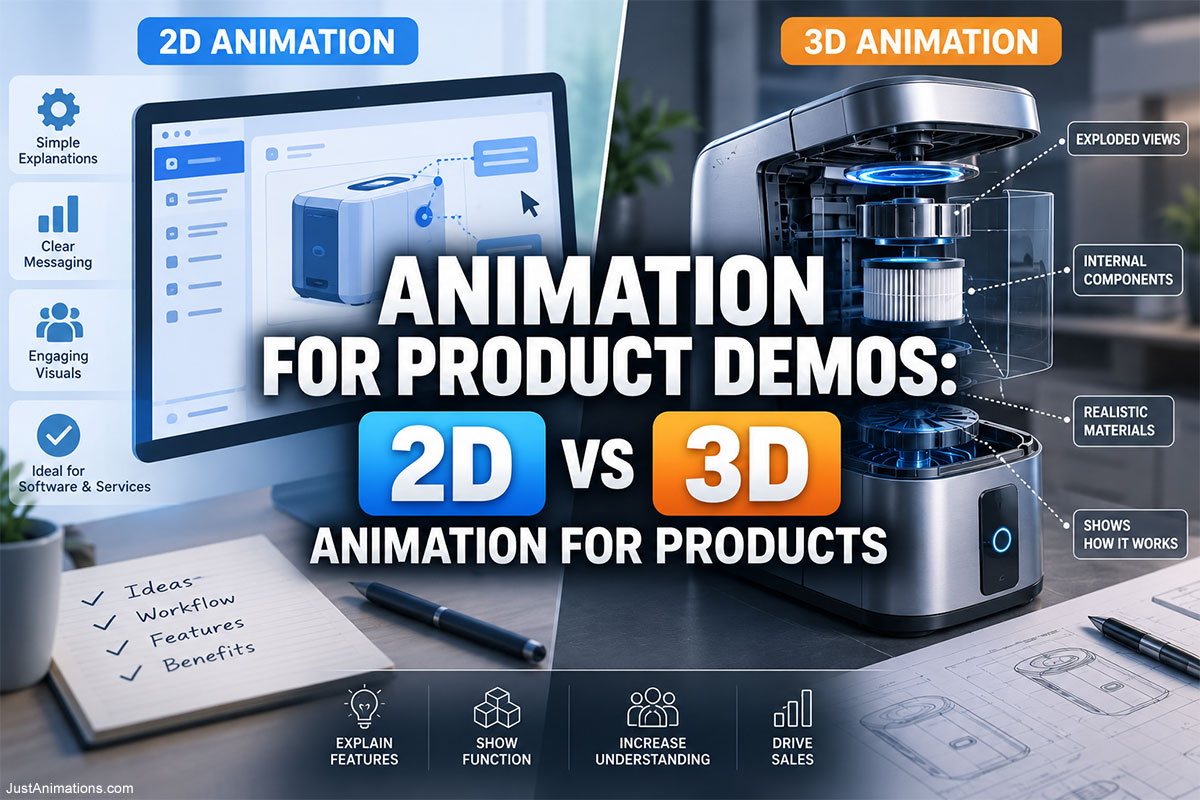
Animation for product demos can show customers what a product does, how it works, what happens inside it, how features connect, and why those features matter—without relying entirely on live-action filming.
But there is an important decision to make before production begins:
Should the product demo use 2D animation, 3D animation, or a combination of both?
The answer depends largely on what the viewer needs to understand.
A SaaS company demonstrating a software workflow may communicate more clearly with 2D interface animation and motion graphics.
A manufacturer explaining a mechanical assembly may need 3D animation because viewers need to understand:
- Depth
- Components
- Internal movement
- Assembly
- Product orientation
A consumer-electronics company may use both.
The device itself appears in realistic 3D.
Then animated 2D labels, typography, diagrams, and data explain its benefits.
That is why choosing between 2D vs 3D animation for products should not begin with:
“Which style looks better?”
It should begin with:
“What does the customer need to see?”
For businesses, companies, enterprises, manufacturers, technology companies, government suppliers, healthcare companies, and product teams, the right product demo animation can make something complicated much easier to understand.
The Core Decision: Are You Explaining an Idea or an Object?
One question can narrow the decision considerably:
Are you primarily explaining an idea?
2D animation may be the stronger starting point.
Examples:
- Software workflow
- Service process
- App feature
- Financial platform
- Data flow
- User journey
Are you primarily explaining a physical object?
3D animation may provide greater value.
Examples:
- Machine
- Device
- Vehicle
- Consumer product
- Medical equipment
- Industrial system
- Mechanical component
Are you explaining both?
A hybrid approach may be the best choice.
For example:
3D product → 2D feature label → 3D cutaway → motion graphic data → 3D closing shot
The technique should change when the communication requirement changes.
What Does Product Demo Animation Actually Need to Accomplish?
A product demonstration should do more than make the product look attractive.
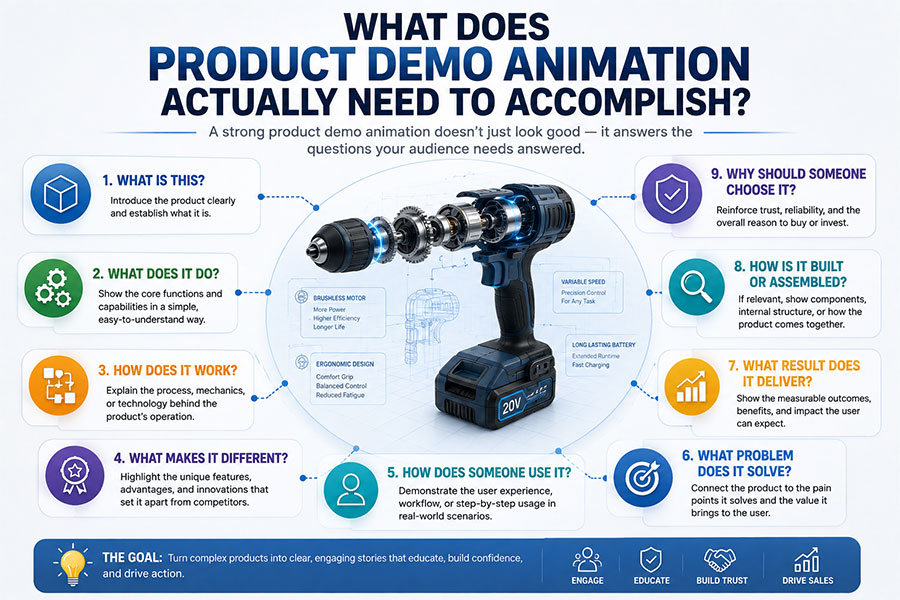
It may need to answer:
- What is this?
- What does it do?
- How does it work?
- What makes it different?
- How does someone use it?
- What happens internally?
- How is it assembled?
- What problem does it solve?
- Why should someone buy it?
Different questions require different visual approaches.
A cinematic rotating 3D product may answer:
“What does it look like?”
But it may not answer:
“How does the customer use the software?”
A 2D animated workflow may explain:
“How does it work?”
but fail to show:
“How are these physical components connected?”
The most effective animation for product demos selects visuals according to the questions the audience is actually asking.
When 2D Animation Makes the Product Easier to Understand
2D animation is particularly effective when simplification creates value.
Instead of reproducing every physical detail, the animation can show only what matters.
That makes 2D useful for:
- SaaS
- Apps
- Interfaces
- Platforms
- Digital services
- Processes
- Systems
- Diagrams
- Customer journeys
Imagine a logistics platform.
The animation may show:
Order received
↓
Inventory checked
↓
Warehouse notified
↓
Shipment dispatched
↓
Customer receives update
There is no need to build a realistic 3D warehouse unless spatial visualization contributes to the message.
Professional 2D animation can combine illustrations, diagrams, interfaces, icons, typography, characters, and motion to explain how a product or platform works without introducing unnecessary visual complexity.
When 3D Product Animation Becomes the Better Tool
3D becomes particularly useful when the audience needs to understand the product as a physical object.
A 3D product model can be viewed from almost any angle.
The production can show:
✓ Front
✓ Back
✓ Top
✓ Bottom
✓ Interior
✓ Individual components
The animation can then manipulate the product in ways that would be difficult with conventional cameras.
For example:
Product rotates
↓
Exterior separates
↓
Internal components move outward
↓
One mechanism becomes highlighted
↓
Mechanism operates
↓
Components reassemble
This makes 3D animation especially useful for product demonstrations involving machinery, consumer electronics, medical devices, industrial systems, vehicles, engineering products, and equipment.
2D vs 3D Animation for Products
The differences become clearer when viewed according to the communication task.
| Requirement | 2D Animation | 3D Animation |
|---|---|---|
| Explain abstract concept | ✓✓✓ | ✓ |
| Demonstrate software | ✓✓✓ | ✓ |
| Show customer journey | ✓✓✓ | ✓ |
| Explain data | ✓✓✓ | ✓✓ |
| Show physical product | ✓✓ | ✓✓✓ |
| Rotate product realistically | ✓ | ✓✓✓ |
| Show internal components | ✓✓ | ✓✓✓ |
| Create exploded views | ✓ | ✓✓✓ |
| Demonstrate assembly | ✓✓ | ✓✓✓ |
| Show realistic materials | ✗ | ✓✓✓ |
| Explain workflow | ✓✓✓ | ✓✓ |
| Demonstrate machinery | ✓ | ✓✓✓ |
| Show interfaces | ✓✓✓ | ✓ |
| Create character scenario | ✓✓✓ | ✓✓✓ |
| Cinematic product reveal | ✓ | ✓✓✓ |
Neither column wins universally.
The correct choice depends on the project.
Product Demos for Software Are Usually About Sequence
Software products rarely need realistic dimensional visualization.
The audience usually needs to understand:
Where do I click?
What happens next?
What does the system do?
What result do I get?
That makes 2D and interface-based animation highly effective.
A SaaS demonstration could show:
Scene 1
User uploads a document.
Scene 2
Platform processes information.
Scene 3
Dashboard updates.
Scene 4
Automated action occurs.
Scene 5
User receives the result.
The animation makes the workflow visible.
A Software Demo Does Not Need to Copy the Interface Exactly
There are cases where literal screen recording is useful.
But an animated product demo can simplify the interface.
Instead of showing:
- Navigation
- Notifications
- Unrelated buttons
- Secondary controls
- Browser chrome
the animation can isolate the feature being discussed.
For example:
Full dashboard
becomes:
Relevant panel only
Then:
Important control highlighted
Then:
Result appears
The audience spends less effort searching the interface.
When Screen Recording and Animation Should Work Together
Software demonstrations do not necessarily need to choose between screen recording and animation.
A hybrid production can use:
Animated introduction
↓
Real interface recording
↓
Animated zoom and highlights
↓
Motion graphic explanation
↓
Real interface result
This gives customers confidence that the actual software exists while still using animation to direct attention.
Physical Products Create Different Visual Problems
A physical product can often be filmed.
But filming may not reveal the most important feature.
Imagine a water filtration system.
A camera can show:
- Exterior housing
- Connections
- Controls
But it cannot naturally show water moving through an opaque internal chamber.
3D animation can.
The housing can become transparent.
Flow can be visualized.
Particles can enter.
The filtration process can be demonstrated.
The internal mechanism can be isolated.
Now the audience understands why the product works, not simply what it looks like.
Show the Inside Without Cutting the Product Apart
One of the strongest advantages of 3D product animation is the ability to reveal hidden components.
Animation can:
- Remove covers
- Create transparency
- Produce cutaways
- Separate layers
- Hide surrounding components
For example:
Exterior view
↓
Housing fades
↓
Internal assembly appears
↓
Important component highlighted
↓
Camera moves closer
This is often cleaner than physically cutting a real product open.
Exploded Views Turn Complexity Into Structure
An exploded view separates components while maintaining their relative position.
This is useful for products containing:
- Motors
- Bearings
- Pumps
- Filters
- Valves
- Electronics
- Mechanical assemblies
Instead of seeing one complicated object, the viewer sees:
Component A
Component B
Component C
and understands how they relate.
3D exploded views can also be animated.
Parts separate.
Pause.
Labels appear.
Then the product reassembles.
That sequence converts a complicated assembly into a controlled visual explanation.
Product Animation Can Reveal Cause and Effect
Product demos are more effective when they show why something happens.
Consider:
Button pressed
↓
Internal motor activates
↓
Mechanism rotates
↓
Output increases
The viewer understands the relationship.
This is stronger than simply showing:
Motor
then:
Product working
Animation fills in the missing connection.
Product Features Should Be Demonstrated, Not Listed
A common product-video mistake is placing the product on screen beside a list:
- Faster
- Stronger
- More efficient
- Easier maintenance
- Longer life
Those may be important benefits.
But animation creates an opportunity to prove them visually.
Instead of:
“Easy maintenance.”
show:
Lock releases → component slides out → replacement inserted → system closes
Instead of:
“Compact design.”
show:
Product positioned beside competing footprint
Instead of:
“Improved airflow.”
show:
Animated airflow moving through redesigned internal path
Demonstration creates visual evidence.
When a 2D Diagram Beats a 3D Render
3D is not always the clearest way to explain a product.
Consider an electrical system containing 25 components.
A realistic 3D model may display too much detail.
A simplified 2D diagram could show:
Power source → controller → device → output
Now the system becomes easier to understand.
A useful rule is:
Use realism when realism helps understanding.
Use simplification when detail becomes an obstacle.
When a 3D Render Beats a 2D Diagram
The reverse is also true.
Imagine explaining how three mechanical parts fit together.
A flat illustration may require:
- Multiple angles
- Arrows
- Labels
- Cross sections
A 3D animation can simply rotate the assembly.
The audience sees the relationship directly.
If depth itself contains information, 3D usually becomes valuable.
Product Demo Animation for Consumer Products
Consumer-product animation may focus more heavily on:
- Appearance
- Features
- Lifestyle benefits
- Materials
- Brand
Examples include:
- Electronics
- Appliances
- Tools
- Furniture
- Beauty devices
- Sporting goods
A 3D commercial might show:
Dark environment
↓
Product enters frame
↓
Camera moves around surface
↓
Button activates
↓
Internal feature briefly appears
↓
Product returns to hero position
This creates both demonstration and brand perception.
Product Demo Animation for Manufacturing
Manufacturing is one of the strongest environments for 3D product visualization.
Manufacturers may need to explain:
- Machinery
- Equipment
- Robotics
- Automation
- Production lines
- Industrial components
A camera may have difficulty seeing:
- Inside machinery
- Behind safety enclosures
- Through housings
- During hazardous operations
Animation can selectively remove those barriers.
Just Animations’ manufacturing animation resources cover applications including machinery demonstrations, assembly visualization, technical sales content, cutaways, maintenance, installation, and industrial product communication.
Product Demo Animation for Medical Devices
Medical devices may require both product and anatomical visualization.
A demonstration could show:
Device exterior
↓
Device positioned relative to anatomy
↓
Internal mechanism operates
↓
Treatment effect appears
3D is useful because spatial relationships can matter.
2D may still be appropriate for:
- Instructions
- User steps
- Safety information
- Supporting diagrams
Medical animation should be reviewed for technical and anatomical accuracy before final production.
Product Animation for Automotive Products
Automotive and mobility products often benefit from 3D.
Animation can demonstrate:
- Vehicle systems
- Batteries
- Motors
- Charging
- Suspension
- Safety systems
- Interiors
For example:
Vehicle exterior
↓
Body becomes transparent
↓
Battery highlighted
↓
Energy travels toward motor
↓
Vehicle begins moving
A complicated system becomes one continuous visual story.
Animation for Industrial Equipment
Industrial products frequently contain their most important features inside the equipment.
A pump may have:
- Impeller
- Shaft
- Motor
- Bearings
- Housing
The customer cannot normally see these components operating together.
3D animation can remove the housing while preserving the working assembly.
That creates a virtual demonstration that physical trade-show models or conventional product photography may not provide.
Animation for Products That Do Not Exist Yet
A physical prototype is not always available.
The product may still be:
- In development
- Awaiting manufacturing
- Going through engineering
- Being prepared for launch
When appropriate source files exist, 3D product visualization can allow marketing and sales content to begin earlier.
Autodesk describes a product-visualization workflow that can move from CAD-based product design into 3D models, lighting, materials, animation, and final rendering. Its 3D product visualization and commerce overview explains how digital product models can be rendered for different customer-facing uses.
This does not mean every CAD file is immediately ready for animation.
Preparation is usually required.
What Happens to CAD Files Before Product Animation?
CAD models are created primarily for engineering.
Animation models have different requirements.
A production team may need to:
- Import the model
- Remove unnecessary geometry
- Simplify components
- Organize assemblies
- Repair surfaces
- Create materials
- Prepare moving parts
- Establish pivots
- Create lighting
- Optimize rendering
Engineering geometry may contain far more detail than a viewer will ever see.
The animation team should preserve what matters while making the model practical for visual production.
Existing CAD Can Still Be Extremely Valuable
Although CAD may require preparation, it can provide:
- Accurate proportions
- Existing components
- Product dimensions
- Assembly information
That can eliminate the need to model the entire product from photographs.
This is especially helpful for:
- Machinery
- Industrial systems
- Medical devices
- Automotive components
- Electronics
The files should be evaluated before the project is quoted.
2D Product Animation Does Not Require CAD
2D production can often begin from simpler references.
These might include:
- Photographs
- Diagrams
- Screenshots
- Sketches
- Brand files
- User-interface designs
The product can then be illustrated in a simplified visual style.
This may be appropriate where exact dimensional realism is not necessary.
Product Demo Animation for Ecommerce
Ecommerce product animation can help customers understand products before purchasing.
Possible content includes:
- Product rotations
- Feature videos
- Configuration demonstrations
- Assembly instructions
- Product comparisons
- Usage animations
A reusable 3D model may support several visual assets.
For example:
Master product model
can become:
- Hero animation
- Product rotation
- Feature animation
- Website loop
- Social media clip
- Advertising asset
This is an important consideration when evaluating the initial production investment.
The Product Page Is Not the Only Destination
A strong product-animation strategy should consider the content’s full lifecycle.
The same core assets may potentially support:
✓ Product pages
✓ Sales presentations
✓ Trade shows
✓ Distributor materials
✓ Social media
✓ Advertising
✓ Training
✓ Investor presentations
✓ Internal education
This is particularly important with 3D because developing the product model may represent a meaningful portion of the initial project.
2D Assets Can Also Become a Reusable System
Reusable 2D product-demo assets might include:
- Icons
- Interface components
- Characters
- Product illustrations
- Diagrams
- Motion systems
A software company planning multiple feature releases could build a consistent visual language.
Future animations then reuse:
- Layout
- Characters
- Transitions
- Interface style
- Typography
This creates consistency across product communications.
The Best Product Demo Often Uses Both 2D and 3D
The choice does not always need to be binary.
Consider a smart industrial sensor.
3D
Show the physical device.
3D
Rotate it and reveal the mounting system.
2D
Add feature labels.
3D
Show internal sensor.
Motion Graphics
Visualize collected data.
2D
Show dashboard workflow.
3D
Return to product hero shot.
Every style handles the information it communicates best.
A Hybrid Demo Can Move Between Product and Information
Physical products frequently exist within larger systems.
A medical device may connect to software.
An industrial sensor may send data into a cloud platform.
A vehicle may connect to a mobile app.
Therefore the demo may move:
Physical object
↓
Invisible signal
↓
Software
↓
Data
↓
Customer outcome
Trying to represent all of that with photorealistic 3D may be unnecessary.
Trying to represent the physical device only in flat diagrams may also be limiting.
Hybrid animation solves the problem.
Should Product Demo Animation Be Photorealistic?
Not necessarily.
3D can be:
- Photorealistic
- Semi-realistic
- Stylized
- Minimal
- Technical
- Diagrammatic
The right level depends on the objective.
Photorealism Makes Sense When:
- Product appearance is a selling point
- Materials matter
- Product is not yet available for photography
- Advertising needs cinematic presentation
Simplified 3D Makes Sense When:
- Function matters more than appearance
- Internal components need explanation
- Technical clarity is the priority
More realism generally adds production requirements.
Do not pay for detail the audience does not need.
Does the Product Need an Environment?
Another useful decision:
Should the product exist in context or in isolation?
Isolated Product
Good for:
- Technical demonstrations
- Exploded views
- Feature videos
- Ecommerce
Product in Environment
Good for:
- Showing use
- Establishing scale
- Demonstrating installation
- Advertising
For example:
A generator floating on a white background demonstrates features.
The same generator on a construction site demonstrates context.
Both may be useful.
Product Animation Should Establish Scale
Without visual reference, the viewer may not understand how large something is.
Useful scale references include:
- Person
- Vehicle
- Room
- Hand
- Familiar object
This matters for:
- Machinery
- Architecture
- Consumer electronics
- Medical devices
Scale is part of understanding.
The Viewer Should Know Where the Camera Is
Complex product animation can become confusing when the camera moves continuously.
Consider:
Front view
↓
Orbit
↓
Close-up
↓
Product opens
If the camera suddenly moves inside the product without establishing orientation, viewers may lose their mental model.
Good product animation periodically provides a stable reference.
For example:
Full product → zoom to component → demonstrate → return to full product
This helps the audience understand how the detail relates to the whole.
Build the Demonstration Around Questions Customers Ask
A powerful approach is to collect actual sales questions.
Examples:
How does it lock?
How do I replace the filter?
How does it connect?
Where is the sensor?
What makes this different?
Each question can become a scene.
Now the product demo supports actual customer conversations rather than generic marketing language.
Product Demo Animation for Sales Teams
A salesperson may use animation during:
- Video calls
- Presentations
- Trade shows
- Distributor meetings
- Product training
The animation should therefore be useful even when someone is talking over it.
Short modular segments can work well.
For example:
Module 1
Product overview.
Module 2
Internal mechanism.
Module 3
Maintenance.
Module 4
Performance.
The salesperson can choose the relevant demonstration.
Product Demo Animation for Trade Shows
Trade-show product demonstrations have different requirements from web videos.
Attendees may:
- Walk past quickly
- Watch without sound
- Stand far from the screen
Therefore booth animation should emphasize:
- Large product visuals
- Short messages
- Clear movement
- Strong looping
Our guide to Animation for Trade Show Booth: Attention Grabbing Videos covers display distance, silent viewing, LED walls, looping, 3D product visualization, and event-specific animation strategy.
Product Demonstration for Government Procurement
Companies selling products into government markets may need visual materials for:
- Procurement
- Presentations
- Training
- Technical evaluation
- Stakeholder communication
The audience may include:
- Procurement officers
- Technical reviewers
- Program managers
- Operations teams
A product demo should emphasize:
- Function
- Reliability
- Application
- Technical clarity
rather than unnecessary visual spectacle.
Different Audiences Need Different Product Demos
One animation may not need to explain everything to everyone.
Consider an industrial machine.
Buyer
Wants to know:
- Output
- Benefits
- Reliability
Engineer
Wants to know:
- Components
- Integration
- Operation
Technician
Wants to know:
- Maintenance
- Installation
- Service
Executive
Wants to know:
- Business value
- Productivity
- Differentiation
The underlying 3D assets can potentially support several different edits targeted at each audience.
Do Not Overload a Product Demo With Specifications
Technical specifications matter.
But placing twenty specifications on screen simultaneously defeats the purpose of animation.
Instead:
Product rotates.
SPEC 1 appears.
Pause.
Camera moves.
SPEC 2 appears.
Pause.
Component opens.
SPEC 3 appears.
Animation controls the sequence in which information is received.
Use Labels Only When They Add Understanding
Product demos can become covered in:
- Arrows
- Lines
- Numbers
- Labels
If everything is labeled, nothing has priority.
Ask:
Does the viewer need this label to understand the demonstration?
If not, remove it.
Clean visuals often communicate technical information more effectively.
What Should Happen in the First Few Seconds?
The opening should establish the product quickly.
A product demo might begin:
Product hero shot
or:
Product already operating
or:
Problem being solved
Avoid spending too long on generic company introductions before showing the product.
Someone intentionally watching a product demonstration generally wants to see the product.
Start With the Whole Before Showing the Parts
A useful technical-animation principle is:
Establish → isolate → explain → return.
Establish
Show the entire product.
Isolate
Focus on one component.
Explain
Show how it works.
Return
Reconnect the detail to the full product.
This preserves spatial understanding.
Storyboarding Is Especially Important for Product Animation
Product demos often contain expensive 3D shots.
That makes pre-production valuable.
A storyboard can determine:
- Product angle
- Camera path
- Exploded view
- Feature sequence
- Text placement
- Timing
The team can review the visual logic before rendering begins.
Our guide to Animation Storyboarding: How to Design Storyboards for Video explains how storyboard panels, camera directions, timing notes, and animatics can help resolve production decisions before full animation.
A Product Demo Storyboard Example
Imagine a new power tool.
Shot 1 — Hero
Tool appears against clean background.
Shot 2 — Rotation
Product rotates 45 degrees.
Shot 3 — Close-Up
Camera moves toward grip.
Shot 4 — Feature
Grip material highlighted.
Shot 5 — Exploded View
Housing separates.
Shot 6 — Internal Mechanism
Motor becomes visible.
Shot 7 — Operation
Motor spins.
Shot 8 — Performance
Metric appears.
Shot 9 — Reassembly
Components return.
Shot 10 — Final Product
Logo and benefit appear.
The storyboard creates a reason for every shot.
What Files Should You Give an Animation Studio?
For a physical product:
- CAD
- 3D models
- Engineering drawings
- Photos
- Product videos
- Material references
- Branding
- Technical documentation
For software:
- Interface files
- Screenshots
- Screen recordings
- User flows
- Figma designs
- Brand guidelines
Also provide:
- Main product benefits
- Audience
- Use cases
- Competitor differences
- Technical reviewers
The better the references, the easier it is to build accurate animation.
Do You Need a Finished Product Before Animation Begins?
No.
Depending on the available references, animation can begin before a manufactured product exists.
Potential sources may include:
- CAD files
- Product drawings
- Prototype data
- Engineering models
- Approved design references
This can make product animation useful for:
- Pre-launch marketing
- Investor presentations
- Trade shows
- Distributor education
However, changes to the engineering design can require updates to the animation.
Teams should establish which version of the product is approved for visualization.
Can Product Animation Replace Live-Action Video?
Sometimes.
But not always.
Animation Is Stronger When:
✓ Product does not exist
✓ Internal components matter
✓ Camera access is difficult
✓ Product is dangerous to film
✓ Multiple configurations are needed
✓ Unrealistic environments are useful
Live Action Is Stronger When:
✓ Human interaction matters
✓ Real-world credibility matters
✓ Product operation is visually compelling
✓ Customer testimony is important
Hybrid Is Stronger When:
Both are valuable.
Example:
Engineer using machine → 3D cutaway → engineer continues operation
The viewer sees both real-world use and internal function.
What Determines the Cost of Product Demo Animation?
The biggest cost factors usually include:
- Duration
- 2D vs 3D
- Number of products
- Modeling requirements
- CAD preparation
- Number of components
- Visual realism
- Character animation
- Environments
- Simulation
- Rendering
- Revisions
A 30-second rotation of an existing clean model is substantially different from a two-minute technical demonstration showing hundreds of parts.
Product Demo Animation Budget Planning Ranges
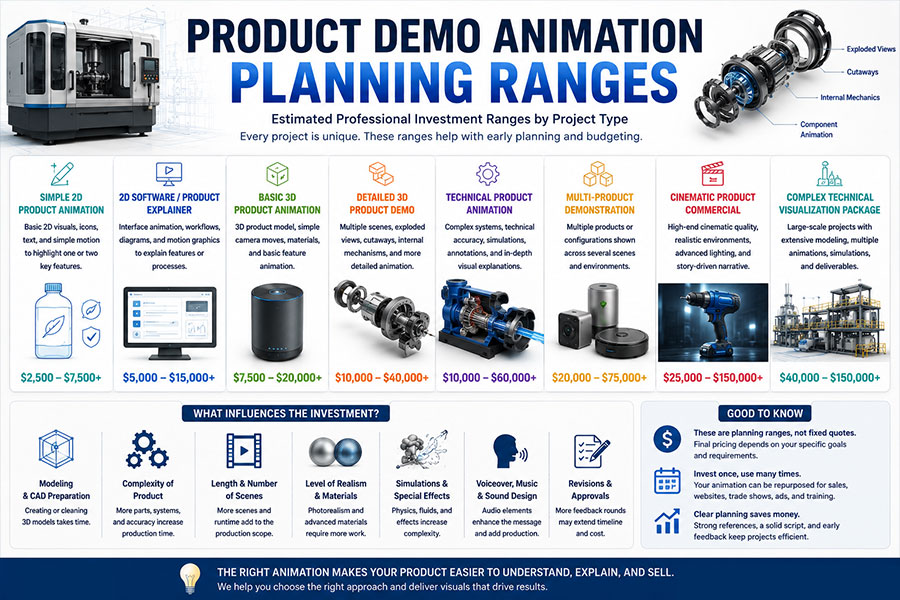
Broad professional planning ranges may include:
| Product Demo | Approximate Range |
|---|---|
| Simple 2D product animation | $2,500–$7,500+ |
| 2D software/product explainer | $5,000–$15,000+ |
| Basic 3D product animation | $7,500–$20,000+ |
| Detailed 3D product demo | $10,000–$40,000+ |
| Technical product animation | $15,000–$60,000+ |
| Multi-product 3D demonstration | $20,000–$75,000+ |
| Cinematic product commercial | $25,000–$100,000+ |
| Complex technical visualization package | $40,000–$150,000+ |
These are broad planning ranges rather than fixed Just Animations pricing.
The actual quote depends on scope.
Why Per-Minute Pricing Can Be Misleading
Two 60-second animations can have completely different production requirements.
Product Demo A
- One 2D diagram
- Simple icons
- Basic motion
Product Demo B
- Custom 3D machine
- 150 components
- Exploded assembly
- Transparent cutaways
- Fluid simulation
- Photorealistic rendering
Both are one minute.
The second requires dramatically more production.
Scope matters more than duration alone.
How Long Can Product Demo Animation Take?
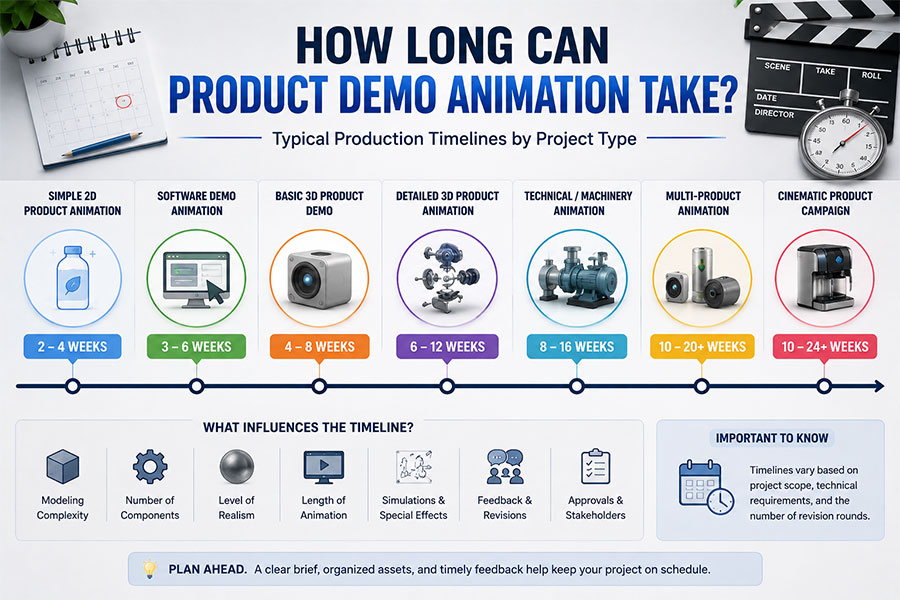
General planning ranges might include:
| Project | Typical Production Window |
|---|---|
| Simple 2D product animation | 2–4 weeks |
| Software demo animation | 3–6 weeks |
| Basic 3D product demo | 4–8 weeks |
| Detailed 3D product animation | 6–12 weeks |
| Technical machinery animation | 8–16 weeks |
| Multi-product visualization | 10–20+ weeks |
| Cinematic product campaign | 10–24+ weeks |
These are approximate professional planning ranges.
Timeline depends on:
- Source files
- Number of scenes
- Technical review
- Modeling
- Rendering
- Revisions
- Stakeholder approvals
How to Shorten the Production Timeline
Provide strong source materials early.
Helpful inputs include:
✓ Approved CAD
✓ Approved script
✓ Product documentation
✓ Brand guidelines
✓ Consolidated feedback
✓ Technical reviewer availability
Late engineering changes can create significant rework.
The most efficient project has a clear approval structure.
Should You Build One Long Demo or Several Short Ones?
Often, modular content is more useful.
Instead of one five-minute animation, consider:
Video 1
Product overview.
Video 2
Feature A.
Video 3
Feature B.
Video 4
Maintenance.
Video 5
Technical workflow.
These videos can still share the same:
- Product model
- Materials
- Lighting
- Environment
A modular strategy can make the content easier to reuse.
Product Demo Animation Should Be Designed for Multiple Formats
Before production, determine whether you need:
- 16:9 website video
- 9:16 social video
- Square version
- Trade-show resolution
- Presentation file
- Silent loop
- Transparent-background animation
Compositions may need to accommodate several formats.
A product placed at the extreme edge of a 16:9 frame may not crop effectively for vertical video.
Plan early.
2D vs 3D Animation for Product Demos: The Fast Decision Test
Ask these questions.
Does the audience need to see depth?
Yes → Favor 3D
Do internal components matter?
Yes → Favor 3D
Is the product software?
Yes → Favor 2D/interface animation
Is the main subject a workflow?
Yes → Favor 2D
Does realistic product appearance matter?
Yes → Favor 3D
Does the audience need simplified diagrams?
Yes → Favor 2D
Does the product combine hardware and software?
Yes → Consider hybrid
Will a reusable 3D product asset have long-term value?
Yes → 3D may justify greater initial investment
The broader 2D vs 3D animation comparison provides additional guidance for businesses choosing between dimensional and illustration-based animation across projects beyond product demonstrations.
Five Product-Demo Mistakes That Weaken the Message
Mistake 1: Showing the Product Without Explaining It
A beautiful rotation is not automatically a demonstration.
Show what matters.
Mistake 2: Choosing 3D Only Because It Looks Premium
Use 3D because depth or realism contributes useful information.
Mistake 3: Choosing 2D Only Because It Seems Simpler
A physical product may require spatial understanding.
Mistake 4: Showing Every Feature
Prioritize what affects the purchase decision.
Mistake 5: Forgetting the Audience
An engineer and a consumer may require completely different demonstrations of the same product.
Think in Scenes, Not Feature Lists
A strong animated product demo is a sequence of visual answers.
Instead of:
Feature 1
Feature 2
Feature 3
consider:
Here is the problem.
Here is the product.
Here is what happens.
Here is why it is different.
Here is the result.
That creates a narrative.
Even technical products benefit from storytelling.
The Best Product Demo Makes the Invisible Understandable
The real value of animation for product demos is not movement for its own sake.
It is visibility.
Animation can show:
- What cameras cannot reach
- What does not yet exist
- What happens inside a product
- How one component affects another
- How software moves information
- How a user moves through a workflow
- How a product changes an outcome
That is why the best choice between 2D vs 3D animation for products depends on the type of understanding the viewer needs.
Use 2D animation when simplification, interfaces, diagrams, users, data, or processes are most important.
Use 3D product animation when depth, physical form, components, products, machinery, or realistic visualization are essential.
Use both when the product exists in both physical and informational worlds.
The goal is not to create the most complicated animation.
It is to create the clearest demonstration.
The strongest animated product demo makes the customer think:
“Now I understand how this works.”
And when that happens, animation has done more than make the product move.
It has made the product easier to evaluate, explain, sell, and remember.
Frequently Asked Questions
What is animation for product demos?
Animation for product demos is animated visual content designed to explain what a product does, how it works, how customers use it, and what features or benefits make it valuable. Product demo animation may use 2D animation, 3D animation, motion graphics, interface animation, product visualization, or a combination of techniques.
Is 2D or 3D animation better for product demos?
2D animation is generally better for software, interfaces, diagrams, workflows, customer journeys, and simplified product explanations. 3D animation is generally better for physical products, machinery, equipment, internal components, realistic materials, exploded views, and spatial demonstrations. Hybrid animation can combine both when a product includes physical and digital elements.
How much does a 3D product demo animation cost?
A basic professional 3D product animation may start in the several-thousand-dollar range, while detailed technical, multi-product, or cinematic demonstrations can reach tens of thousands of dollars or more. Costs depend on modeling, CAD preparation, product complexity, duration, realism, simulations, rendering, and revisions.
Can a product animation be made from CAD files?
Yes. CAD and engineering files can often provide a useful foundation for 3D product animation. The files may need to be imported, cleaned, simplified, reorganized, textured, optimized, and prepared for movement and rendering before they are production-ready animation assets.
Can 2D and 3D animation be combined in the same product demo?
Yes. Combining 2D and 3D is often highly effective. A physical product can be shown in realistic 3D while 2D typography, labels, diagrams, interface graphics, charts, and motion graphics explain features and benefits. Hybrid product animation allows each visual technique to handle the information it communicates most clearly.