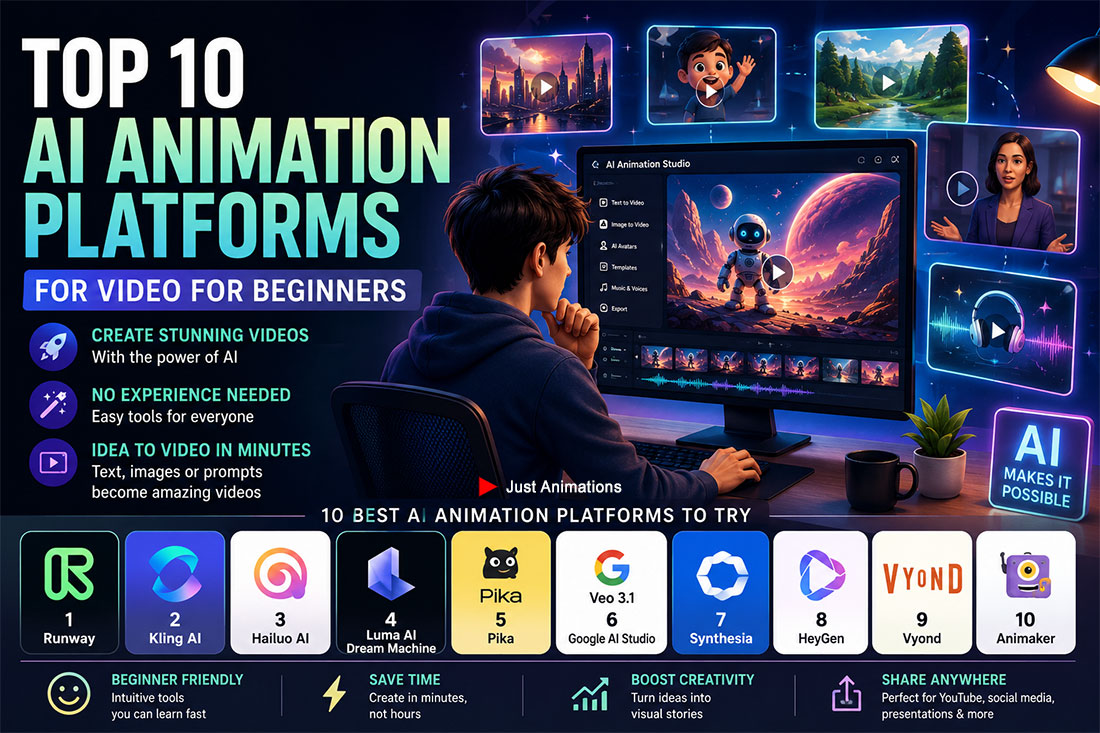
The top 10 AI animation platforms for video for beginners, including services, and tools are changing rapidly due to the rapid fast moving pace of the artificial intelligence industry.
AI animation is no longer just for advanced editors.
Beginners can now create video from text prompts.
Images can become motion.
Avatars can present scripts.
Product shots can become campaign clips.
Training videos can be created without a camera crew.
But there is a catch.
Not every AI animation platform is beginner-friendly.
Some tools are powerful but confusing.
Some are easy but limited.
Some are great for cinematic video.
Some are better for avatars.
Some are stronger for explainers.
Some are better for social media clips.
The best AI animation platform for beginners depends on the job.
A beginner making a TikTok-style clip needs a different tool than a business creating an explainer video.
A training team needs something different than a product marketer.
A founder making a pitch video needs something different than a YouTuber.
This guide breaks down the top AI animation platforms for video for beginners.
The goal is simple.
Help you choose the right tool before wasting time, credits, or money.
What Beginners Should Look For In An AI Animation Platform
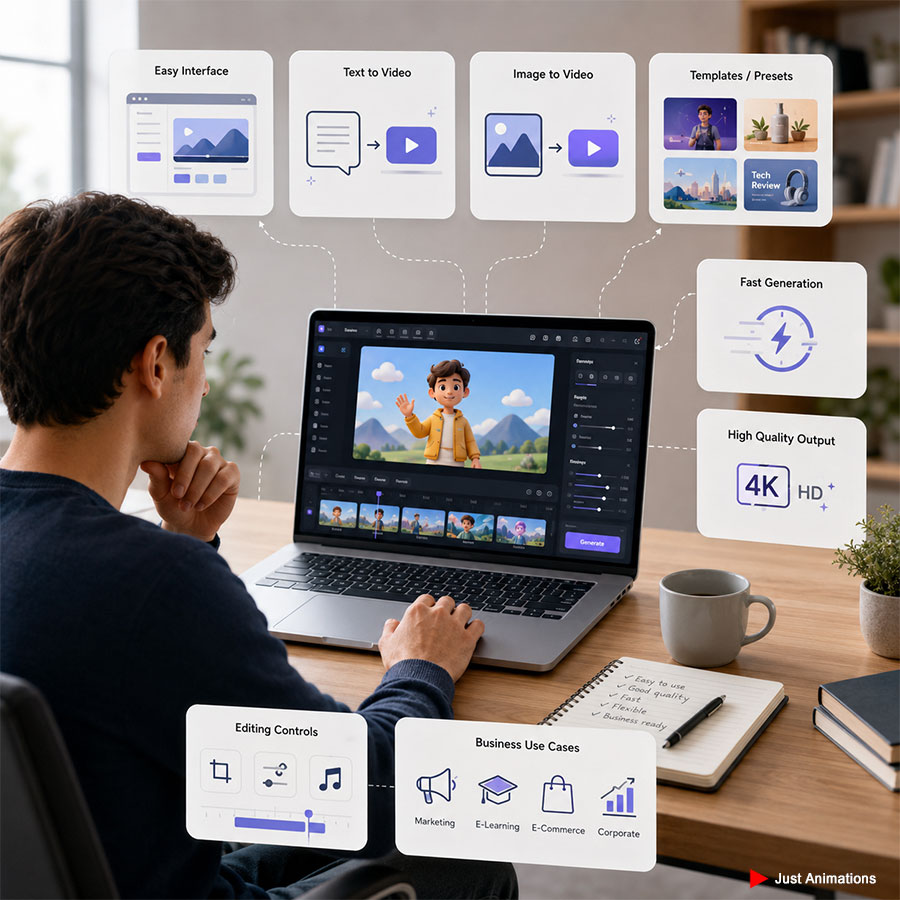
A beginner does not need the most complicated tool.
A beginner needs a tool that produces useful results quickly.
The platform should be easy to test.
It should have a clean interface.
It should support text-to-video or image-to-video.
It should not require advanced editing knowledge.
It should make it easy to export and reuse the video.
| Beginner Need | Why It Matters | Priority |
|---|---|---|
| Easy prompting | Lets you create without editing experience | ██████████ 10/10 |
| Image-to-video | Makes still photos and designs more useful | █████████░ 9/10 |
| Templates or presets | Helps beginners avoid blank-page confusion | ████████░░ 8/10 |
| Fast generation | Makes testing ideas less frustrating | ████████░░ 8/10 |
| Good output quality | Keeps videos from looking cheap | █████████░ 9/10 |
| Editing controls | Helps refine the result after generation | ███████░░░ 7/10 |
| Business use cases | Helps create content beyond novelty clips | ████████░░ 8/10 |
The best beginner tool is not always the most powerful.
It is the one you will actually use.
1. Runway
| Beginner Fit | Creative Control | Business Value |
|---|---|---|
| ████████░░ 8/10 | █████████░ 9/10 | █████████░ 9/10 |
Runway is one of the strongest AI animation platforms for beginners who want high-quality video generation.
It is especially useful for creators, marketers, founders, designers, agencies, and video teams that want cinematic AI video without starting from traditional animation software.
Runway is not the simplest tool on the list.
But it is one of the most capable.
Beginners can use it for text-to-video, image-to-video, video editing, concept clips, campaign visuals, product mood videos, and creative testing.
The biggest advantage is creative range.
You can create polished motion from prompts.
You can test visual ideas quickly.
You can generate cinematic scenes without filming.
✓ Best for cinematic AI video generation
✓ Strong for image-to-video and creative concepts
✓ Good for beginners who want quality and room to grow
Runway is a good first choice if you want one serious AI video platform that can grow with you.
2. Kling AI
| Beginner Fit | Creative Control | Business Value |
|---|---|---|
| ████████░░ 8/10 | ████████░░ 8/10 | ████████░░ 8/10 |
Kling AI is a strong AI video generator for beginners who want high-quality motion and creative flexibility.
It supports AI video generation, image generation, effects, and other creative tools.
For beginners, Kling AI is useful because it can turn simple ideas into visually strong clips.
It is especially good for creators who want cinematic movement, product-style visuals, social media video, music video concepts, and creative experiments.
The platform is also useful for people who want a more direct AI creative studio experience.
You can start with a prompt.
You can start with an image.
You can explore different visual directions without traditional animation skills.
✓ Best for creative AI video generation
✓ Useful for cinematic clips, product visuals, and social video
✓ Strong fit for beginners who want impressive motion fast
Kling AI is a strong option if you want a visual-first tool for generating polished AI video clips.
3. Hailuo AI
| Beginner Fit | Creative Control | Business Value |
|---|---|---|
| █████████░ 9/10 | ███████░░░ 7/10 | ███████░░░ 7/10 |
Hailuo AI is another beginner-friendly AI video platform for text-to-video and image-to-video creation.
It is useful for people who want to generate short animated clips without dealing with complex editing software.
For beginners, Hailuo AI is appealing because the workflow is simple.
Write a prompt.
Upload an image if needed.
Generate the video.
Refine from there.
This makes it useful for social media content, creative ads, concept videos, product mood clips, YouTube Shorts, TikTok-style content, and quick visual experiments.
It may not replace a full production workflow.
But it can be useful for fast ideation.
✓ Best for simple text-to-video and image-to-video creation
✓ Useful for beginner social clips and creative testing
✓ Good fit when speed matters more than heavy editing control
Hailuo AI is a good choice if you want quick AI video output without a steep learning curve.
4. Luma AI Dream Machine
| Beginner Fit | Creative Control | Business Value |
|---|---|---|
| ████████░░ 8/10 | ████████░░ 8/10 | ████████░░ 8/10 |
Luma AI Dream Machine is built for generating and exploring AI video ideas.
It is useful for beginners who want cinematic motion, image-to-video, visual storytelling, and concept generation.
Dream Machine can help users create more atmospheric video clips.
That makes it useful for luxury visuals, real estate concepts, product mood videos, brand campaigns, travel visuals, social clips, and creative storyboards.
For beginners, the value is in speed and visual quality.
You can test creative ideas quickly.
You can generate motion from a still image.
You can explore different visual styles before building a bigger campaign.
✓ Best for cinematic image-to-video concepts
✓ Useful for brand mood, lifestyle visuals, and idea testing
✓ Strong fit for beginners who want polished visual atmosphere
Luma AI Dream Machine is a good option when the video needs to feel cinematic or atmospheric.
5. Pika
| Beginner Fit | Creative Control | Business Value |
|---|---|---|
| █████████░ 9/10 | ███████░░░ 7/10 | ██████░░░░ 6/10 |
Pika is one of the more playful AI animation tools.
It is beginner-friendly because it focuses on quick visual effects and short creative clips.
Pika is useful for people who want to animate images, create social content, test effects, and make short-form video ideas without heavy editing.
It works especially well for creators who want attention-grabbing content.
Not every Pika video will feel corporate.
That is not really the point.
Its strength is speed, creativity, and visual experimentation.
✓ Best for short creative AI clips
✓ Useful for social content, effects, and playful video ideas
✓ Strong fit for beginners who want fast visual experimentation
Pika is a good beginner option if you want fast creative output for social media or concept testing.
6. Veo 3.1 | Google AI Studio
| Beginner Fit | Creative Control | Business Value |
|---|---|---|
| ███████░░░ 7/10 | █████████░ 9/10 | █████████░ 9/10 |
Veo 3.1 in Google AI Studio is a strong option for users who want access to Google’s advanced AI video generation model.
For beginners, this can be useful because it brings high-end AI video generation into a more accessible AI workspace.
Veo 3.1 is best suited for people who want realistic video generation, cinematic clips, native audio possibilities, and AI-generated scenes with strong visual quality.
It can be especially useful for creators, developers, marketers, and teams already exploring Google AI Studio.
The learning curve may be higher than simple consumer apps.
But the output potential is strong.
✓ Best for advanced AI video generation in Google AI Studio
✓ Useful for cinematic scenes, realistic clips, and creative testing
✓ Strong fit for beginners who are comfortable experimenting with AI tools
Veo 3.1 is a strong choice when quality matters and the user is willing to learn the workflow.
7. Synthesia
| Beginner Fit | Creative Control | Business Value |
|---|---|---|
| █████████░ 9/10 | ███████░░░ 7/10 | ██████████ 10/10 |
Synthesia is different from cinematic AI video tools.
It is built around AI avatars.
That makes it very useful for beginners creating business videos.
If you need training content, onboarding videos, tutorials, internal communications, product walkthroughs, or educational videos, Synthesia can be much easier than filming a presenter.
You type a script.
Choose an avatar.
Select a voice and language.
Create the video.
For beginners, this is practical.
No camera.
No studio.
No actor.
No complicated editing setup.
✓ Best for AI avatar training videos
✓ Useful for onboarding, tutorials, and business education
✓ Strong fit for companies creating repeatable video content
Synthesia is one of the best beginner tools for business training and internal video content.
8. HeyGen
| Beginner Fit | Creative Control | Business Value |
|---|---|---|
| █████████░ 9/10 | ███████░░░ 7/10 | █████████░ 9/10 |
HeyGen is another strong AI avatar and AI video platform.
It is useful for beginners who want presenter-style videos, marketing clips, personalized video, translated videos, and business content.
HeyGen is especially useful when speed matters.
Sales teams can create outreach videos.
Marketing teams can create short explainers.
Training teams can create internal clips.
Founders can create simple presenter-led content without filming.
HeyGen can also be useful for localization and video translation workflows.
✓ Best for AI avatar videos and personalized business content
✓ Useful for sales, marketing, training, and localization
✓ Strong fit for beginners who need professional-looking presenter videos
HeyGen is a good choice if you want avatar-led video that feels fast and business-friendly.
9. Vyond
| Beginner Fit | Creative Control | Business Value |
|---|---|---|
| ████████░░ 8/10 | ████████░░ 8/10 | █████████░ 9/10 |
Vyond is built for business animation.
It is not mainly about cinematic AI video.
It is more useful for explainers, training videos, sales enablement, HR content, compliance videos, process videos, and internal communications.
For beginners, Vyond can be helpful because it gives more structure than open-ended AI video tools.
You are not just prompting a random scene.
You are building a business video.
That makes it useful for teams that need clear animated communication.
Not just visual experimentation.
✓ Best for business explainers and training animation
✓ Useful for HR, sales enablement, compliance, and process videos
✓ Strong fit for beginners who need structured animated content
Vyond is a strong beginner platform when the goal is business clarity.
10. Animaker
| Beginner Fit | Creative Control | Business Value |
|---|---|---|
| █████████░ 9/10 | ██████░░░░ 6/10 | ███████░░░ 7/10 |
Animaker is a beginner-friendly animation platform for people who want to create animated videos without traditional animation skills.
It is useful for simple explainers, social videos, character animations, educational content, business videos, and template-based animation.
For beginners, Animaker is helpful because it is designed to make animation more accessible.
You do not need to understand professional animation software.
You can start with templates and guided tools.
That makes it practical for small businesses, creators, marketers, educators, and teams that need quick animated videos.
✓ Best for simple animated videos and templates
✓ Useful for explainers, education, and lightweight business content
✓ Strong fit for beginners who want animation without a complex workflow
Animaker is a good entry-level choice when ease of use matters more than cinematic realism.
Which AI Animation Platform Is Best For Beginners?
The best beginner platform depends on the type of video.
Do not choose based only on hype.
Choose based on the result you need.
| Beginner Goal | Best Platform Options | Why |
|---|---|---|
| Cinematic AI video | Runway, Kling AI, Luma AI Dream Machine, Veo 3.1 | Better for visual quality and cinematic motion |
| Fast social clips | Pika, Hailuo AI, Animaker | Easier for short-form content |
| Avatar videos | Synthesia, HeyGen | Better for presenter-led business content |
| Business explainers | Vyond, Animaker | Better for structured communication |
| Product or brand concepts | Runway, Kling AI, Luma AI Dream Machine | Better for visual mood and product storytelling |
| Training content | Synthesia, HeyGen, Vyond | Better for repeatable education videos |
Here is the simple buyer view.
Cinematic AI Video
██████████ Runway, Kling AI, Luma, Veo
Avatar Business Video
█████████░ Synthesia, HeyGen
Beginner Social Clips
████████░░ Pika, Hailuo AI
Business Explainers
████████░░ Vyond, Animaker
Creative Testing
█████████░ Runway, Pika, Hailuo, Luma
If you are a beginner, start with the use case.
Then choose the tool.
Best AI Animation Platforms By Difficulty Level
Some tools are easier than others.
That does not mean they are better.
It means they are faster to start with.
| Platform | Beginner Difficulty | Best For |
|---|---|---|
| Pika | Easy | Short creative clips |
| Hailuo AI | Easy | Quick text-to-video and image-to-video |
| Animaker | Easy | Simple animated explainers |
| Synthesia | Easy to medium | Avatar training videos |
| HeyGen | Easy to medium | Avatar marketing and sales videos |
| Vyond | Medium | Business animation and training |
| Luma AI Dream Machine | Medium | Cinematic image-to-video |
| Kling AI | Medium | Creative AI video generation |
| Runway | Medium to advanced | Higher-quality AI video creation |
| Veo 3.1 | Google AI Studio | Medium to advanced |
The easiest tool may not produce the best output.
The most powerful tool may require more learning.
Beginners should pick the tool that matches their patience, goal, and project value.
What AI Animation Platforms Are Best For Business?
Business users usually need more than a cool clip.
They need a clear message.
They need the right format.
They need something that supports a goal.
That goal might be sales.
Training.
Marketing.
A product launch.
A trade show.
A pitch deck.
A social campaign.
| Business Use Case | Strong Platform Fit | Value Level |
|---|---|---|
| Training videos | Synthesia, HeyGen, Vyond | ██████████ 10/10 |
| Explainer videos | Vyond, Animaker, Runway | █████████░ 9/10 |
| Product concepts | Runway, Kling AI, Luma AI Dream Machine | ████████░░ 8/10 |
| Social campaigns | Pika, Hailuo AI, Canva-style tools, Animaker | ████████░░ 8/10 |
| Trade show visuals | Runway, Kling AI, Veo 3.1, Luma | ████████░░ 8/10 |
| Internal updates | Synthesia, HeyGen | █████████░ 9/10 |
For business use, the tool is only one part of the process.
The script still matters.
The offer still matters.
The audience still matters.
The edit still matters.
AI can make video easier.
It does not automatically make the message good.
What AI Animation Tools Still Struggle With
AI animation is impressive.
But it is not perfect.
Beginners should understand the limits before relying on it for important projects.
Common issues include:
- Inconsistent characters
- Strange hand or object movement
- Weak text rendering inside videos
- Scene drift
- Product inaccuracies
- Odd camera motion
- Brand inconsistency
- Difficult revision control
- Clips that look good but say nothing
This matters for business videos.
A fun social clip can survive a few imperfections.
A product launch video cannot.
A medical animation cannot.
A luxury brand campaign cannot.
A trade show screen cannot.
The more important the video is, the more editing, direction, and review it needs.
How Beginners Should Start With AI Animation
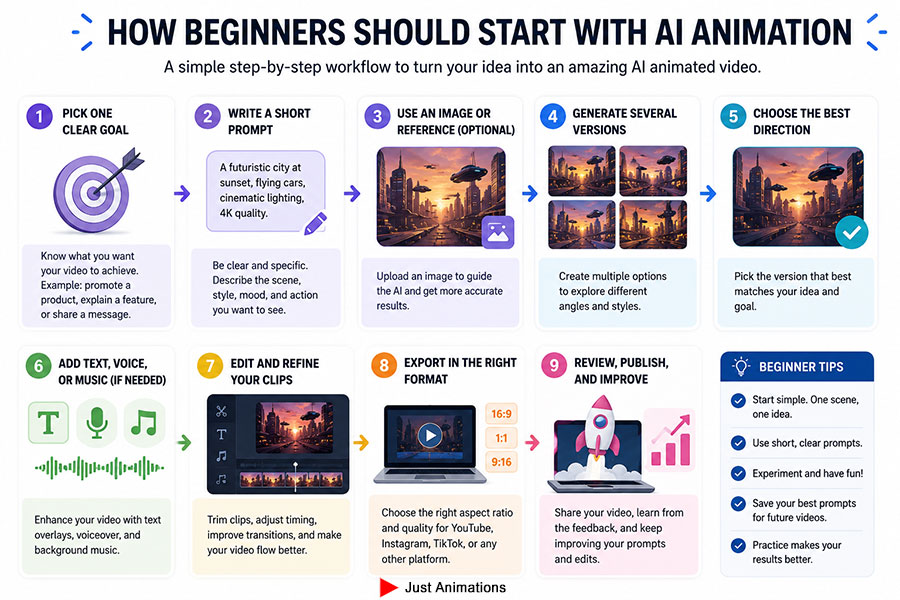
Do not start by trying to make a full video.
Start smaller.
Create a test clip.
Then improve it.
Then build the final piece.
A simple beginner workflow looks like this:
✓ Pick one clear goal
✓ Write a short prompt
✓ Use one image or reference if possible
✓ Generate several versions
✓ Choose the best direction
✓ Add text, voice, or music later
✓ Edit the strongest clips together
✓ Export for the right platform
The biggest beginner mistake is asking AI to do too much in one prompt.
Keep the prompt focused.
One scene.
One idea.
One action.
One visual style.
Then build from there.
Final Thoughts
The best AI animation platforms for video for beginners are not all the same.
Runway is the strongest all-around choice for users who want higher-quality AI video generation.
Kling AI is excellent for creative AI video and visually impressive motion.
Hailuo AI is useful for quick text-to-video and image-to-video creation.
Luma AI Dream Machine is strong for cinematic mood and image-to-video concepts.
Pika is ideal for playful short-form AI clips.
Veo 3.1 in Google AI Studio is powerful for users who want advanced AI video generation.
Synthesia and HeyGen are best for AI avatar videos.
Vyond is strong for business explainers and training content.
Animaker is a good beginner platform for simple animated videos.
The right choice depends on what you are making.
For beginners, the best strategy is simple.
Start with the outcome.
Pick the easiest tool that can create that outcome.
Then improve your prompts, editing, and structure over time.
AI animation is powerful.
But the best videos still come from clear ideas.
FAQ
What Is The Best AI Animation Platform For Beginners?
The best AI animation platform for beginners depends on the type of video. Runway is strong for higher-quality AI video generation, Pika and Hailuo AI are useful for short creative clips, Synthesia and HeyGen are strong for avatar videos, and Animaker is useful for simple animated videos.
Which AI Animation Platform Is Best For Text-To-Video?
Runway, Kling AI, Hailuo AI, Luma AI Dream Machine, Pika, and Veo 3.1 in Google AI Studio are strong options for text-to-video creation. The best choice depends on whether the user wants cinematic quality, fast social clips, creative effects, or more advanced AI video generation.
Which AI Animation Tool Is Best For Business Videos?
For business videos, Synthesia, HeyGen, Vyond, and Animaker are useful for training, onboarding, explainers, and internal communications. Runway, Kling AI, Luma AI Dream Machine, and Veo 3.1 can be useful for product concepts, campaign visuals, trade show clips, and brand video ideas.
Can Beginners Make AI Animation Videos Without Editing Experience?
Yes. Beginners can make AI animation videos without traditional editing experience by using platforms like Pika, Hailuo AI, Synthesia, HeyGen, Animaker, and Vyond. More advanced tools like Runway, Kling AI, Luma AI Dream Machine, and Veo 3.1 may require more experimentation but can produce stronger visuals.
What Should Beginners Know Before Using AI Animation Tools?
Beginners should know that AI animation tools can create impressive clips, but they may struggle with consistency, accurate text, realistic hands, product details, and brand control. The best results usually come from short prompts, clear scenes, multiple generations, and some editing after the AI video is created.