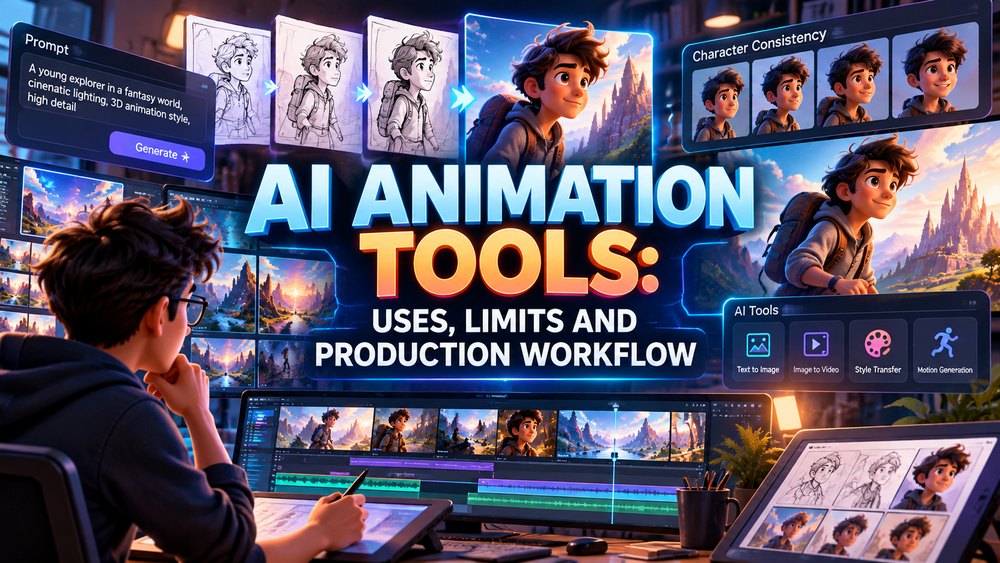
AI animation tools are changing how motion content is planned, generated, revised, and versioned. They can turn text prompts into video, animate reference images, extend shots, generate backgrounds, create motion tests, support storyboarding, and accelerate parts of post-production.
But AI animation is not one single tool category, and it is not a replacement for every traditional animation workflow.
The most useful way to evaluate AI animation is by task.
A tool may be excellent at generating a five-second atmospheric shot but unreliable for a 90-second product demonstration that requires exact brand colors, consistent characters, accurate machinery, and repeatable camera angles.
Another tool may be strong for concept development but weak for final delivery.
This article focuses on AI animation tools as part of a production workflow: where they fit, where they fail, how businesses should evaluate them, and where professional animators still add essential control.
For a broader creative argument about choosing between AI-generated and traditional animation approaches, see AI Animation: The Choice Is Yours. The AI animation services page covers Just Animations’ service offering, while this article concentrates on tool selection and production design.
AI Animation Tools Are Better Understood as Categories
A list of “best AI animation tools” becomes outdated quickly because models and products change rapidly.
A more useful framework is to group tools by what they do.
Text-to-Video Tools
These generate moving footage from written prompts.
They are useful for:
- Concept shots
- Social content
- Atmospheric scenes
- Visual experimentation
- Story exploration
Current examples include Google Veo 3.1, Runway Gen-4.5, and Adobe Firefly’s video and animation tools.
Image-to-Video Tools
These animate an existing still image.
They can help when a team already has:
- Character art
- Product imagery
- Concept frames
- Storyboards
- Branded illustrations
The image provides stronger visual direction than text alone.
Video-to-Video and Transformation Tools
These alter existing footage or animation.
Potential uses include:
- Style changes
- Background changes
- Cleanup
- Extension
- Reframing
- Versioning
AI-Assisted Editing Tools
AI can also support production without generating the core visuals.
Examples include:
- Transcription
- Captioning
- Rough-cut assistance
- Background removal
- Object masking
- Audio cleanup
- Versioning
The distinction matters because businesses do not need to choose between “AI” and “non-AI” for an entire project. Different stages can use different methods.
What Current AI Video Systems Can Do Well
Modern generative-video systems are increasingly capable of:
- Text-to-video generation
- Image-to-video animation
- Camera movement
- Style matching
- Short scene creation
- Character references
- Scene extension
- Native audio in some systems
Google describes Veo 3.1 as its leading video-generation model with improved realism, prompt adherence, character reference controls, scene extension, and audio capabilities. Adobe Firefly also offers an AI animation generator designed to turn text and image inputs into animated video clips.
These tools are useful because they reduce the friction between an idea and a moving visual test.
A creative team can explore five directions in the time it once took to build one rough motion test.
That is a real production advantage.
Where AI Animation Tools Fit Best
AI animation is strongest when speed and exploration matter more than exact repeatability.
Concept Development
A team can quickly test:
- Mood
- Camera angle
- Lighting
- Environment
- Character direction
Storyboarding and Previsualization
Generated frames or clips can help stakeholders understand the intended direction before expensive production begins.
Social and Short-Form Content
AI tools can create fast variations for short campaigns, especially when the content does not require a long continuity chain.
Background and Environment Exploration
AI can help produce visual references for locations or abstract worlds.
Pitch Materials
Concept clips can make a proposal or treatment easier to understand.
Versioning
Some tools can accelerate alternate aspect ratios, scene variants, or language-support workflows.
Where AI Animation Tools Still Struggle
The most important production question is not what a tool can generate once.
It is what the tool can reproduce consistently across many shots.
Character Consistency
A character may change:
- Face
- Clothing
- Proportions
- Hair
- Accessories
between generations.
Reference-image systems are improving this, but long-form consistency still requires careful control.
Product Accuracy
AI-generated video can invent details.
That is a serious problem when the subject is:
- Machinery
- Medical equipment
- Automotive products
- Engineering systems
- Branded consumer products
A fictional screw, port, logo, button, or moving component can make the video misleading.
Precise Motion
A prompt may describe a mechanism correctly but the generated movement may not match the actual engineering sequence.
Typography
AI video systems can still struggle with stable, accurate text inside moving scenes.
Long-Form Continuity
Maintaining the same spatial layout, props, characters, and visual logic across dozens of shots is harder than generating isolated clips.
AI Animation Is Often Best as a Layer, Not the Entire Pipeline
A practical professional workflow can combine AI with traditional production.
For example:
Creative brief -> human script -> AI concept frames -> human storyboard -> AI motion tests -> 3D product animation -> AI background variation -> human edit -> sound -> final QC
This approach uses AI where it creates speed without surrendering control where accuracy matters.
A Production Workflow for AI-Assisted Animation
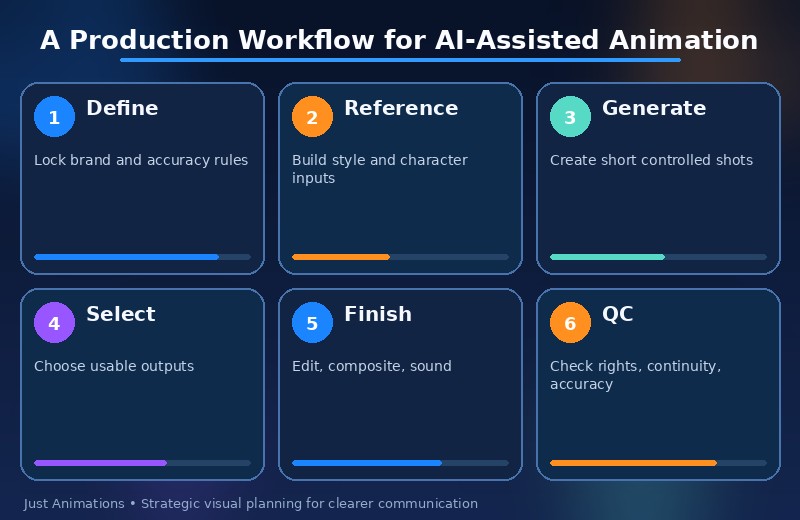
1. Define the Non-Negotiables
Before opening a tool, identify what must remain consistent.
Examples:
- Product geometry
- Character appearance
- Brand colors
- Legal language
- Technical steps
- Logo usage
2. Separate Reference Generation From Final Output
AI-generated references can be extremely useful even when they are not suitable for final publication.
Use them to explore:
- Camera language
- Color
- Environment
- Composition
3. Build a Reference Package
Provide consistent inputs:
- Character sheets
- Product images
- Style frames
- Color references
- Camera references
4. Generate in Short Controlled Shots
Short clips are easier to review than attempting to create a full long-form sequence in one pass.
5. Edit and Composite
Generated clips often become more useful after:
- Editing
- Color correction
- Stabilization
- Typography
- Sound design
- Compositing
6. Conduct Human Quality Control
Review for:
- Brand accuracy
- Physical errors
- Continuity
- Rights concerns
- Technical mistakes
AI changes the workflow, but it does not remove the need for review.
AI Animation Tools vs Traditional 2D Animation
AI and 2D animation solve different problems.
| Need | AI Tools | Traditional 2D |
| Fast concept exploration | Strong | Moderate |
| Exact character consistency | Improving | Strong |
| Frame-level control | Limited | Strong |
| Stylized illustration | Strong for concepts | Strong for final control |
| Long-form revisions | Variable | Predictable |
| Brand-specific motion system | Variable | Strong |
Professional 2D animation remains useful when the project needs repeatable character design, precise vector assets, controlled timing, and long-term reuse.
AI Animation Tools vs 3D Animation
3D remains stronger for exact physical products and reusable dimensional assets.
A properly built 3D model can be:
- Rotated
- Re-lit
- Re-rendered
- Exploded
- Reused
AI may create a convincing image of a product, but if the geometry must be exact, traditional 3D animation often provides more reliable control.
The two can also work together. AI can help generate environments or concept directions around a controlled 3D product render.
How Businesses Should Compare AI Animation Tools
Do not compare tools only by visual wow factor.
Evaluate them against the project.
Input Control
Does the system accept:
- Text
- Images
- Video
- Multiple reference images
Character and Object Consistency
Can the same subject remain stable across multiple shots?
Camera Control
Can the team specify framing and movement?
Output Format
Does it support the needed:
- Resolution
- Aspect ratio
- Duration
Editing Integration
Can generated clips move easily into the team’s post-production workflow?
Commercial Terms
Are the terms appropriate for client work?
Current AI Animation Tool Examples
The tool market changes quickly, so the following should be treated as examples rather than a permanent ranking.
Adobe Firefly
Useful for teams already working inside Adobe’s creative ecosystem and looking for text- and image-driven generative video workflows.
Runway Gen-4.5
Runway documents Gen-4.5 as a text-to-video and image-to-video model designed for stronger prompt adherence and motion control.
Google Veo 3.1
Google’s Veo 3.1 supports reference-driven generation, scene extension, camera controls, and audio-oriented video generation.
The key point is that tool names matter less than matching capabilities to the production need.
Why “One Prompt = Finished Animation” Is the Wrong Expectation
Professional video usually requires more than generation.
The final asset may still need:
- Editing
- Brand typography
- Logo integration
- Sound
- Color correction
- Voiceover
- Legal review
- Captions
- Alternate formats
A generated clip can be a raw material rather than a finished deliverable.
AI Animation and Intellectual Property
Businesses should review tool terms and internal policies before using generated assets commercially.
Questions include:
- What rights does the tool grant?
- Are training-data concerns relevant to the brand?
- Can employees upload confidential product images?
- Can customer data appear in prompts?
- Does the tool provide provenance metadata?
Legal requirements vary by project and jurisdiction, so significant commercial uses should be reviewed by appropriate legal or rights professionals.
AI Animation for Marketing
Marketing teams can use AI to accelerate:
- Campaign concepts
- Social variants
- Backgrounds
- Short visual hooks
- Pitch mockups
The strongest use is often speed of experimentation.
Teams can test more ideas before committing to the final direction.
AI Animation for Product Demos
Use caution.
If the product must be exact, AI should not be allowed to invent geometry.
A better workflow may use:
Controlled 3D product -> AI environment -> human compositing
That preserves technical accuracy while still using AI for creative variation.
AI Animation for Entertainment
Entertainment projects can use generative tools for:
- Concept art
- Previsualization
- Pitch sequences
- Experimental shots
- Background exploration
But long-form character continuity and performance still require strong production design and supervision.
AI Animation for Technology Companies
Technology companies can use AI animation for:
- Product launch concepts
- Abstract data visuals
- Futuristic environments
- Social content
- Event screens
The technology animation context is especially suited to AI-assisted visual experimentation because many subjects are already abstract or digital.
How AI Changes the Role of the Animator
AI reduces the amount of time required for some repetitive or exploratory tasks.
It increases the importance of others:
- Art direction
- Prompt and reference design
- Selection
- Continuity management
- Editing
- Quality control
- Storytelling
The animator becomes less responsible for creating every pixel manually and more responsible for controlling the system that produces the final visual result.
AI Animation Tools Should Be Evaluated on Repeatability
One impressive clip is not enough for a business campaign.
Ask:
- Can the same character return?
- Can the same product remain accurate?
- Can the look survive ten scenes?
- Can the client request revisions?
- Can the output be recreated later?
These are production questions, not demonstration questions.
Where Professional Studios Still Add Value
A studio can coordinate:
- Strategy
- Script
- Storyboard
- AI generation
- 2D/3D production
- Compositing
- Voiceover
- Sound
- Versioning
- Quality control
That matters when a company needs a finished communication asset rather than a collection of experimental clips.
The Animation Maker: Tools, Costs and Professional Solutions article provides another useful comparison between self-service creation tools and professional production.
A Simple AI Animation Decision Framework
Use AI tools when:
- Rapid visual exploration matters
- Short-form variation is useful
- Exact geometry is not critical
- The team can review and edit outputs
Use controlled 2D or 3D workflows when:
- Character consistency is critical
- Product accuracy matters
- Long-form continuity matters
- Revisions must be predictable
Use a hybrid workflow when both speed and control matter.
AI Animation Is a Production Choice, Not a Shortcut to Strategy
AI animation tools can make production faster.
They can make experimentation cheaper.
They can create visual possibilities that would once have required much more manual work.
But the tool still needs direction.
A successful project must answer:
- Who is the audience?
- What should they understand?
- What must stay accurate?
- Where can AI safely improvise?
- How will outputs be reviewed?
The businesses that get the most value from AI animation will not necessarily be the ones that generate the most clips.
They will be the ones that know where AI belongs inside a larger creative system.
Use a Tool Scorecard Instead of Chasing the Newest Model
AI video products change quickly. A practical evaluation scorecard can keep the decision tied to production needs.
| Evaluation Factor | Question to Ask |
| Visual quality | Does it match the required finish? |
| Consistency | Can subjects remain stable across shots? |
| Control | Can the team direct camera and motion? |
| Accuracy | Does it preserve products and brand details? |
| Workflow | Can outputs be edited and versioned? |
| Commercial terms | Are the usage terms acceptable? |
A tool that wins on visual spectacle may still lose on consistency or revision control.
Better References Usually Produce Better AI Animation
Prompt text is only one input. Reference images, product photography, character sheets, color palettes, and first-frame controls can make generation more predictable.
A professional workflow may create a reference package containing:
- Character front and side views
- Approved wardrobe
- Product angles
- Lighting references
- Environment style frames
- Camera examples
This shifts AI animation from random prompting toward controlled art direction.
The same discipline helps teams compare outputs objectively. Instead of asking whether one clip looks impressive, they can ask whether it matches the approved reference system.
AI Animation Costs Include Review Time, Not Just Generation Credits
Generative video can appear inexpensive when pricing is measured only by the cost of producing a clip. That can be misleading.
A commercial workflow may generate many unusable versions before one shot is approved. Teams also spend time on:
- Prompt iteration
- Reference preparation
- Selection
- Continuity checks
- Editing
- Cleanup
The real cost is the complete workflow required to reach an approved result.
AI is most economical when it reduces total production effort, not simply when the generation button is cheap to press.
Archive Prompts, References and Approved Outputs
AI-assisted projects benefit from documentation because generated results may be difficult to reproduce exactly later.
Teams should retain:
- Final prompts
- Reference images
- Model or tool names
- Approved clips
- Editing project files
- Brand instructions
This creates a production record that helps future revisions and makes it easier to understand how a final shot was created.
Without documentation, a team may spend hours trying to recreate a visual direction that already worked once. AI generation is faster when the successful decisions are preserved rather than rediscovered.
A well-scoped project also gives the studio more room to improve creative quality instead of spending time resolving preventable uncertainty.
That planning discipline is what turns animation from a visual extra into a dependable communication asset.
Clear governance makes AI animation easier to scale responsibly across teams.
Frequently Asked Questions
What are AI animation tools?
AI animation tools use generative or machine-learning systems to create, transform, or assist moving visual content from text, images, video, references, or other inputs. They can support concept development, short video generation, image animation, editing, and versioning.
What are AI animation tools best used for?
They are particularly useful for rapid concept exploration, short-form video, motion tests, background ideas, storyboarding support, and creative variation. Exact products, long-form continuity, and repeatable characters may require more controlled production methods.
Can AI animation replace professional animators?
AI can automate or accelerate some tasks, but professional production still benefits from human direction, storytelling, brand control, continuity management, editing, technical accuracy, sound, and quality assurance.
Which AI animation tools are popular now?
Current examples include Adobe Firefly, Runway Gen-4.5, and Google Veo 3.1. The market changes quickly, so businesses should compare capabilities and commercial terms rather than relying on a permanent ranking.
Is AI animation safe for commercial use?
It depends on the tool, source materials, licensing terms, brand requirements, and project. Businesses should review platform terms, confidentiality policies, ownership questions, and rights requirements before commercial publication.