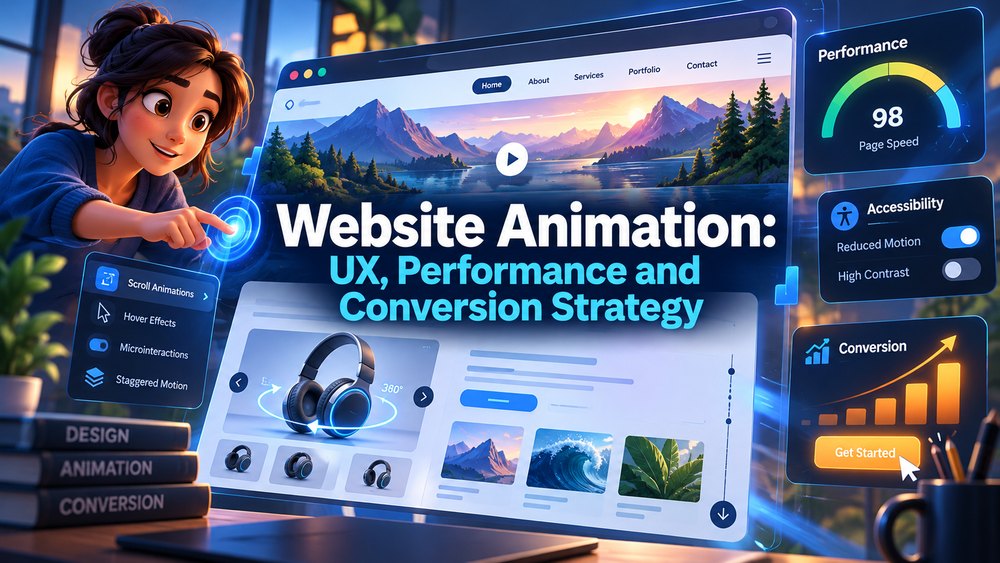
Website animation can make a digital experience easier to understand, more responsive, and more memorable when motion is tied to a clear user goal. It can also slow a page down, distract visitors, create accessibility problems, or make a website feel unnecessarily complicated when animation is added without purpose.
That makes website animation a UX decision before it becomes a visual-effects decision.
A moving hero section may help visitors understand a product in seconds. A small interface transition can confirm that an action worked. A 3D product loop can communicate physical features more effectively than still photography. A scroll-triggered sequence can show how a process develops over time.
But none of those outcomes happen simply because something moves.
This article focuses on website animation strategy: where motion creates value, how to balance animation with performance, how to think about conversion, and how businesses can build a repeatable motion system rather than adding one-off effects across a site.
For a service and pricing overview, see Website Animation Services: Costs, Types, and Studio Guide. This article intentionally takes a different angle so the two pages support rather than compete with each other.
Start With the User Journey, Not the Animation Style
The strongest website animation decisions begin with a question:
What does the visitor need to understand or do at this point on the page?
A homepage hero may need to establish:
- What the company does
- What the product looks like
- What makes the offer different
A pricing section may need to help visitors compare options.
A software page may need to demonstrate a workflow.
A checkout interface may need to confirm that something was added successfully.
When the purpose is clear, the motion can be designed around it.
When the purpose is unclear, animation often becomes decoration.
Where Website Animation Adds the Most Value
Website motion tends to be most useful in a few specific areas.
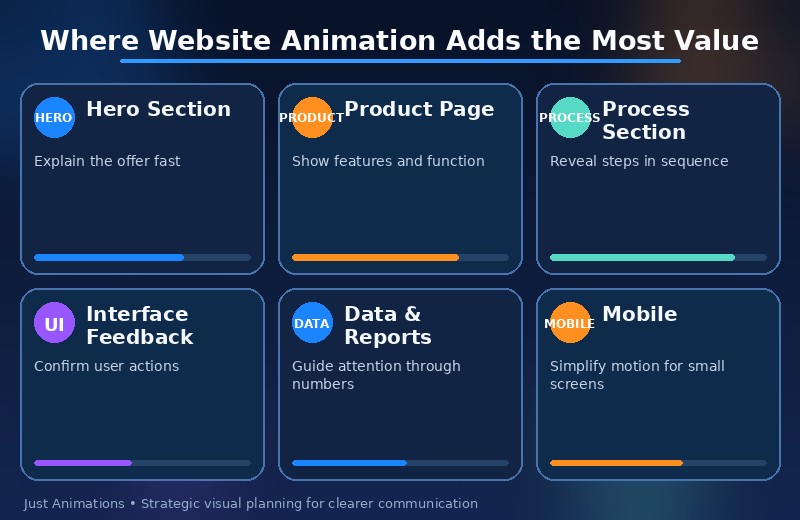
Hero Sections
A short animated sequence can quickly establish the product, service, or brand.
Useful hero animation may include:
- Product rotation
- Interface demonstration
- Character scene
- Motion graphics
- Cinematic background loop
The hero should not make visitors wait before the main message becomes understandable.
Product Pages
Animated product demonstrations can show:
- Features
- Internal components
- Assembly
- Usage
- Configuration
This is especially useful for businesses using 3D animation to explain products that are difficult to photograph or demonstrate physically.
Process Sections
Animation can reveal information step by step.
For example:
Request submitted -> data processed -> system responds -> customer receives result
This is often easier to understand than a static diagram containing every step at once.
Interface Feedback
Microinteractions can confirm:
- Button clicks
- Upload progress
- Navigation changes
- Completed actions
- Errors
Motion is functional here. It tells the user what happened.
Data and Reports
Animated charts and motion graphics can guide attention through a sequence of numbers or relationships.
Professional motion graphics are particularly useful when a website needs to explain data, processes, or abstract business ideas.
The Best Website Animation Often Looks Simple
Simple does not mean low quality.
It means the user can understand what is happening without decoding the interface.
A strong motion system may use only a few repeated behaviors:
- Fade and move in
- Expand
- Highlight
- Reveal
- Transform
- Confirm
When the same visual rules are used consistently, visitors learn how the interface behaves.
That reduces cognitive effort.
Website Animation and Conversion: What Can Motion Actually Do?
Animation cannot force a visitor to convert.
But it can support conversion by reducing uncertainty and helping people understand value faster.
Motion may help when it:
- Demonstrates the product
- Shows how a service works
- Draws attention to an important feature
- Confirms interaction
- Makes comparison easier
- Creates trust through polished presentation
The important point is that conversion improvement should come from better communication, not simply more visual activity.
A button that bounces continuously may attract attention, but it can also feel aggressive.
A product animation that demonstrates exactly what changes after a user takes an action may be more persuasive because it creates understanding.
Use Motion to Demonstrate, Not Repeat the Copy
One of the weakest uses of website animation is showing the same information twice.
If the headline says:
“Our platform connects your data.”
and the animation simply displays the words again, the motion adds little value.
A stronger animation might show:
Disconnected systems -> moving data -> connected platform -> unified result
Now the visual explains the claim.
That same principle is discussed in Visual Storytelling in Animation: How Motion Shapes Meaning.
Performance Is Part of the Creative Brief
Website animation is different from a video that lives on YouTube or a trade-show screen.
The asset must live inside a page that also contains:
- Text
- Images
- Navigation
- Analytics
- Scripts
- Forms
- Third-party tools
Large files can slow the experience.
That means the animation team and web-development team should agree on technical constraints early.
Questions should include:
- What is the maximum acceptable file size?
- Does the animation need to autoplay?
- Does it require sound?
- Is it interactive?
- Does it need transparency?
- What happens on mobile?
- Is a static fallback required?
Match the Format to the Motion
Different web-animation formats solve different problems.
| Format | Good For | Main Consideration |
| SVG/CSS | Simple vector motion, icons | Lightweight when kept simple |
| Lottie | Interface and vector animation | Good for scalable motion systems |
| Video | Cinematic or complex animation | Compression and autoplay behavior |
| Animated WebP | Short loops | File size and browser behavior |
| WebGL / 3D | Interactive products and environments | Device performance and complexity |
The best format is not the newest format. It is the one that delivers the required experience without unnecessary technical cost.
Mobile Changes the Animation Strategy
A desktop animation may not translate directly to a phone.
Mobile users have:
- Smaller screens
- Different aspect ratios
- Touch interaction
- Potentially slower connections
- Less room for supporting text
An animation that shows three products side by side on desktop may need to become a single-product sequence on mobile.
A complex scroll effect may need a simpler version.
A long cinematic hero may need a shorter loop.
Designing the mobile motion experience early is usually better than cropping the desktop version later.
Accessibility Should Be Designed, Not Added at the End
Some users experience dizziness, nausea, headaches, or distraction from certain types of motion.
The World Wide Web Consortium documents the `prefers-reduced-motion` media feature and recommends allowing users to avoid nonessential motion. Its guidance on using prefers-reduced-motion explains how sites can respond to system-level motion preferences.
Website animation planning should consider:
- Reduced-motion versions
- Static fallbacks
- Pause controls
- Avoiding unnecessary parallax
- Limiting repeated movement
- Keeping content understandable without animation
Accessibility is not separate from UX. It is part of UX.
Motion Can Guide Attention, but It Can Also Steal It
The human visual system notices change.
That makes motion useful for directing attention.
But if every element moves, the page loses hierarchy.
The principles in Animation Psychology: Why Motion Captures Human Attention are especially relevant on websites because visitors are often trying to read, compare, or complete a task while animation is happening around them.
Use selective movement.
A mostly stable page with one purposeful animation can be more effective than a page where every section slides, spins, floats, and pulses.
Build a Motion System Instead of Collecting Effects
Large websites benefit from consistent motion rules.
A motion system can define:
Entry Behavior
How do cards, images, and sections appear?
Interaction Feedback
How do buttons, toggles, menus, and forms respond?
Timing
How fast do common transitions happen?
Easing
Should movement feel soft, mechanical, energetic, or premium?
Reduced Motion
What changes when the user asks for less motion?
Brand Behavior
Are there signature transitions that make the site feel distinct?
This creates consistency across pages and teams.
Website Animation for SaaS and Technology
Software companies often benefit from interface animation because the product itself is digital.
Useful website animation can show:
- Dashboard workflows
- Automation
- Integrations
- Data movement
- AI processes
- Alerts
- Before-and-after states
Instead of asking visitors to read six paragraphs explaining how a feature works, the site can show the sequence.
Website Animation for Ecommerce
Ecommerce animation should help shoppers evaluate the product.
Useful examples include:
- Product rotation
- Feature callouts
- Assembly
- Size comparison
- Configuration changes
- Material details
The motion should answer purchase questions.
Animation that slows down the product page without adding useful information is unlikely to help.
Website Animation for Professional Services
Services are more abstract than physical products.
Animation can make them visible through:
- Process diagrams
- Customer journeys
- Data flows
- Animated icons
- Character scenarios
- Motion graphics
Professional 2D animation can be particularly useful when a business needs to explain a service without relying on literal photography.
Website Animation for Government and Public-Sector Sites
Government sites should prioritize clarity and accessibility.
Animation can still be useful for:
- Public-service explainers
- Maps
- Emergency-preparedness steps
- Infrastructure visualization
- Data
But essential information should not depend on complex motion.
The content must remain readable and usable for people who disable animation or use assistive technologies.
How to Evaluate Whether an Animation Is Worth Keeping
Ask five questions.
1. Does It Explain Something?
If yes, it probably has communication value.
2. Does It Guide the User?
If yes, it may improve navigation or task completion.
3. Does It Confirm an Action?
If yes, it may improve interface feedback.
4. Does It Slow the Experience Down?
If yes, the benefit must justify the cost.
5. Does the Page Still Work Without It?
If no, confirm that the animation is genuinely essential.
Measuring Website Animation Performance
Do not judge motion only by whether stakeholders like it.
The website team can compare:
- Engagement with the animated section
- Product-demo starts
- Scroll depth
- Form completion
- CTA clicks
- Page speed
- Bounce or abandonment patterns
Not every animation needs an A/B test, but high-impact homepage or product-page motion should have a measurable objective.
Avoid These Common Website Animation Mistakes
Long Intro Sequences
Visitors should not have to wait for the website to reveal the main message.
Autoplay Sound
Unexpected audio can create a poor experience.
Motion During Reading
Constant background movement can compete with text.
Desktop-Only Thinking
Animation needs a mobile plan.
No Reduced-Motion Alternative
Accessibility should be planned from the start.
Too Many Independent Styles
The site should feel like one system.
How Animation Studios and Web Developers Should Work Together
The animation studio creates visual assets.
The web team controls implementation.
The two should coordinate around:
- File formats
- Dimensions
- Aspect ratios
- Trigger behavior
- Performance
- Mobile behavior
- Fallbacks
- Accessibility
This is why website animation should not be treated as a finished MP4 dropped onto a page without technical planning.
A Practical Website Animation Planning Framework
Before production begins, define:
- Page and section
- User objective
- Message
- Animation purpose
- File-format requirement
- Mobile behavior
- Reduced-motion behavior
- Performance budget
- Conversion or UX metric
- Ownership and implementation responsibility
This turns motion from a visual extra into a controlled part of the website experience.
Website Animation Should Make the Site Easier to Use
The strongest website animation is not the animation visitors notice most.
It is the animation that makes the site easier to understand and interact with.
That may be a sophisticated 3D product sequence.
It may also be a tiny button response.
The scale of the animation matters less than whether it solves a real communication or UX problem.
When animation improves clarity, reinforces the brand, respects performance, works on mobile, and supports accessibility, it can become a genuine conversion and user-experience asset.
When it exists only to create movement, it often becomes noise.
Measure the Behavior the Animation Is Supposed to Influence
A website animation should have a reason to exist, and that reason should suggest what to measure.
If the animation explains a product, useful metrics may include:
- Product-demo completion
- Clicks into feature pages
- Qualified form starts
If the animation provides interface feedback, the relevant measure may be task success rather than marketing conversion.
If the animation is purely brand-oriented, qualitative measures such as recall, user testing, or engagement may matter more than direct clicks.
The goal is not to force every motion element into an A/B test. It is to avoid judging website animation only by internal preference.
Create a Motion Governance System for Large Websites
Organizations with many pages or multiple web teams benefit from documented motion rules.
A motion governance system can specify:
- Approved transition durations
- Reduced-motion behavior
- Maximum hero-loop length
- When autoplay is acceptable
- File-size expectations
- Mobile fallbacks
- Review ownership
This prevents one team from building restrained interface motion while another adds constant parallax, large videos, and unrelated effects.
The result is a website that feels intentionally animated rather than assembled from different motion trends.
For enterprises, this also makes future redesigns easier because motion becomes part of the design system instead of a collection of isolated custom effects.
Website Animation Should Have an Exit Strategy
Not every motion effect should live on a site forever.
Campaign pages change. Products evolve. Browsers and devices change. Performance standards change. A motion system should therefore be maintainable.
Ask:
- Can the animation be replaced easily?
- Is the source file available?
- Does the implementation depend on one developer?
- Will the asset still work after a redesign?
Maintainable animation is especially important for enterprise websites, where a temporary visual experiment can become a long-term technical dependency if it is not documented.
Treat Website Motion as Part of the Product Experience
Website animation is sometimes commissioned as a marketing asset and implemented later by another team. That separation can create problems if the visual idea does not fit the actual interaction model.
The best results come when design, animation, development, and content teams agree on behavior early. A scroll sequence should be designed with real page structure in mind. A product animation should account for where text and controls will appear. A microinteraction should support the interface state rather than compete with it.
When motion is treated as part of the product experience, it becomes easier to maintain, test, and improve.
A well-scoped project also gives the studio more room to improve creative quality instead of spending time resolving preventable uncertainty.
That planning discipline is what turns animation from a visual extra into a dependable communication asset.
Frequently Asked Questions
What is website animation?
Website animation is motion designed for websites and web applications, including hero sequences, interface transitions, product demonstrations, animated icons, motion graphics, characters, scroll-triggered effects, and interactive 3D experiences.
Does website animation improve conversion rates?
It can support conversion when it helps visitors understand a product, feature, process, or next action more clearly. Animation does not automatically increase conversion, and distracting or slow motion can hurt the experience.
Does website animation affect page speed?
Yes. Large video files, complex JavaScript, heavy 3D scenes, and poorly optimized assets can affect performance. File format, compression, loading strategy, and implementation should be planned with the web-development team.
Should websites support reduced motion?
Yes. Nonessential motion should account for users who prefer reduced motion, and important content should remain understandable when animation is minimized or disabled.
What type of animation works best on a website?
The best type depends on the task. SVG, CSS, and Lottie work well for lightweight vector motion; video works for cinematic sequences; 2D animation works for illustrated explanations; and 3D or WebGL can work for product visualization and interactive experiences.