3D animation creates movement in a three-dimensional digital environment. It can show products from any angle, reveal components hidden inside machinery, visualize buildings before construction, create characters and environments, demonstrate medical devices, and turn technical systems into something an audience can actually watch.
For businesses, the value of 3D animation is usually not “more realism” by itself. The value is control.
A camera can move through an object. A housing can become transparent. A machine can be exploded into components. A product that has not been manufactured yet can be visualized. A dangerous process can be demonstrated without putting anyone at risk.
That is why 3D animation is used across manufacturing, technology, healthcare, architecture, engineering, advertising, entertainment, real estate, automotive, aerospace, and product marketing.
This article focuses on the commercial planning side of 3D animation: what it is best for, what drives cost, how production works, how long projects take, and what businesses should prepare before hiring a studio. For service-specific details, see the 3D animation services page.
What Is 3D Animation in Practical Business Terms?
3D animation is the process of creating digital models and making them move within a virtual three-dimensional space.
A professional pipeline can include:
- Modeling
- Texturing
- Materials
- Rigging
- Animation
- Camera layout
- Lighting
- Simulation
- Rendering
- Compositing
- Editing
- Sound
Autodesk describes 3D animation as the process of bringing digital models to life through modeling, rigging, animation, lighting, and rendering. Its 3D animation guide provides a useful technical overview of the core pipeline.
For a business buyer, however, the most useful question is not simply, “What software is used?”
It is:
What visual problem does 3D solve that 2D graphics or live-action video cannot solve as clearly?
Where 3D Creates the Most Value
3D animation is strongest when depth, physical form, spatial relationships, or invisible internal systems matter.
| Business Need | Why 3D Helps |
| Product launch | Shows a product before or without a physical shoot |
| Machinery demo | Reveals internal parts and motion |
| Architecture | Visualizes spaces before completion |
| Medical device | Shows interaction between device and anatomy |
| Automotive | Demonstrates systems, materials, and components |
| Trade show | Creates high-impact visuals for large screens |
| Training | Shows procedures consistently and safely |
| Advertising | Creates cinematic product and brand imagery |
If the audience needs to understand an abstract workflow, 2D or motion graphics may be more efficient. If the audience needs to understand an object in space, 3D becomes much more valuable.
That distinction is explored further in Animation for Product Demos: 2D vs 3D Animation for Products.
The First Cost Question: What Must Be Built?
A 3D animation project does not begin with movement. It begins with assets.
Before anything can rotate, open, walk, or explode apart, the studio needs digital objects to animate.
Those assets might already exist as:
- CAD files
- Engineering models
- Architectural files
- Existing 3D models
Or they may need to be created from:
- Photographs
- Drawings
- Blueprints
- Product samples
- Concept art
The difference matters because asset creation can represent a large part of the initial budget.
A project with one clean, production-ready product model is very different from a project requiring five complex machines to be modeled from photographs.
Existing CAD Helps, but It Is Not Automatically Animation-Ready
Businesses often assume that because engineering CAD exists, the 3D animation model is finished.
Sometimes the CAD is an excellent starting point. But engineering geometry and animation geometry have different goals.
The studio may still need to:
- Remove hidden or unnecessary parts
- Simplify extremely dense geometry
- Repair surfaces
- Organize assemblies
- Create materials
- Set pivots
- Prepare moving components
- Optimize for rendering
The value of CAD is accuracy. The challenge is making that accuracy practical for visual production.
What Actually Drives 3D Animation Cost?
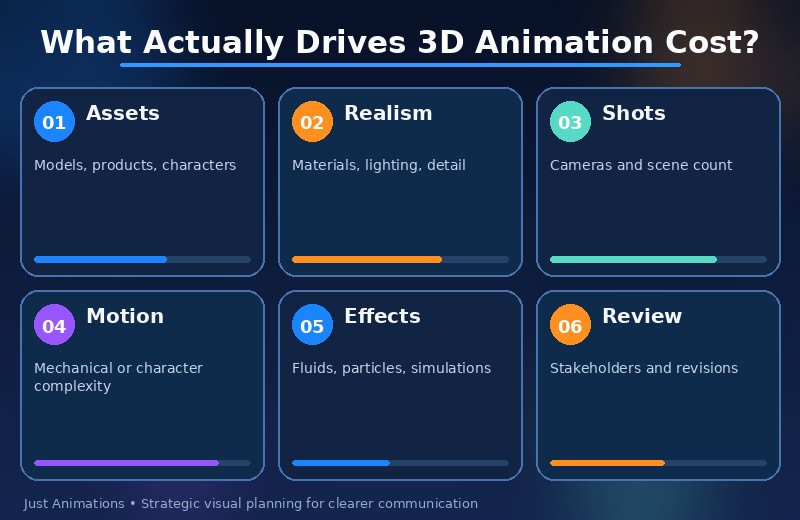
The biggest cost drivers are usually scope and complexity, not duration alone.
Number of Assets
More products, environments, characters, and props mean more modeling and preparation.
Level of Realism
Photorealistic materials, lighting, hair, skin, glass, liquids, and reflections require more work than simplified technical visualization.
Number of Shots
Every new shot may require camera setup, animation, lighting, rendering, and compositing.
Animation Complexity
A simple product rotation is much easier than a mechanical sequence containing dozens of moving components.
Simulation
Fluid, smoke, fire, cloth, hair, particles, crowds, and destruction can increase production requirements significantly.
Character Work
Characters may require modeling, rigging, facial controls, body animation, clothing, hair, and performance refinement. Businesses considering character-led 3D can review the 3D Character Animation: Design, Costs, and Studio Guide.
Review Requirements
Technical projects may require approval from engineers, product teams, medical experts, legal teams, or executives. More stakeholder rounds can extend production.
3D Animation Planning Ranges
The following are broad professional planning ranges, not fixed Just Animations pricing.
| Project Type | Approximate Planning Range |
| Simple 3D logo or object animation | $2,500-$7,500+ |
| Basic product animation | $7,500-$20,000+ |
| Detailed product demonstration | $10,000-$40,000+ |
| Technical machinery animation | $15,000-$60,000+ |
| Character-led 3D video | $20,000-$75,000+ |
| Cinematic commercial | $25,000-$100,000+ |
| Multi-product visualization package | $30,000-$150,000+ |
| Complex enterprise or film sequence | $50,000-$250,000+ |
A quote should be based on the actual scene list, source assets, number of deliverables, realism level, and revision structure.
Why Price Per Minute Can Be Misleading
Two 60-second videos can have completely different workloads.
A simple video might contain:
- One existing product model
- One environment
- Four camera moves
- Basic labels
A complex video might contain:
- Five custom products
- Detailed internal components
- Exploded views
- Fluid simulation
- Photoreal materials
- Multiple environments
- Character interaction
Both are one minute long. They are not comparable projects.
A better pricing question is:
How much production work exists inside each second?
A Typical 3D Animation Production Process
Professional projects usually become more efficient when decisions happen in the right order.
1. Discovery and Objective
The studio determines:
- Audience
- Business goal
- Main message
- Distribution channels
- Technical requirements
2. Script or Shot Outline
Not every 3D product video needs narration, but every project needs a visual plan.
A shot outline might specify:
- Product reveal
- Camera orbit
- Housing removal
- Internal component highlight
- Mechanism demonstration
- Reassembly
- Final hero shot
3. Storyboard or Previsualization
The team establishes camera angles and shot order before high-quality rendering begins.
The animation storyboarding guide explains why this stage can reduce expensive late revisions.
4. Model Preparation
Assets are modeled, cleaned, organized, and prepared for animation.
5. Materials and Look Development
The team determines how surfaces should appear:
- Metal
- Plastic
- Glass
- Rubber
- Fabric
- Painted surfaces
6. Rigging and Mechanical Setup
Characters need digital skeletons. Mechanical products may need pivots, constraints, and controls so parts move correctly.
7. Animation
Objects, cameras, components, and characters are animated according to the approved plan.
8. Lighting
Lighting establishes realism, mood, product readability, and brand tone.
9. Rendering
The computer calculates finished image frames.
10. Compositing and Editing
Visual layers are combined, labels or motion graphics are added, and shots are edited into the final sequence.
11. Sound and Delivery
Voiceover, music, effects, and final exports are prepared for the required platforms.
How Long Does 3D Animation Take?
A simple project may take several weeks. A detailed technical or cinematic project can take several months.
| Project | Typical Planning Window |
| Simple 3D object animation | 2-4 weeks |
| Basic product demo | 4-8 weeks |
| Detailed product animation | 6-12 weeks |
| Technical machinery project | 8-16 weeks |
| Character-heavy production | 10-20+ weeks |
| Multi-video 3D campaign | 12-24+ weeks |
Timing depends on how quickly source files, technical approvals, and consolidated feedback are available.
Photorealistic vs Stylized 3D
3D animation does not have to look realistic.
A project can be:
- Photorealistic
- Technical
- Minimal
- Cartoon-like
- Low-poly
- Isometric
- Cinematic
- Abstract
Photorealism makes sense when material appearance is part of the selling proposition.
Examples include:
- Consumer electronics
- Luxury products
- Automotive products
- Architecture
Simplified 3D may be better when function matters more than surface detail.
Examples include:
- Training
- Engineering explanation
- Industrial systems
- Process visualization
Do not pay for realism the audience does not need.
3D Animation for Manufacturing and Engineering
Manufacturing is one of the clearest business cases for 3D.
Machinery often contains its most important features behind:
- Metal housings
- Safety guards
- Walls
- Internal assemblies
Animation can make those barriers disappear.
The audience can see:
Input -> mechanism -> process -> output
This is why manufacturing animation is useful for sales, training, trade shows, installation, and product education.
3D Animation for Trade Shows
Trade shows reward movement, scale, and visual immediacy.
A 3D product can:
- Rotate on a large LED wall
- Separate into components
- Reveal a hidden mechanism
- Loop continuously
Our guide to Animation for Trade Show Booth: Attention Grabbing Videos covers the special requirements of silent looping, viewing distance, display size, and event reuse.
3D Animation for Architecture and Real Estate
Architecture uses 3D to communicate something that may not physically exist yet.
Animations can show:
- Exterior massing
- Interior spaces
- Lighting conditions
- Landscaping
- Camera walkthroughs
- Development context
This is particularly useful for pre-construction sales, stakeholder presentations, and planning communication.
3D Animation for Healthcare and Medical Devices
Healthcare projects may use 3D to show:
- Device operation
- Anatomy
- Procedure steps
- Internal mechanisms
- Treatment effects
Accuracy matters more than spectacle. Technical and medical reviewers should be involved before final rendering.
3D Animation for Advertising
Advertising uses 3D differently from technical training.
The goal may be to make a product feel:
- Premium
- Fast
- Innovative
- Durable
- Precise
Lighting, camera movement, sound, and pacing become part of the brand message.
A commercial might show very little technical information but create strong visual perception.
When 2D Is Better Than 3D
3D is not automatically the right choice.
Use 2D or motion graphics when:
- The subject is abstract
- Software interfaces dominate
- Characters need a simple illustrative style
- Fast versioning matters
- The message is primarily data or process
The broader 15 Animation Styles guide can help compare visual approaches before a project is scoped.
What Should a Business Give a 3D Animation Studio?
Better inputs usually produce better estimates and fewer revisions.
Useful project materials include:
- CAD or 3D models
- Product photography
- Engineering drawings
- Brand guidelines
- Technical documentation
- Existing videos
- Competitor references
- Desired style examples
- Audience description
- Main message
- Target duration
- Required formats
- Deadline
If several departments are involved, identify the final approver before production begins.
How to Evaluate a 3D Animation Studio
Look beyond the showreel.
A strong studio should be able to explain:
How It Handles Technical Accuracy
Who reviews models and mechanisms?
How It Plans Shots
Is there a storyboard or previsualization stage?
How It Handles Revisions
Which stages can be revised and how many rounds are included?
What Final Assets Are Delivered
Will you receive only a master video, or also social cutdowns, silent loops, still frames, and alternate aspect ratios?
Whether Assets Can Be Reused
A 3D product model may support future campaigns, training, web visuals, and event screens.
Common 3D Animation Mistakes
Starting With Rendering Before the Story Is Approved
Beautiful shots cannot fix a weak sequence.
Modeling Too Much Detail
Invisible geometry still costs time to build and manage.
Changing Engineering Files Late
Product changes after animation begins can create major rework.
Using Constant Camera Movement
The viewer can lose spatial orientation.
Treating 3D as Decoration
Every shot should explain, demonstrate, or persuade.
3D Animation Should Make Complex Things Easier to See
The strongest reason to use 3D animation is simple:
It can show what the audience could not otherwise see.
That may be the inside of a machine.
The future interior of a building.
The movement of a medical device.
The structure of a product that has not been manufactured yet.
The best 3D animation is not the one with the most polygons or the most dramatic camera movement.
It is the one that gives the audience useful understanding while supporting the business objective.
Rendering Strategy Can Change the Budget
Rendering is the stage where the computer produces final image frames from the 3D scene. The creative team may already have approved the animation, but lighting, materials, effects, shadows, reflections, and image quality still need to be calculated.
Rendering requirements can change significantly based on:
- Resolution
- Number of frames
- Sampling quality
- Reflections
- Volumetric effects
- Motion blur
- Simulation complexity
A simple technical render may finish quickly. A photorealistic cinematic scene can require substantially more computing time.
Some productions also use real-time engines for preview, visualization, or final output. Real-time workflows can shorten iteration in certain projects, but they still require good models, lighting, materials, and technical setup. They do not eliminate production work; they change where the work happens.
Plan 3D Deliverables Before Rendering Begins
A business may need more than one master video. It may also need:
- 9:16 vertical edits
- 1:1 social versions
- Silent trade-show loops
- Transparent product passes
- Still renders
- Alternate product colors
Those requests affect composition and rendering. A product placed tightly at the edge of a 16:9 frame may not crop well into vertical format later.
Defining deliverables during pre-production makes the 3D scene more reusable and can prevent expensive reframing after final renders are complete.
Should a Business Build One 3D Video or a Reusable 3D Library?
For companies with several products or recurring campaigns, the better investment may be a reusable 3D content system rather than one isolated video.
A reusable library can contain:
- Approved product models
- Materials
- Lighting setups
- Camera templates
- Environments
- Motion presets
Future videos can then begin with existing assets instead of rebuilding from zero.
This approach is particularly valuable for manufacturers, technology companies, medical-device firms, and product brands that release updates or attend multiple trade shows each year.
The initial project may cost more because the assets are built carefully, but the long-term production economics can improve when those assets are used repeatedly.
Approval Discipline Protects 3D Production Quality
A 3D project becomes progressively harder to change as it moves from storyboard to model preparation, animation, lighting, and rendering. That is why approval discipline matters.
Clients should treat each milestone as a decision point. If the product orientation, camera angle, or sequence is still uncertain, it is better to resolve that before final lighting and rendering begin. Consolidated feedback is also important. Five departments sending separate revision notes can create more rework than one coordinated review.
A clear approval structure improves schedule predictability and helps the studio spend more time improving the animation rather than repeatedly rebuilding approved work.
Frequently Asked Questions
What is 3D animation?
3D animation is the process of creating digital objects, characters, and environments in three-dimensional space and adding movement through rigging, keyframing, simulation, motion capture, camera animation, and related techniques.
How much does 3D animation cost?
Professional 3D animation can range from several thousand dollars for simple object animation to tens or hundreds of thousands for detailed technical, character, cinematic, or multi-video projects. Modeling, realism, number of shots, simulations, and revisions are major cost drivers.
How long does a 3D animation project take?
A basic project may take 2-8 weeks, while detailed technical, character, or campaign projects may require 8-24 weeks or more. Timelines depend on scope, asset readiness, rendering, approvals, and revisions.
Is 3D animation better than 2D animation?
Not universally. 3D is stronger when depth, physical products, realistic environments, machinery, or internal components matter. 2D is often stronger for simplified concepts, software, diagrams, characters, and fast visual communication.
Can 3D animation use CAD files?
Yes. CAD can provide accurate product geometry, but files often require cleanup, simplification, material creation, organization, and animation preparation before they are ready for a production pipeline.