Website animation services don’t mean a website needs to move constantly to feel engaging.
It needs the right elements to move at the right moment.
Website animation can introduce a brand, demonstrate a product, guide visitors through a page, explain a difficult concept, provide interaction feedback, and make digital content feel more responsive.
Businesses use website animation in homepage hero sections, product pages, software demonstrations, service pages, landing pages, online stores, presentations, portals, mobile applications, and interactive digital experiences.
The strongest website animation is not added simply because movement looks modern.
It is designed around a communication or user-experience purpose.
This guide explains the main types of website animation services, how motion can improve user experience and engagement, which industries benefit most, what custom animation costs, how long production takes, and what businesses should look for when hiring a website animation studio.
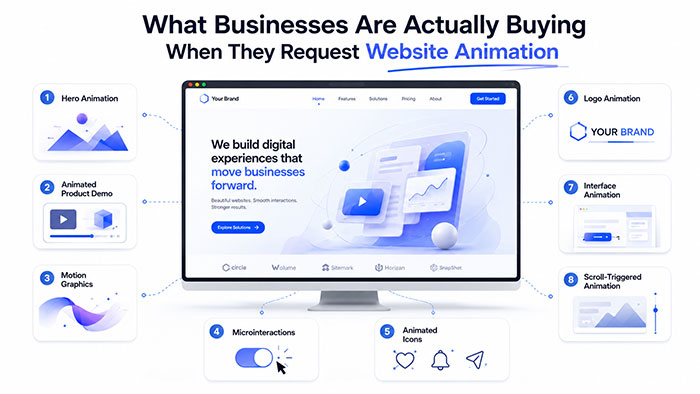
What Businesses Are Actually Buying When They Request Website Animation
Website animation is animated visual content created for use within a website or web-based experience.
It can range from a small icon responding to a click to a complete three-dimensional product demonstration displayed within a homepage hero section.
Website animation may be used to:
✓ Introduce the company
✓ Explain a product or service
✓ Show how software works
✓ Guide attention toward important content
✓ Confirm that an action has occurred
✓ Make data easier to understand
✓ Create a memorable visual identity
✓ Demonstrate an internal product component
✓ Support a call to action
✓ Turn a static page into an interactive experience
Website animation is not one specific production style.
It can include:
- 2D illustration
- 3D animation
- Motion graphics
- Animated typography
- Character animation
- Logo animation
- Interface animation
- Scroll-triggered movement
- Animated icons
- Data visualization
- Product demonstrations
- Interactive graphics
- Background loops
- Page transitions
The correct approach depends on what the visitor needs to understand or do.
The Main Forms of Website Animation
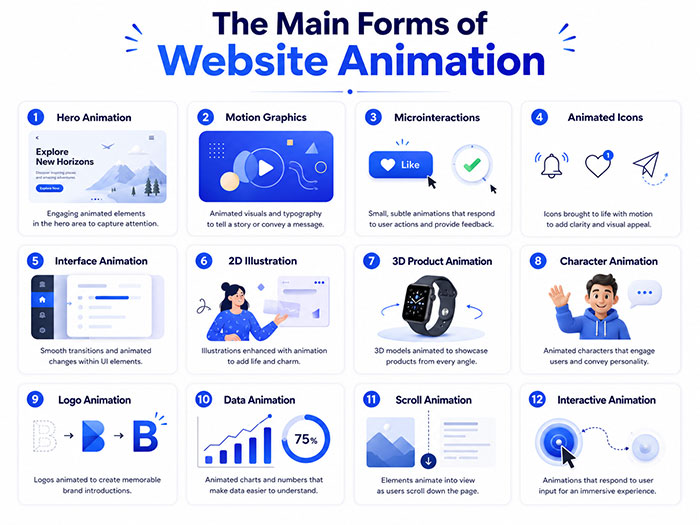
| Website Animation Type | Common Use | Typical Website Placement |
|---|---|---|
| Hero animation | Introduce the brand or product | Homepage header |
| Motion graphics | Explain concepts, data, or services | Landing and service pages |
| Microinteractions | Confirm clicks, selections, and progress | Buttons, forms, menus, and applications |
| Animated icons | Organize features or benefits | Service grids and feature sections |
| Interface animation | Demonstrate software functionality | SaaS and technology pages |
| 2D illustration | Explain a story or customer journey | Homepage and explainer sections |
| 3D product animation | Show products, equipment, or components | Product and technical pages |
| Character animation | Add personality or guide visitors | Brand, education, and onboarding pages |
| Logo animation | Strengthen brand introductions | Loading screens, headers, and video areas |
| Data animation | Present statistics and comparisons | Reports, dashboards, and enterprise pages |
| Scroll animation | Reveal information progressively | Long-form landing pages |
| Interactive animation | Let users explore content | Product configurators and digital experiences |
A website may combine several types of animation, but each one should have a defined role.
Where Website Animation Creates Real User-Experience Value
Animation can make a website more attractive, but visual appeal is only one benefit.
Well-planned motion can also help visitors understand what is happening on the page.
It Directs Attention
Motion naturally attracts the eye.
A subtle animation can draw attention toward:
- A new product
- An important benefit
- A pricing option
- A form
- A demonstration
- A call-to-action button
- A page transition
- A confirmation message
The movement should support the content hierarchy rather than compete with it.
It Explains Relationships
Animation can show how two ideas, products, screens, or process stages connect.
For example, a static diagram may display the components of a system.
An animated diagram can show:
- Where information begins
- How it moves
- Which component processes it
- What happens next
- Where the final result appears
This is particularly useful for technical, financial, industrial, software, and healthcare websites.
It Provides Interaction Feedback
Visitors need to know when a website has received their input.
Useful feedback animation includes:
✓ A button changing after it is clicked
✓ A progress indicator appearing
✓ A menu expanding smoothly
✓ A selected item becoming highlighted
✓ A form displaying a success state
✓ A product entering a shopping cart
✓ A file showing that it is uploading
✓ A dashboard confirming that data has refreshed
Without feedback, visitors may click repeatedly or wonder whether the website is working.
It Reduces the Amount of Text Required
Some ideas are easier to show than describe.
A short animated sequence can demonstrate:
- How a mechanism works
- How an application moves between screens
- How a service progresses
- How a product assembles
- How customer information travels
- How a building will appear
- How an organization creates an outcome
This can make a page easier to scan without removing important written content.
It Makes the Website Feel More Responsive
Subtle transitions can make a website feel polished and intentional.
Visitors may not consciously identify every animation, but they notice when interactions feel abrupt, delayed, or disconnected.
Motion That Helps Visitors vs. Motion That Gets in Their Way
Website animation should improve the experience rather than make the visitor work harder.
Motion That Usually Helps
✓ Explains an unfamiliar product
✓ Confirms that a user action succeeded
✓ Reveals content in a logical sequence
✓ Shows how a service works
✓ Highlights an important next step
✓ Demonstrates an internal product component
✓ Makes complex data easier to follow
✓ Reinforces the brand identity
✓ Adds context to a transition
✓ Supports a clear narrative
Motion That Frequently Creates Problems
✗ Autoplay animation with loud sound
✗ Constant movement across the entire page
✗ Long introductions visitors cannot skip
✗ Text that moves before it can be read
✗ Scroll effects that take control away from the visitor
✗ Large animations that slow mobile performance
✗ Decorative movement surrounding every button
✗ Flashing or rapidly repeating content
✗ Important information available only through animation
✗ Effects that make navigation difficult to predict
The question should not be, “Where can we add movement?”
It should be, “Where can movement make the experience clearer?”
Homepage and Hero Animation
The homepage hero section is one of the most visible places to use website animation.
It may be the first brand experience a visitor sees.
Hero animation can include:
- An animated brand statement
- A product demonstration
- A looping visual scene
- A three-dimensional object
- A character introducing the company
- Animated typography
- A short background video
- A moving data visualization
- A visual explanation of the service
A good hero animation should communicate quickly.
Visitors should not need to watch a long sequence before understanding what the company does.
The logo, headline, supporting copy, and call to action should remain clear even when the animation is paused or unavailable.
Animated Product Demonstrations
Product animation can show features that are difficult to communicate through standard photography.
A product page may use animation to:
✓ Rotate the product
✓ Reveal internal components
✓ Show assembly or installation
✓ Demonstrate movement
✓ Compare product configurations
✓ Highlight materials
✓ Explain technical benefits
✓ Present a product before it is manufactured
✓ Show an item within an environment
✓ Visualize invisible processes
Businesses developing machinery, electronics, medical devices, architecture, automotive products, and industrial systems may benefit from professional 3D animation services.
The article 3D Animation Services: Costs, Uses, and Project Planning provides additional information about modeling, texturing, rendering, technical visualization, and 3D production budgets.
Website Explainer Animation
An animated explainer can be integrated directly into a homepage, service page, landing page, or product section.
Website explainers are particularly useful when:
✓ The service is unfamiliar
✓ The product has several stages
✓ The value proposition is difficult to summarize
✓ Customers repeatedly ask the same questions
✓ The buying process requires education
✓ The company needs to build trust quickly
✓ The subject involves data or technical terminology
Professional explainer video animation may combine scriptwriting, storyboards, illustrations, characters, motion graphics, voiceover, and sound.
The full video can appear on a primary page while shorter sections are reused throughout the website.
Motion Graphics for Websites
Motion graphics combine movement with typography, shapes, diagrams, icons, numbers, and brand elements.
They are well suited to websites that need to explain:
- Statistics
- Timelines
- Service processes
- Business results
- Product comparisons
- Financial data
- Research findings
- Customer journeys
- Platform features
- Organizational structures
Custom motion graphics services can turn static information into visual sequences that are easier to follow.
Motion graphics can also support calls to action, section transitions, presentations, embedded videos, and animated infographics.
Two-Dimensional Website Animation
Two-dimensional animation can create a friendly, illustrative, and highly branded experience.
Common uses include:
- Animated website illustrations
- Character-led explanations
- Process animations
- Service demonstrations
- Onboarding sequences
- Educational content
- Animated maps
- Interactive stories
- Icon systems
- Customer scenarios
Professional 2D animation services are often more flexible than live-action video when the business needs to visualize abstract ideas or create a completely original visual style.
2D assets can also be adapted into banners, social posts, advertisements, presentations, and explainer videos.
Characters and Animated Website Mascots
A character can guide visitors, demonstrate a product, explain a process, or represent the brand.
Website characters may appear as:
✓ A homepage mascot
✓ An onboarding guide
✓ A customer-support assistant
✓ A product demonstrator
✓ A training character
✓ An educational narrator
✓ An interactive application figure
✓ A recurring campaign personality
The character should have a clear purpose.
Adding a mascot simply because it appears friendly can weaken the brand when the design, personality, and role are not carefully planned.
The guide Animation Characters: How Brands Build Memorable Mascots explains how recognizable silhouettes, personality, movement rules, and long-term reuse affect character development.
Businesses needing dimensional characters can also review the 3D Character Animation: Design, Costs, and Studio Guide.
Animated Logos and Brand Transitions
A logo animation can appear:
- When the website loads
- At the beginning of an embedded video
- Within the hero section
- During a page transition
- Inside a mobile application
- At the end of an interactive sequence
- Within a digital presentation
Professional logo animation services can turn the existing logo into a short branded movement rather than applying a generic spin, flash, or particle effect.
The motion should reflect the organization’s personality.
A financial company may use precise and controlled movement.
An entertainment company may use expressive or cinematic motion.
A technology company may use geometric construction or interface-inspired transitions.
Microinteractions That Make Websites Easier to Use
Microinteractions are small animations connected to a specific user action.
Examples include:
- A button responding to a hover
- A menu changing after selection
- A password field confirming strength
- A form displaying an error
- A toggle changing position
- A product entering a cart
- A progress bar advancing
- A notification appearing
- A search field expanding
These animations are usually brief.
Their value comes from feedback and clarity rather than spectacle.
A good microinteraction should help the visitor understand:
✓ What changed
✓ What action was accepted
✓ What action failed
✓ What is currently selected
✓ What will happen next
Scroll-Triggered Animation
Scroll-triggered animation begins when the visitor reaches a particular section of the page.
It may reveal:
- Text
- Images
- Charts
- Products
- Diagrams
- Process stages
- Before-and-after comparisons
- Interactive scenes
Scroll animation can create a strong narrative flow when each movement introduces the next piece of information.
It becomes frustrating when visitors must scroll through excessive movement to reach content they already understand.
The animation should follow the visitor’s pace rather than taking control of it.
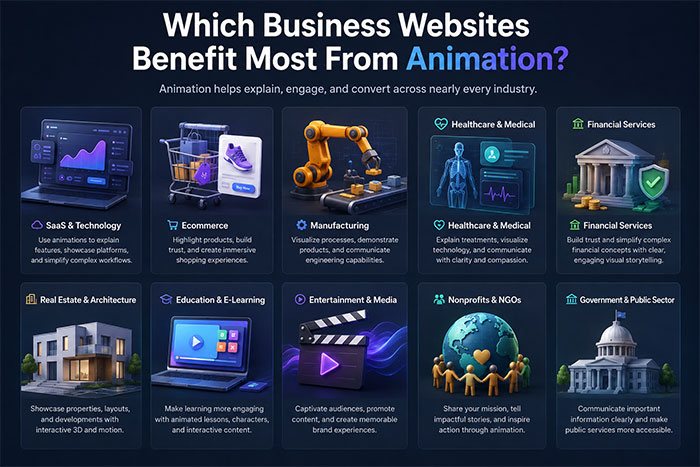
Which Business Websites Benefit Most From Animation?
Website animation can be used in almost any industry, but it creates the most value when the business has something important to explain, demonstrate, visualize, or differentiate.
SaaS and Technology Website Animation
Software and technology companies often sell products that cannot be understood through a photograph.
A technology animation may demonstrate:
- User interfaces
- Platform workflows
- Automation
- Cloud systems
- Data movement
- Cybersecurity
- Integrations
- Artificial intelligence
- Application onboarding
Website animation can help visitors understand the platform before requesting a demonstration or starting a trial.
Ecommerce and Product Website Animation
Online stores can use animation to:
✓ Rotate products
✓ Demonstrate size or movement
✓ Show assembly
✓ Highlight product features
✓ Compare options
✓ Present materials
✓ Explain installation
✓ Create interactive product reveals
Animation is especially useful when a product has mechanical features, configurable parts, or benefits that are not obvious in a static image.
Manufacturing and Industrial Website Animation
A manufacturing animation can help companies explain equipment, systems, factories, robotics, automation, assembly, and technical processes.
Website visitors may include:
- Buyers
- Engineers
- Distributors
- Investors
- Employees
- Technical partners
- Procurement teams
Three-dimensional animation can show how equipment functions without arranging a factory shoot or physically disassembling the product.
Medical and Healthcare Website Animation
A medical animation may visualize:
- Anatomy
- Procedures
- Medical devices
- Treatment processes
- Patient journeys
- Research
- Pharmaceutical mechanisms
- Healthcare software
Animation should be reviewed carefully for accuracy and should not create misleading expectations about treatment outcomes or product performance.
Financial and Fintech Website Animation
A finance animation can simplify:
- Banking products
- Insurance
- Investment processes
- Payment systems
- Financial applications
- Risk concepts
- Market data
- Customer onboarding
- Fraud prevention
Animated charts, interface demonstrations, and motion graphics can make abstract financial subjects easier to follow.
Government and Public-Sector Website Animation
A government animation can help federal, state, municipal, and public-sector organizations explain:
- Programs
- Policies
- Public services
- Infrastructure
- Safety information
- Emergency procedures
- Community consultations
- Digital-service adoption
Website animation can make public information more accessible when it supports clear language and does not replace essential written content.
Enterprise Website Animation
An enterprise animation can support:
- Product launches
- Investor communication
- Corporate strategy
- Software demonstrations
- Data visualization
- Organizational change
- Training
- Customer education
Large companies may also need motion guidelines so animation remains consistent across departments, regional sites, campaigns, and digital products.
Non-Profit and NGO Website Animation
A non-profit animation can communicate:
- Mission
- Community impact
- Program activity
- Fundraising goals
- Research
- Public issues
- Volunteer opportunities
- Donor results
Animated impact data, character stories, maps, and visual explainers can make complex issues easier to understand without turning the page into a commercial advertisement.
Architecture and Real Estate Website Animation
Architecture, construction, and property companies can use animation to show:
- Building concepts
- Interior spaces
- Site plans
- Construction stages
- Community developments
- Property features
- Proposed infrastructure
- Before-and-after conditions
An architecture animation can transform plans, CAD files, and three-dimensional models into visual experiences for investors, buyers, contractors, and approval authorities.
Entertainment and Gaming Website Animation
Entertainment websites can use animation as part of the experience itself.
Applications may include:
- Character introductions
- Cinematic backgrounds
- Title animation
- Interactive scenes
- Game interfaces
- Trailer sections
- Music visuals
- Streaming promotions
- Event campaigns
Movement can be more expressive in entertainment, but navigation and readability should still remain clear.
Matching Website Animation to the Business Goal
| Business Goal | Useful Website Animation |
|---|---|
| Explain a service | 2D explainer or motion graphics |
| Demonstrate software | Interface animation |
| Present a product | 3D rotation or product animation |
| Improve onboarding | Character guide or step animation |
| Highlight data | Animated charts and infographics |
| Strengthen branding | Hero animation or logo animation |
| Increase interaction | Microinteractions |
| Support a launch | Cinematic hero sequence |
| Explain a technical process | 3D visualization or animated diagram |
| Improve fundraising | Impact animation and data storytelling |
| Present architecture | Walkthrough or construction sequence |
| Guide a form | Progress and success-state animation |
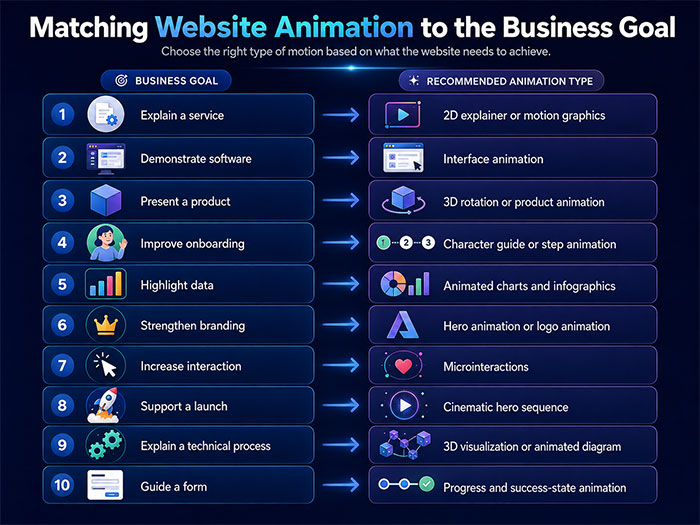
One website animation may support several goals, but it should have one primary purpose.
How Website Animation Can Improve Engagement
Engagement does not mean forcing visitors to watch an effect.
It means giving them a reason to continue exploring.
Website animation can support engagement by:
✓ Creating an immediate visual focal point
✓ Breaking long pages into understandable sections
✓ Demonstrating rather than merely describing
✓ Rewarding interaction with feedback
✓ Revealing information progressively
✓ Making technical subjects more approachable
✓ Creating brand personality
✓ Encouraging visitors to explore products
✓ Supporting visual storytelling
✓ Making key content easier to remember
The animation should be connected to useful information.
Movement without substance may attract attention briefly but will not create meaningful engagement.
What Should Businesses Budget for Website Animation?
Website animation pricing varies according to the style, length, number of assets, level of customization, responsiveness, interactivity, file formats, and implementation requirements.
The following figures are general planning ranges in USD.
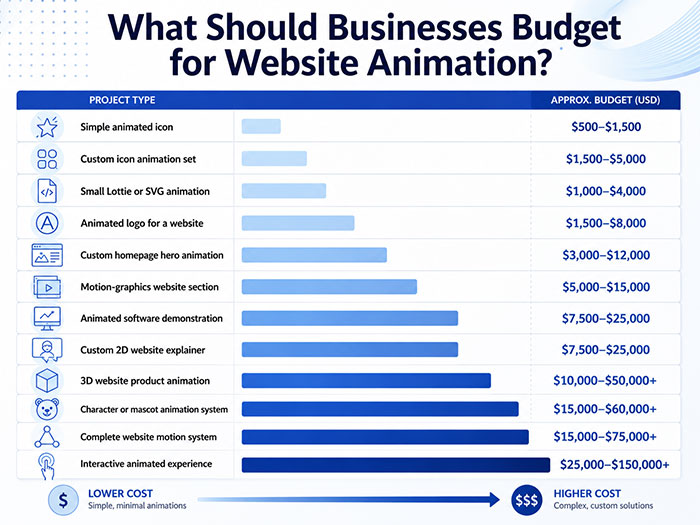
| Website Animation Project | Approximate Budget Range |
|---|---|
| Simple animated icon | $500–$1,500 |
| Custom icon animation set | $1,500–$5,000 |
| Small Lottie or SVG animation | $1,000–$4,000 |
| Animated logo for a website | $1,500–$8,000 |
| Custom homepage hero animation | $3,000–$12,000 |
| Motion-graphics website section | $5,000–$15,000 |
| Animated software demonstration | $7,500–$25,000 |
| Custom 2D website explainer | $7,500–$25,000 |
| 3D website product animation | $10,000–$50,000+ |
| Character or mascot animation system | $15,000–$60,000+ |
| Complete website motion system | $15,000–$75,000+ |
| Interactive animated experience | $25,000–$150,000+ |
These ranges are not fixed service prices.
A studio should prepare a custom estimate after reviewing the number of assets, animation style, technical requirements, intended platforms, revisions, and production schedule.
What Changes the Final Website Animation Cost?
Original Asset Creation
The studio may need to create:
- Illustrations
- Characters
- Icons
- Products
- Environments
- Three-dimensional models
- Textures
- Interface screens
- Data visualizations
Animation costs less when usable and properly prepared source assets already exist.
Two-Dimensional vs. Three-Dimensional Production
Detailed 3D production may require:
- Modeling
- Texturing
- Rigging
- Lighting
- Rendering
- Compositing
A small 2D icon animation is usually less expensive than a photorealistic product sequence.
Number of Animated Elements
One homepage hero animation is a smaller project than an entire motion system containing icons, transitions, banners, product sequences, and microinteractions.
Interactivity
A video that plays automatically is different from an animation that responds to:
- Scrolling
- Clicking
- Dragging
- Product selection
- Cursor movement
- Form completion
- Real-time data
Interactive animation requires coordination between animation and web development.
Responsive Versions
The animation may need separate layouts for:
- Desktop
- Tablet
- Mobile
- Wide screens
- Vertical displays
Simply shrinking the desktop version may not produce an effective mobile experience.
File Formats
Additional formats may be required for:
- Transparent backgrounds
- Video editing
- Websites
- Applications
- Social media
- High-resolution screens
- Interactive development
Revisions
Changing timing or color may be straightforward.
Changing the entire visual concept after animation has begun may require the studio to repeat several production stages.
How Long Does Website Animation Production Take?
| Website Animation Project | Typical Production Time |
|---|---|
| Simple icon animation | 3–7 business days |
| Animated logo | 1–3 weeks |
| Lottie or SVG asset | 1–3 weeks |
| Homepage hero animation | 2–5 weeks |
| Interface demonstration | 3–6 weeks |
| 2D website explainer | 4–8 weeks |
| 3D product animation | 6–12 weeks |
| Character animation system | 6–14 weeks |
| Complete website motion system | 8–16 weeks |
| Interactive digital experience | 10–24 weeks or longer |
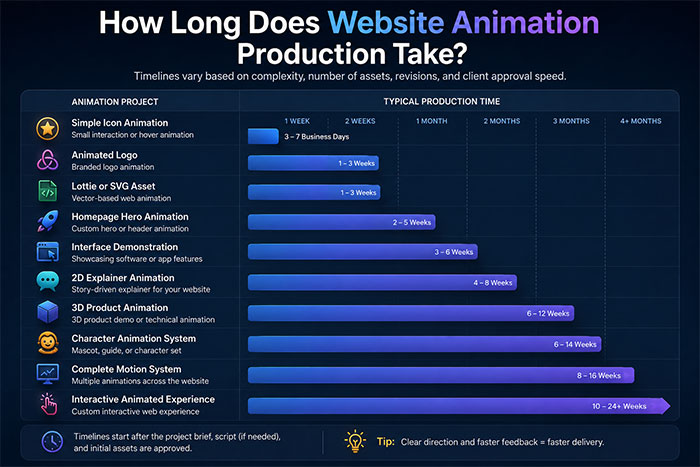
Timelines depend on the client’s approval process.
A small animation can take longer than expected when several departments provide conflicting feedback.
A complex project can move efficiently when the brief, assets, technical requirements, and decision-making process are already defined.
The Website Animation Production Process
1. Defining the Role of Motion
The studio and client determine:
- What needs to move
- Why it needs to move
- What the visitor should understand
- What action should follow
- Where the animation will appear
- Which devices must support it
2. Reviewing the Website and Brand
The animation team may review:
- Website designs
- Wireframes
- Brand guidelines
- Existing illustrations
- Logo files
- Interface prototypes
- Product documentation
- Technical requirements
3. Selecting the Animation Method
The project may use:
- 2D animation
- 3D animation
- Motion graphics
- Lottie
- SVG
- Video
- CSS-based motion
- Interactive development
- A combination of methods
4. Creating Concepts and Storyboards
The studio may prepare:
✓ Creative concepts
✓ Style frames
✓ Storyboards
✓ Motion tests
✓ Character designs
✓ Product models
✓ Interface sequences
5. Producing and Reviewing the Animation
The team creates the movement and provides review stages before final delivery.
Approvals may cover:
- Visual direction
- Timing
- Movement
- Transitions
- Color
- Sound
- Mobile behavior
- Final loop
6. Exporting and Supporting Implementation
The final assets are prepared for the web-development team.
Implementation support may include:
- File-format recommendations
- Loop instructions
- Transparency settings
- Playback behavior
- Mobile alternatives
- Reduced-motion alternatives
- Compression guidance
- Developer notes
Website Animation Formats Businesses Should Understand
SVG
SVG is useful for scalable vector illustrations, icons, diagrams, and logos.
It can remain sharp at different screen sizes.
Lottie or JSON
Lottie animation is commonly used for lightweight vector motion in websites and applications.
It works well for:
- Icons
- Loading states
- Illustrations
- Logo movement
- Interface feedback
Not every animation style can be reproduced effectively as a Lottie file.
WebM
WebM can provide efficient web video and may support transparent backgrounds, depending on the production and browser requirements.
MP4
MP4 is widely used for embedded website video.
It is suitable for:
- Hero sequences
- Explainer videos
- Product demonstrations
- Background loops
It does not normally support transparency.
MOV With Transparency
A transparent MOV file can be useful for editing and compositing, but it may need to be converted or optimized before website use.
GIF
GIF may work for small, simple loops.
However, it can produce larger files, limited colors, and lower visual quality than more modern alternatives.
Image Sequences
Image sequences provide high quality and precise control but may require more technical implementation and larger asset management.
Website Animation Must Be Planned for Performance
A beautiful animation can still create a poor website experience when it is too large or implemented incorrectly.
Businesses should avoid:
✗ Uploading uncompressed production files
✗ Using desktop-scale video on every mobile device
✗ Loading every animation immediately
✗ Hiding important text inside video
✗ Making visitors wait for decorative movement
✗ Using several large animated backgrounds
✗ Delivering only one technical format
✗ Ignoring slower connections and devices
Good production and good implementation need to work together.
The animation studio creates the visual asset.
The web-development team determines how, when, and where the asset loads.
Accessibility and Reduced Motion
Not every visitor wants or can comfortably view extensive motion.
Large-scale zooming, panning, parallax, flashing, and constant movement can cause discomfort or make content harder to use.
Website animation planning should consider:
✓ Reduced-motion alternatives
✓ Pause and play controls
✓ Static fallback images
✓ Clear readable content
✓ Limited autoplay
✓ Keyboard accessibility
✓ Sufficient contrast
✓ Predictable navigation
This guide to reduced motion explains how websites can recognize a visitor’s motion preference and provide a reduced-motion version of the experience.
The goal is not necessarily to eliminate every animation.
It is to avoid making nonessential movement a requirement for using the website.
Custom Website Animation vs. Templates
| Custom Website Animation | Template Animation |
|---|---|
| Created for the brand | Uses an existing visual pattern |
| Designed around the communication goal | Designed around available effects |
| Can match custom website layouts | May require the page to fit the template |
| Supports original characters and illustrations | Often uses stock assets |
| Can include responsive versions | May have limited device flexibility |
| More distinctive | May resemble other websites |
| Higher production cost | Lower initial cost |
| Better suited to long-term brand use | Better suited to temporary content |
Template animation may be appropriate when:
✓ The budget is limited
✓ The content is temporary
✓ The animation is decorative
✓ Brand originality is not important
✓ The website is an early prototype
Custom animation is more appropriate when:
✓ The website is a major sales channel
✓ The business has a distinctive product
✓ The animation must explain something accurately
✓ The company is launching or rebranding
✓ The asset will be reused
✓ The motion needs to match brand guidelines
✓ Several responsive versions are required
Should an Animation Studio or Web Agency Handle the Project?
Website animation usually requires both creative production and technical implementation.
An animation studio may manage:
- Creative concepts
- Storyboards
- Illustration
- Character design
- 2D animation
- 3D animation
- Motion graphics
- Rendering
- File preparation
A website designer or developer may manage:
- Page layout
- Animation placement
- Responsive behavior
- Loading
- Browser testing
- User interactions
- Performance
- Accessibility controls
- Content management
The strongest results often come from collaboration.
The animation studio should understand where and how the asset will be used.
The web team should receive technically appropriate files and clear implementation instructions.
How to Choose a Website Animation Studio
Look for Relevant Website Work
A strong general animation portfolio does not automatically prove that the studio understands web delivery.
Ask to see:
✓ Homepage animation
✓ Interface demonstrations
✓ Product animation
✓ Lottie or SVG work
✓ Transparent animation
✓ Responsive examples
✓ Interactive projects
Evaluate Communication, Not Only Visual Style
The studio should ask:
- Who is the audience?
- What does the visitor need to understand?
- Where will the animation appear?
- What action should follow?
- Which devices must support it?
- How will the asset be implemented?
Confirm the Deliverables
Determine whether the project includes:
✓ Storyboards
✓ Style frames
✓ Animation
✓ Mobile versions
✓ Static fallbacks
✓ Transparent files
✓ Web-ready exports
✓ Source files
✓ Implementation notes
✓ Revision rounds
Ask About Ownership
The contract should explain who owns:
- The final animation
- Illustrations
- Characters
- 3D models
- Source files
- Licensed assets
- Music
- Future modification rights
Confirm Who Handles Integration
Do not assume the animation studio will edit the website.
Confirm whether the studio will:
- Deliver assets only
- Collaborate with the existing developer
- Provide implementation recommendations
- Support testing
- Coordinate with a partner web team
Questions to Ask Before Starting a Website Animation Project
- What should this animation help the visitor understand?
- Where will it appear on the website?
- Is the animation completely custom?
- Which production style do you recommend?
- Will it work on desktop and mobile?
- Which file formats will be delivered?
- Will a static fallback be included?
- Can a reduced-motion version be provided?
- Who will implement the animation?
- Is source-file delivery included?
- How many concepts are included?
- How many revision rounds are included?
- How will the files be compressed?
- Can the animation be reused elsewhere?
- What could increase the final cost?
When Website Animation May Not Be the Right Investment
Website animation may not provide enough value when:
✗ The page has no clear communication goal
✗ The website is about to be redesigned
✗ The company has not completed its branding
✗ The animation would delay essential website content
✗ A static diagram communicates the information better
✗ The budget cannot support professional production
✗ The website cannot implement the asset properly
✗ The animation is being added only because a competitor uses one
Motion should solve a problem.
It should not become another problem for the visitor.
Turning One Website Animation Into Several Marketing Assets
A professionally created animation can often be adapted for:
✓ Social media
✓ Digital advertising
✓ Presentations
✓ Trade shows
✓ Email campaigns
✓ Product demonstrations
✓ Sales materials
✓ Training
✓ Video introductions
✓ Event displays
Planning these uses before production allows the studio to prepare suitable compositions, resolutions, aspect ratios, backgrounds, and durations.
One homepage hero animation may become:
- A short social video
- A vertical advertisement
- A presentation opener
- A product-page loop
- An event-screen visual
- A sales-demo asset
This can improve the long-term value of the production.
Where AI Can Support Website Animation
AI-assisted tools can help with:
- Concept development
- Visual references
- Motion tests
- Background generation
- Product environments
- Voice testing
- Versioning
- Cleanup
- Resizing
The article AI Animation: How Businesses Use Animation AI Video Tools explains how AI may support parts of production while professional animators maintain creative direction, accuracy, brand consistency, and quality control.
Businesses should confirm:
✓ Which assets use AI
✓ Who owns the final work
✓ Whether generated content is commercially usable
✓ How the output will be edited
✓ How brand consistency will be maintained
AI can accelerate some tasks, but it does not decide where website movement creates genuine user value.
Why Businesses Hire Just Animations for Website Animation
Just Animations creates custom animated assets for websites, applications, product pages, presentations, digital campaigns, and interactive experiences.
Projects may include:
✓ Homepage hero animation
✓ 2D website illustration
✓ 3D product animation
✓ Software interface demonstrations
✓ Character animation
✓ Motion graphics
✓ Logo animation
✓ Animated explainers
✓ Social and advertising adaptations
✓ Multi-format delivery
Our process can include creative planning, script development, storyboards, design, animation, sound, revisions, and final file preparation.
We can collaborate with a company’s internal designers, developers, marketing departments, technical specialists, agencies, and web-production partners.
Businesses can request a quote from Just Animations to discuss the website, animation type, required formats, production schedule, and intended uses.
Building Movement Around a Clear Purpose
Website animation can improve user experience and engagement when movement has a defined role.
It can explain a product, guide attention, provide feedback, strengthen branding, visualize technical information, and create a more memorable digital experience.
The right solution may be a small icon animation, a homepage hero sequence, an animated explainer, a three-dimensional product demonstration, a character guide, or a complete website motion system.
Before beginning production, define:
✓ What the visitor should understand
✓ What action should follow
✓ Where the animation will appear
✓ Which devices must support it
✓ Which formats are required
✓ Who will implement it
✓ How accessibility will be handled
✓ How the asset may be reused
The best website animation is not the animation visitors notice most.
It is the movement that makes the website easier to understand, more engaging to explore, and more effective at communicating what the business offers.
Questions Businesses Ask About Website Animation Services
What is website animation?
Website animation is motion-based visual content created for a website or web application. It can include hero animation, animated icons, microinteractions, motion graphics, interface demonstrations, 2D illustration, 3D product animation, logo movement, scroll effects, and interactive experiences.
How much does website animation cost?
A simple animated icon may cost approximately $500–$1,500. Custom hero animation may cost $3,000–$12,000, while animated explainers, 3D product demonstrations, character systems, and complete website motion systems may range from $7,500 to more than $75,000.
Can website animation improve user experience?
Yes. Website animation can improve user experience when it guides attention, explains relationships, provides feedback, demonstrates products, organizes information, and helps visitors understand what to do next. Excessive or unnecessary movement can have the opposite effect.
Which businesses benefit most from website animation?
Technology companies, SaaS platforms, ecommerce stores, manufacturers, medical organizations, financial companies, enterprises, government agencies, non-profits, architecture firms, real estate companies, entertainment brands, and other businesses with complex products or services can benefit from website animation.
How do you choose a website animation studio?
Review the studio’s website-related portfolio, animation quality, supported formats, mobile-planning process, accessibility awareness, ownership terms, revision policy, technical deliverables, and ability to collaborate with designers and developers. The studio should understand both the visual goal and how the animation will function within the website.